Initial Start-up and Service
26
Steps (continued)
28. Check Dekamatik-HK Accessory
Initial start-up
1. Check via Scan 2 on the
programming unit whether the
connected expansion module is
recognized.
Calling up Scan 2
Open the cover:
Menu option Button
→ SYSTEM ”D”
→ OPERATING
STATUS ”B”
→ CONTINUE ”A”
until
”Scan 2”
is
displayed
Expansion module
The last-placed digit has the following
meaning:
2____0 =Viessmann 2-wire BUS
expansion module not
recognized
2____1 =Viessmann 2-wire BUS
expansion module is
recognized
Dekamatik-HK
The second-placed digit from the left
has the following meaning:
_2____ =Extension kit for a heating
circuit with mixing valve or
Dekamatik-HK1/-HK2
recognized
_3____ =Dekamatik-HK4 recognized
2. If the expansion module or the
Dekamatik is not recognized, check
that they were installed correctly.
Please note:
A green LED will flash on the
expansion module if the data BUS is
intact. If the LED is not lit, the data
line ”X5.3”-”X5.4” may be
incorrectly connected.
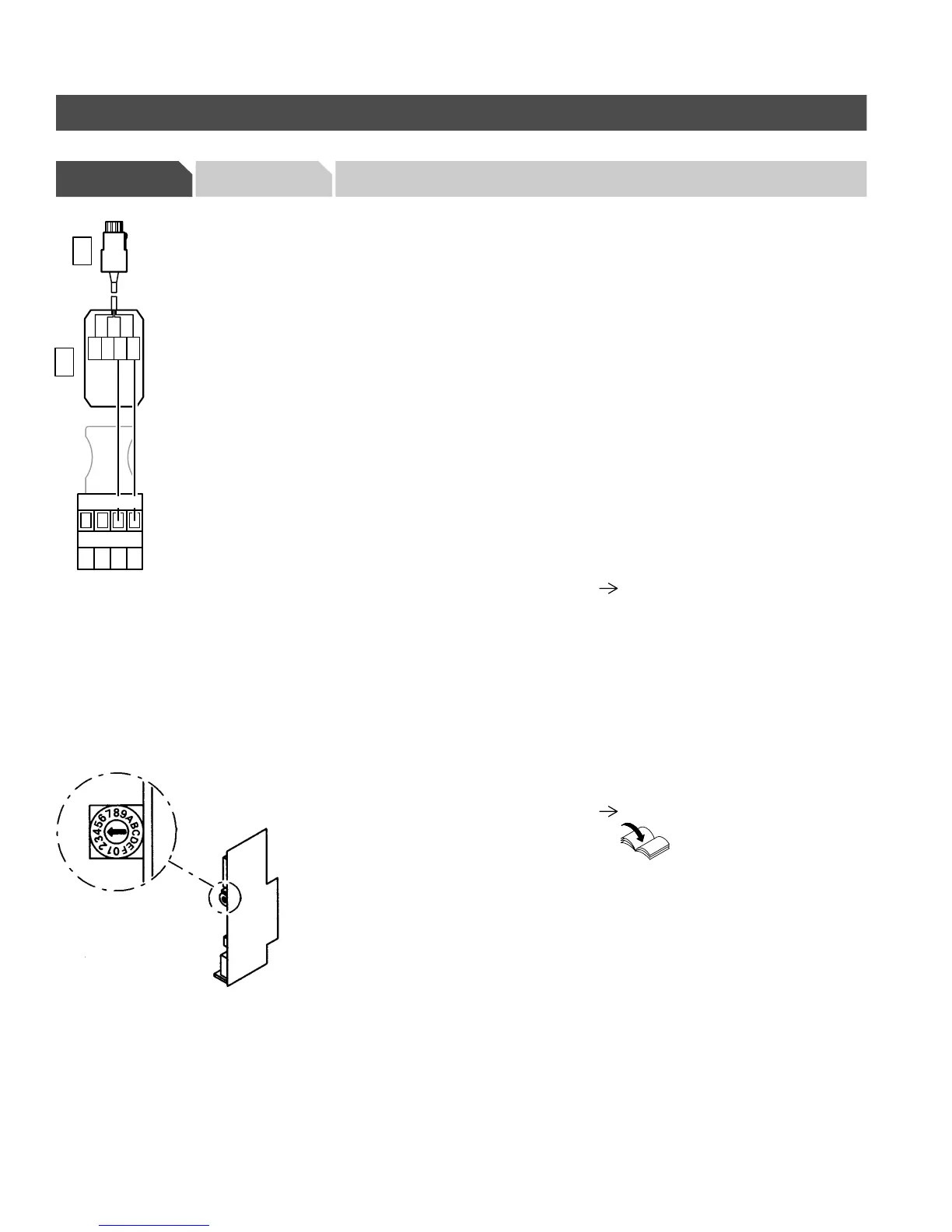
See wiring diagram in section entitled
”Additional Information”.
Check setting of rotary switch
H Dekamatik-HK1:
The rotary switch on the
communication module must be set
to ”4”.
H Dekamatik-HK2:
The rotary switch on the circuit board
E4 must be set to ”4”.
H Dekamatik-HK 4:
The rotary switch on circuit
board E4.1 must be set to ”4” and
the rotary switch on circuit
board E4.2 to ”5”.
Please note:
Please reference
corresponding installation
documentation for
Dekamatik-HK.
5285 961 v1.3
2341
X5
21 23
22 24
WH
BN
GN
YE
141
141





 To Next Page