General Information
7
Removing and Reinstalling Front Enclosure Panel and Cover Panel
Some of the following start-up/service
steps require the removal of the front
enclosure panel and the cover panel.
To avoid personal injury and/or product
damage of any kind please follow the
instructions below carefully when
removing or reinstalling the front
enclosure panel and cover panel.
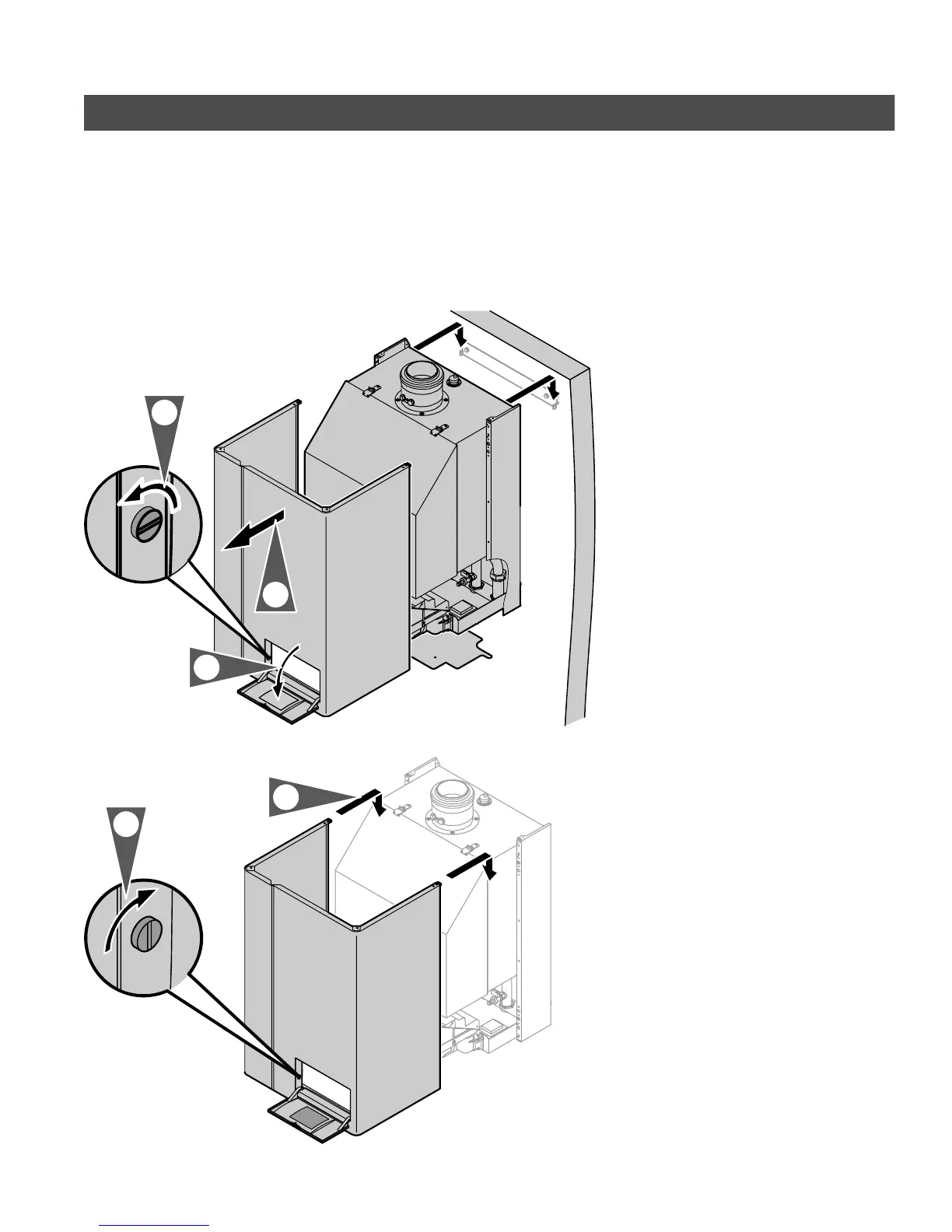
To remove front enclosure panel and
cover panel proceed as follows:
1. Close main gas supply valve.
2. Open flip-down cover of front
enclosure panel (by exerting slight
pressure with fingertip). Switch off
system on/off switch.
3. Turn off power supply to boiler and
ensure that power supply cannot be
activated during the duration of the
start-up/service work.
5. Unlock enclosure panel by giving
cover lock a quarter turn.
6. Remove burner cover panel by
unlocking the two pull-down latches
located on the bottom of the panel,
and slide out panel.
7. Attach front enclosure panel.
8. Secure in place by rotating slotted
screw.
5285 961 v1.3
5.
4.
2.
1.
3.





 To Next Page