TECHNICAL SUPPORT 1 800 908 0884
14 18
STEP 16
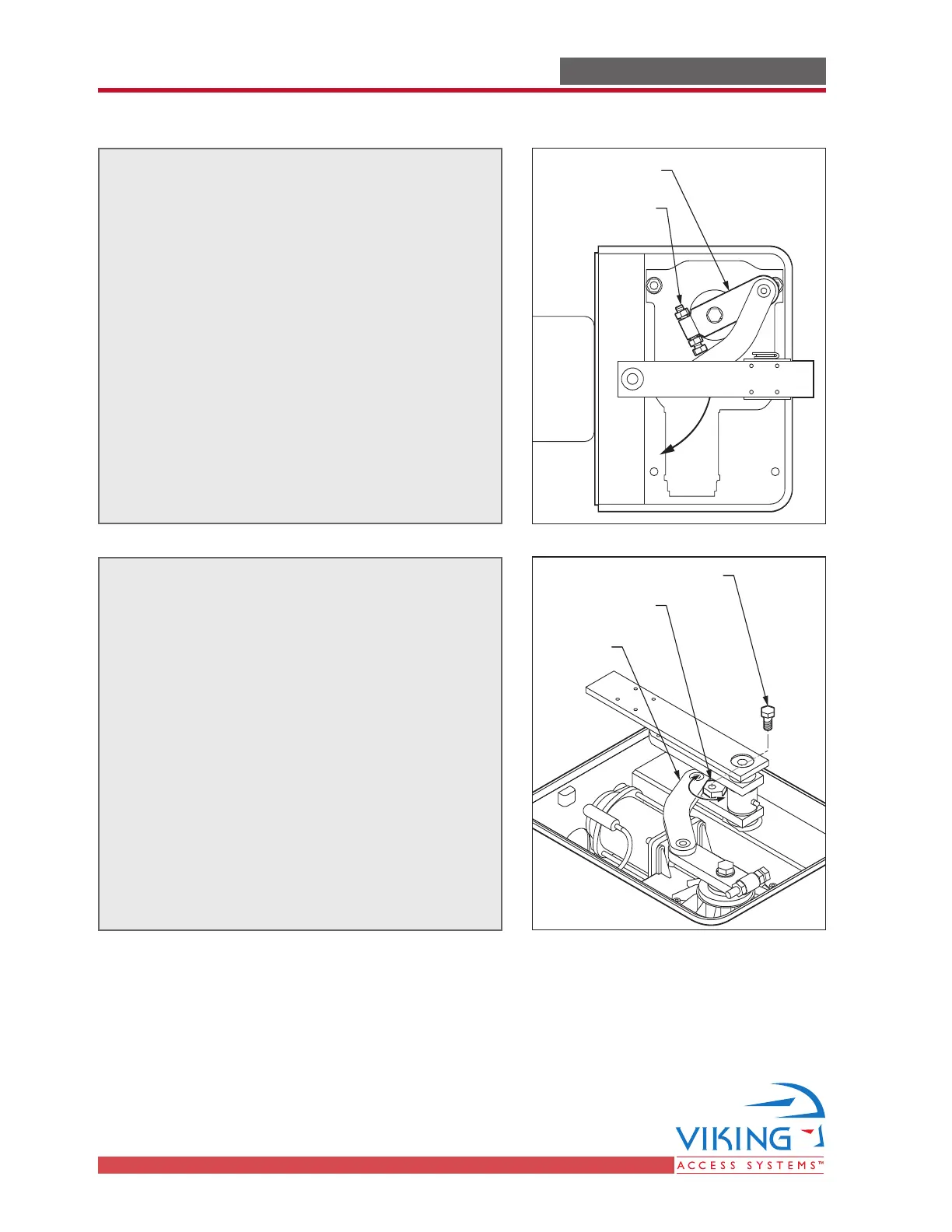
To adjust the closed position stop:
Loosen both nuts on the Closed Position
Adjustment Bolt.
Adjust the Bolt to stop the gate’s closing at
the proper position:
• Turning the Bolt clockwise allows the gate
to close later.
• Turning the bolt counterclockwise causes
the gate to close earlier.
Upon obtaining the desired closed position,
tighten both nuts securely against the
Primary Drive Arm.
STEP 17
To adjust the open position stop:
Loosen the Open Position Adjustment Bolt.
Rotate the Open Position Stop so that it
bumps against the Secondary Drive Arm at
the desired position:
• Rotating the Stop to minimum position
allows the gate to open further.
• Rotating the Stop to maximum position
causes the gate to open less.
Upon obtaining the desired open position,
tighten Open Position Adjustment Bolt
against the Open Position Stop.
Primary
Drive Arm
Closed Position
Adjustment Bolt
Secondary
Drive Arm
Open Position
Stop
(rotate to adjust)
Open Position
Adjustment Bolt
Limit Setup Procedure
GATE OPERATOR INSTALLATIONGATE OPERATOR INSTALLATION



 To Next Page