© 2010 Viking Preferred Service
13
Service Diagnostics and Procedures
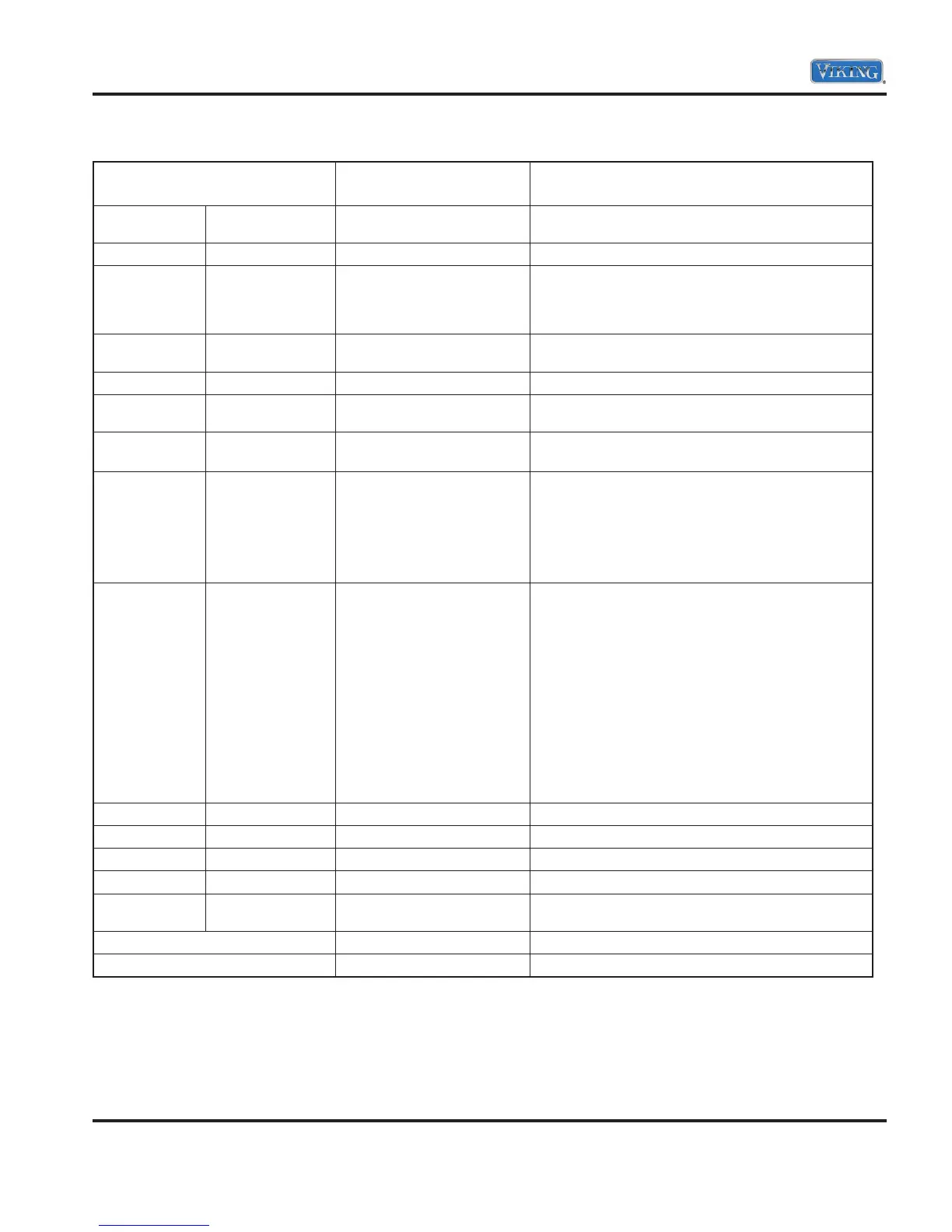
Fail Codes
Flash
Pots/Pans Normal Wash
Fault Action
1 1
Pan Moisture Sensor
Disconnected
Verify pan moisture sensor is connected, verify
moisture sensor resistance.
1 4 Diverter Time-out Verify diverter resistance and wiring.
1 5 Drain Error Verify drain is free and clear of obstructions, verify
dishwasher is level, check drain pump resistance,
check drain pump for obstructions.
Check disposer for plug.
2 2
Fill Time-out
Verify water pressure, verify inlet hose is not
restricted, water valve is not restricted.
3 1 UI-MC Communication Error Check connector between UI and Relay Board.
3 3 Drain Pump Error Check drain pump resistance, check drain pump for
obstructions.
5 5 Internal Error Press and hold start button for
four seconds. If it repeats, replace controls.
1 2 Motor Control Status Error Check wires between control board and motor
Check wires between motor and start capacitor
Check for rotor turning freely and check winding
resistances
Check control
Check capacitor
3 2 Pump Flow Error 1. Verify water is fully turned on to dishwasher
2. Verify that fill line is not kinked
3. Verify that dishwasher is level front to back and
side to side
4. Verify that filters are not clogged
5. Verify that there has not been a decrease in water
pressure
6. Verify that the drain has the proper high loop
7. Verify proper fill level
8. Enable extended fill service mode (press and hold
“NORMAL WASH” for 10 seconds)
9. Could be defective wash motor
10. Could be defective water inlet valve
11. Could be defective main control
4 1 Temperature Sensor Error
Check connections. Check for 47k Ω ohms at ambient.
4 2 Wash Heater Error
Check wiring to element. Check for 12 Ω ohms.
4 3 Dispenser Error
Check connections. Check for 8.3 Ω ohms.
4 4 Inlet Valve Error
Check connections. Check for 1.1k Ω ohms.
5 4 Current Sense Error 1. Could be defective main control
2. Could be defective wire harness
See Note A Pan Moisture
Check the base pan for water. Check for 175k Ω ohms.
See Note B Power Loss Reset and test.
Note A: Both lights flash continuously.
Note B: All lights, except START and RUN (select models), flash continuously.
Note C: To reset unit, press and hold the “START” button for four seconds.
Note D: Numbers listed indicate the times the lights will flash when a specific error is detected.
(For example: For a drain error, the POTS/PANS light will flash once and the NORMAL WASH
light will flash five times.)


 To Next Page