34
c
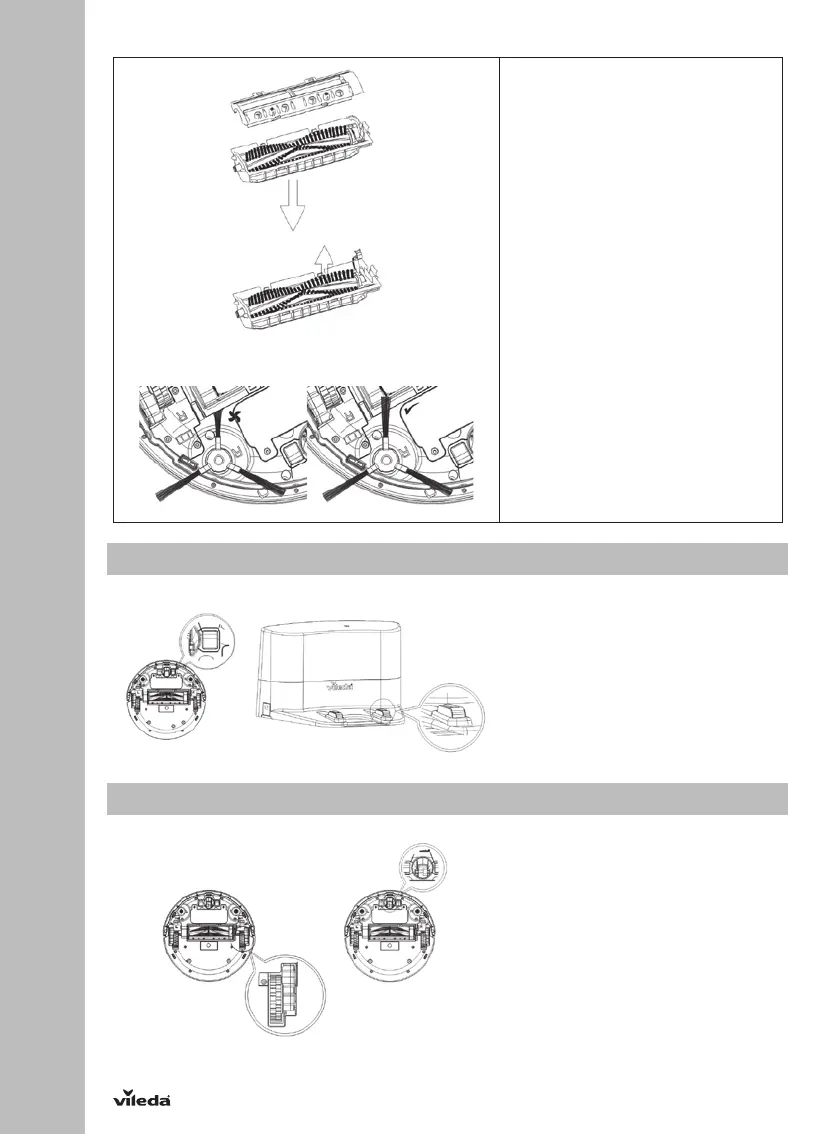
Remove the main brush
1. Lever the red main brush retainer.
2. Remove the main brush from the
holder.
3. Clean the brush and the brush
holder, by either using the
maintenance brush or running
water.
NOTE: If hair got knotted on the main
brush, you can use a small scissor to
cut and remove it easily.
4. Re-install the main brush in the
original order of disassembly
after it’s fully dry.
5. Check if side brush can rotate
free. Take care that the side
brushes are not trapped by the
main brush kit.
4.3 Cleaning Sensors and Wheels
Once per month slightly wipe all the
sensors as well as the charging
poles from the dockingstation with a
soft cleaning cloth or tool.
NOTE: Keep the robot and sensors
dry and avoid to be affected with
damp.
4.4 Cleaning driving wheels and center wheel
Monthly remove hair and dust from
the left, right and front wheel with
the maintenance brush or a soft
cleaning tool.


 To Next Page