9
S
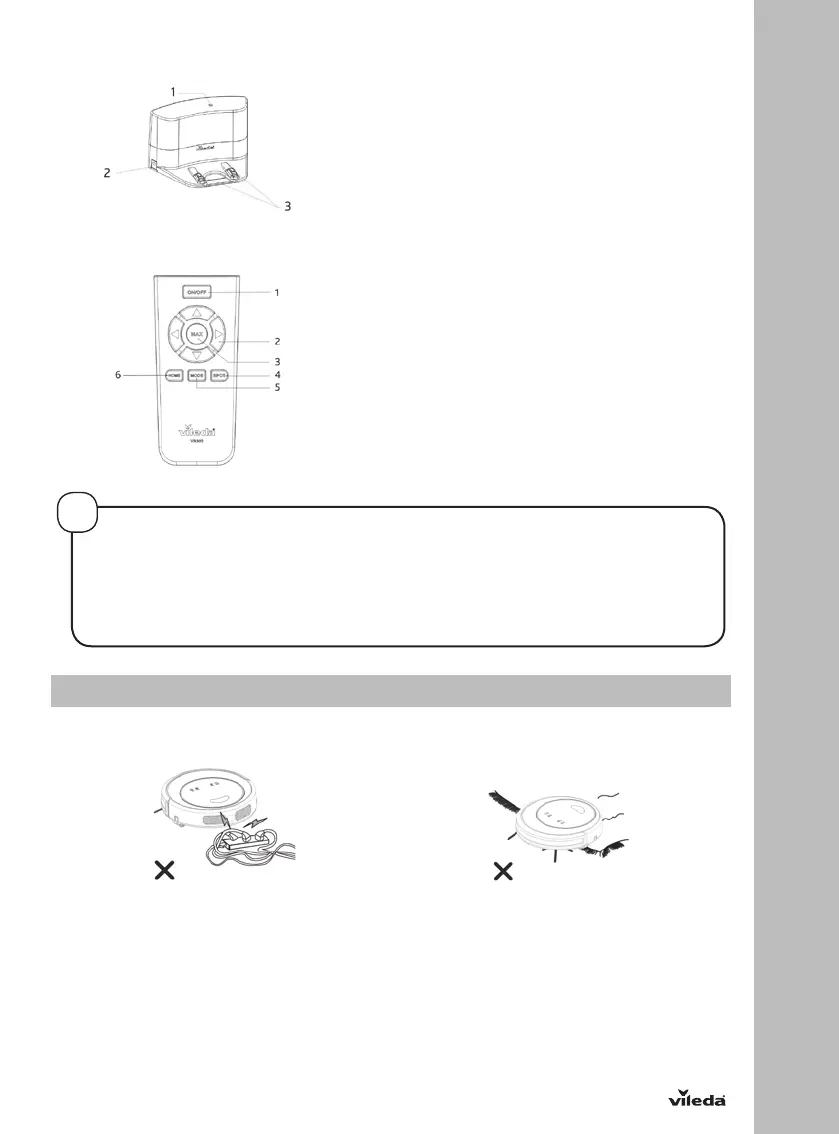
DOCKING STATION
1. Power indicator
2. Charging socket
3. Charging poles
REMOTE CONTROL
1. Power button / ON-OFF
2. Arrow keys for navigation of the robot
3. MAX mode button
4. Spot mode button
5. Cleaning mode button
6. Home / Auto charging button
•
3. Product Operation
TIPS BEFORE THE FIRST USE
Before you use the robot for the first time, make sure your home is ready and safe to use it:
Remove power cords and small objects
from the floor
The device is not suitable for long piled
carpets.
HOW TO SET UP YOUR REMOTE CONTROL
• Install two AAA type batteries into the remote controller before use.
• Remove the batteries if the remote controller will be left unused for a long period.
• If you use the remote controller near the charging station, the robot may not recognize the command and
may not work
!


 To Next Page