12
G
4. MAINTENANCE
Please use page 4-5 in the manual for reference.
Tips for keeping the performance stable
To keep your Vileda robot at the best level of performance, it is recommended to maintain the robot regularly.
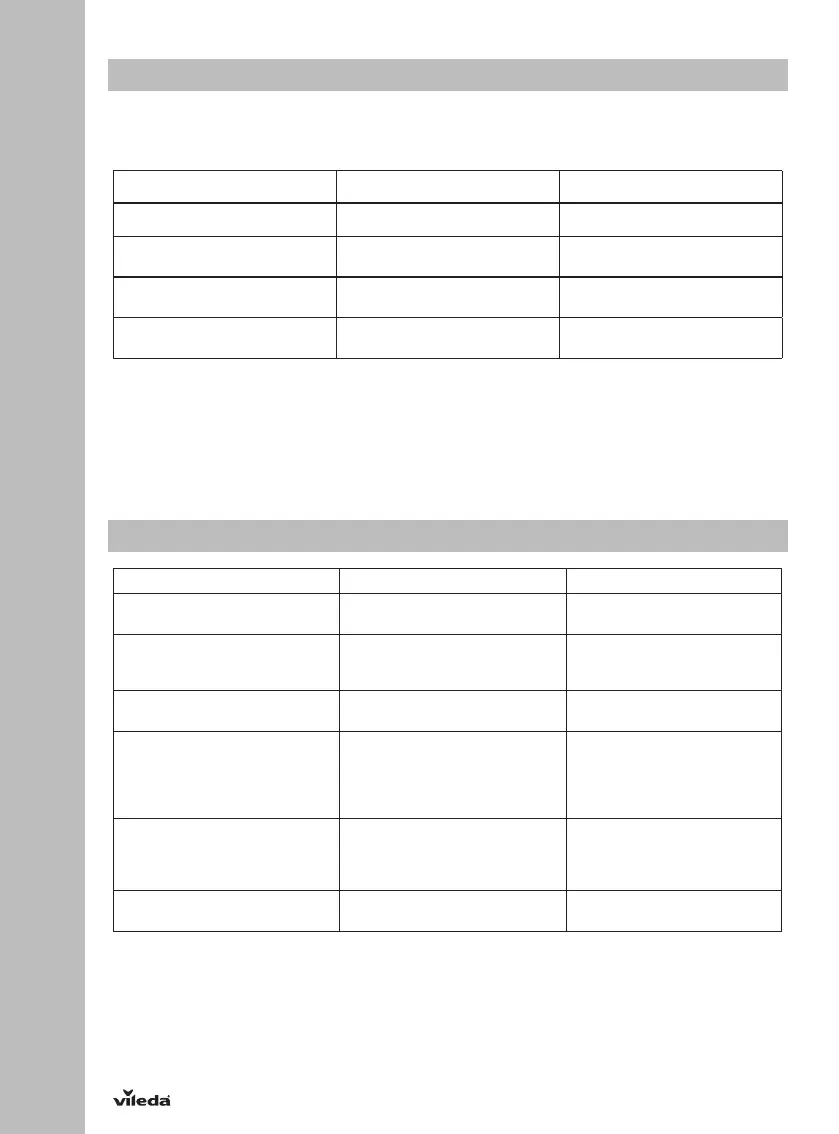
Robot Part Care Frequency Replacement Frequency
Dust box After every use —
Side brushes Once per week
(twice per week in homes with pets)
Every 6-12 months
High efficiency filter
Once per month
(twice per month in homes with pets)
Every 3 months
Front wheel, driving wheel and
drop sensors
Once per month —
BATTERY REMOVAL AND REPLACEMENT
Only use a replacement battery as supplied by Vileda.
1. Make sure the device is switched off at the main switch.
2. Remove the screws on the battery cover with a screw driver.
3. Remove the battery cover.
4. Lift the battery and remove it from the housing.
5. Unplug the wire connector that links the battery and robot.
5. TROUBLESHOOTING
Problem Possible Reason Possible Solution
Robot is not running • Battery is too low. • Recharge the battery for 5
hours.
Low or no suction • Dust box is full.
• Filter is blocked with dirt.
• Filter is missing.
• Empty dust box.
• Clean the filter with brush.
• Put filter back in place.
Abnormal movement • Wheels are dirty.
• Drop sensors are dirty.
• Clean wheels.
• Clean drop sensors.
Side brushes are deformed • Hair and dirt is stuck to the
side brushes.
• The side brushes are blocked by
an object.
• Remove the side brushes and
clean them carefully.
• Put the side brushes in warm
water for about 5 seconds if
they are curled or deformed.
Low battery after charging or no
charging possible
• Connection of battery is not
good.
• Charger or battery is defective.
• Contact the Vileda service
(address see last page).
Robot stops working, and power
button is flashing slowly red
• Low battery power. • Charge the robot.



 To Next Page