Installation & User Manual System CTB-100V
32
4.3 Operation from substations.
Calls can be made from substations to the operation panels by pressing the CALL push button. A call is indicated
by a flashing green LED and a signal in the operation panel. The operation panel confirm the call by pressing
respective line button. The communication is set up. Only the operation panel can switch off and end the call.
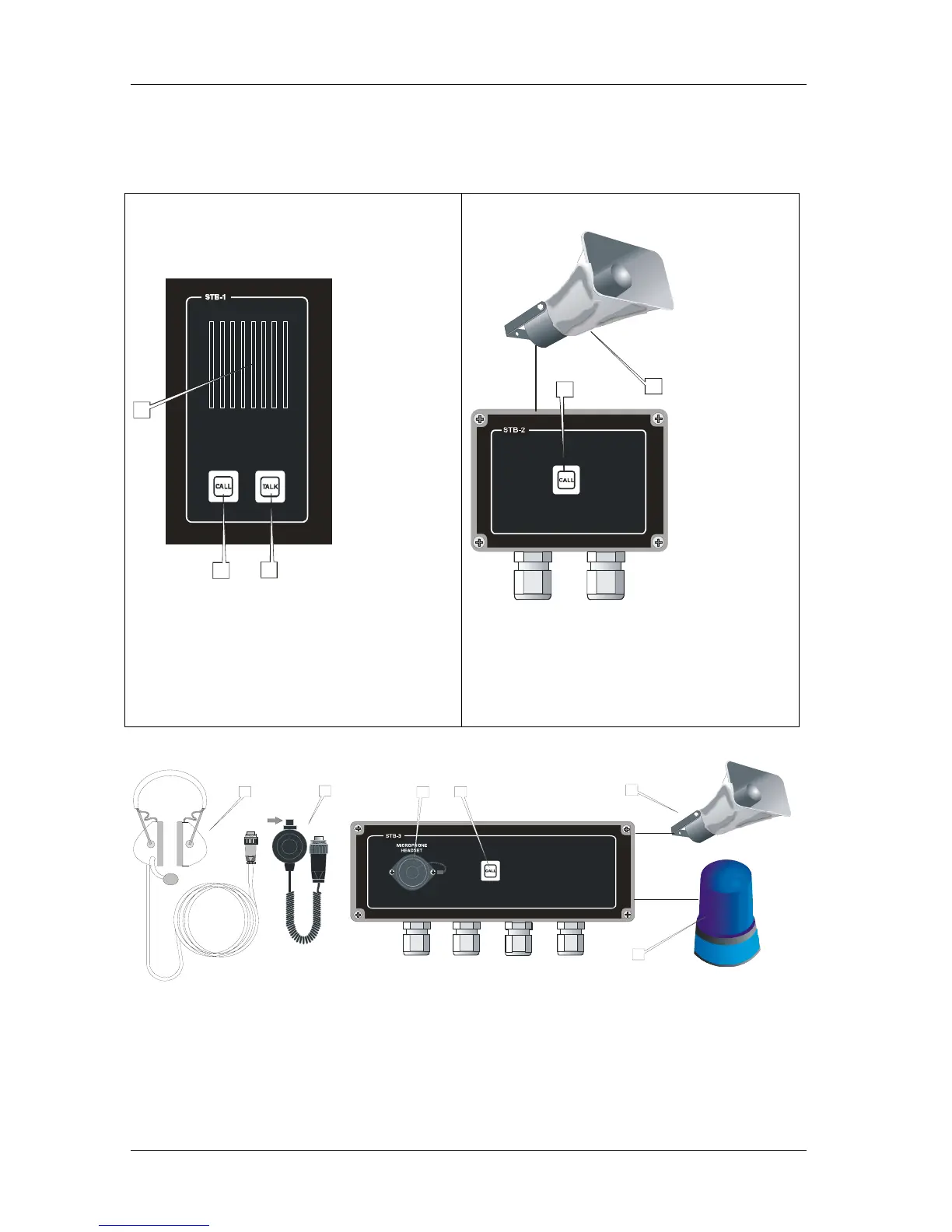
Figure 11 Substation STB-1
1
2
3
1. Re-entrant
For communication from the central unit.
Microphone for communication to the central unit.
2.
Push button switch for call to central unit.
3.
PTT switch for talk to the central unit
PTT switch = Push to talk button switch
Loudspeaker
CALL
TALK
Figure 12 Substation STB-2
1
2
1.
Push button switch for call to central unit.
2
CALL
.
For communication from the central unit.
Microphone for communication to the central unit.
Re-entrant Loudspeaker
Figure 13 Substation STB-3
1
1
2
10m cable
6
5
3
4
PTT SWITCH
1. For headset or Microphone.
2. Push button switch for call to central unit.
3. For communication from the central unit.
4.
5. P-MT7 with boom microphone
6. P-66 with PTT switch
Contact
Call
Loudspeaker
Headset
Microphone
Signal device Activated from the central unit.
PTT switch = Push to talk button
.



 To Next Page