Home
VIRTUS Fleet
Dash Cameras
Zeus
Page 49
VIRTUS Fleet Zeus - Page 49
62 pages
Manual
Save Page as PDF
To Next Page
To Next Page
To Previous Page
To Previous Page
Loading...
Installation
Device Manual
47
11.
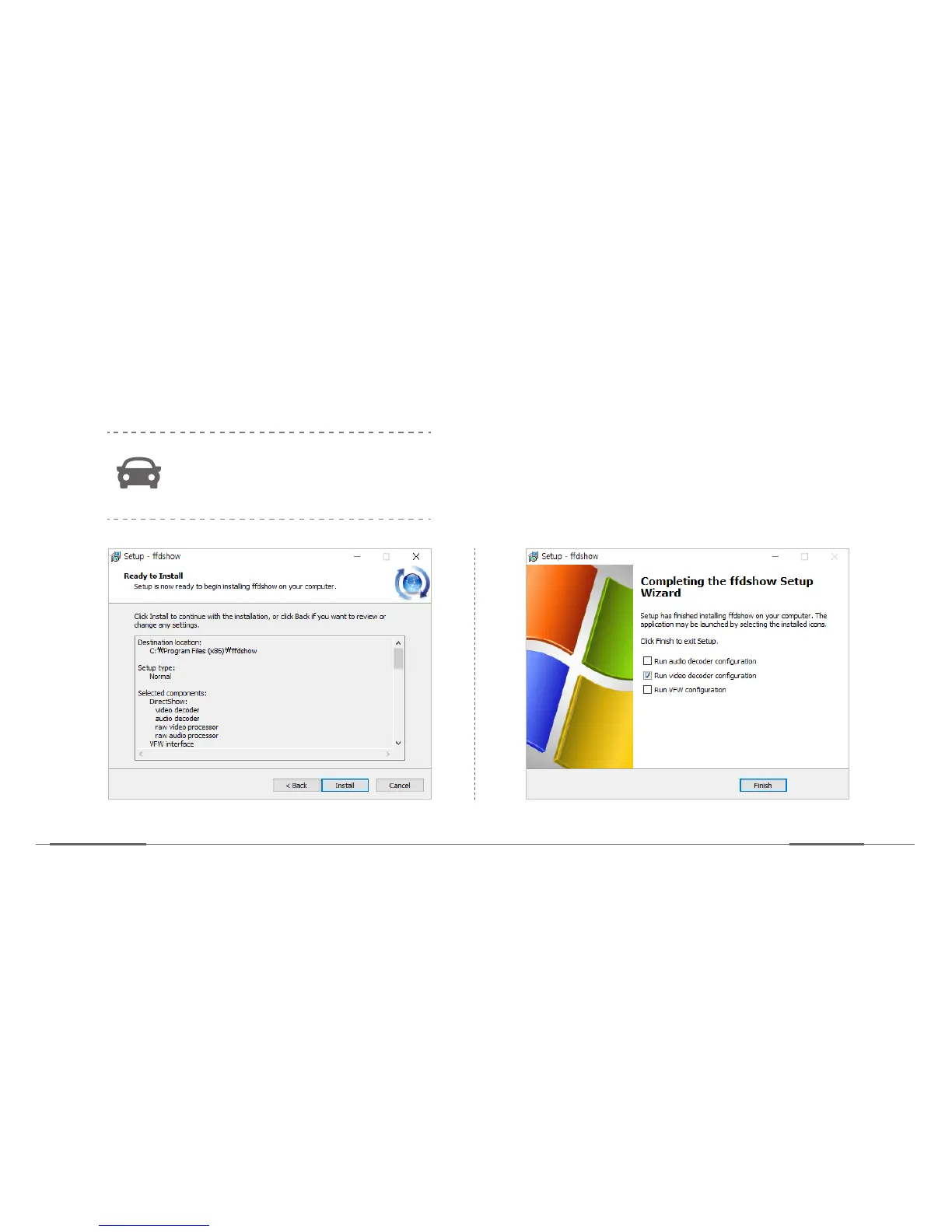
Now click Install.
Then the related files are
installed on the computer
.
If other viewer is installed, it can
cause conflict. Accordingly, remove
other viewer program first.
12.
Tick the
“Run video decoder configura
tion”
box
and c
lick
Finish
.
48
50
Table of Contents
Main Page
Default Chapter
4
Table of Contents
4
Safety Information
5
Instructional Icons
5
Warning
6
Caution
8
Package Components
10
Product Specification
13
Getting Started
14
Device Layout
14
Mounting the Microsd Cards
16
Insert the Microsd Card
17
Remove the Microsd Card
18
Mounting the USIM Card
19
Insert the USIM Card
19
Remove the USIM Card
20
Installation
21
Device Installation Layout (Recommend)
22
Installing the Main Device
23
Installing the Cameras
27
Installing the GPS
30
Installing the E-Call Kit
31
Mount the SD Cards and USIM Card
32
Connect Constant Power Cable
33
Device Status
34
Operation Modes
34
LED Status Display
35
Video Recording
36
SD Card Memory Proportion Per Settings
36
Recording Type
37
Event Types
38
Data Transmission
39
Event Data Transmission
39
Status Report
40
NAND Memory
41
E-Call
42
Calling Scenario
42
Upon no Reception
43
Reception Scenario
43
Installing the PC Viewer
44
Using the PC Viewer
51
Screen Description
52
Control Panel Description
54
Device Setting
55
Updating the Firmware
59
Ce Warning
60
Warranty Card
61


 To Next Page