24
Viscount Physis Organs Reference Manual
The buttons to visualize and navigate through all the display screens are located near the display.
- [SEQUENC]: screens for use of the instrument’s internal sequencer.
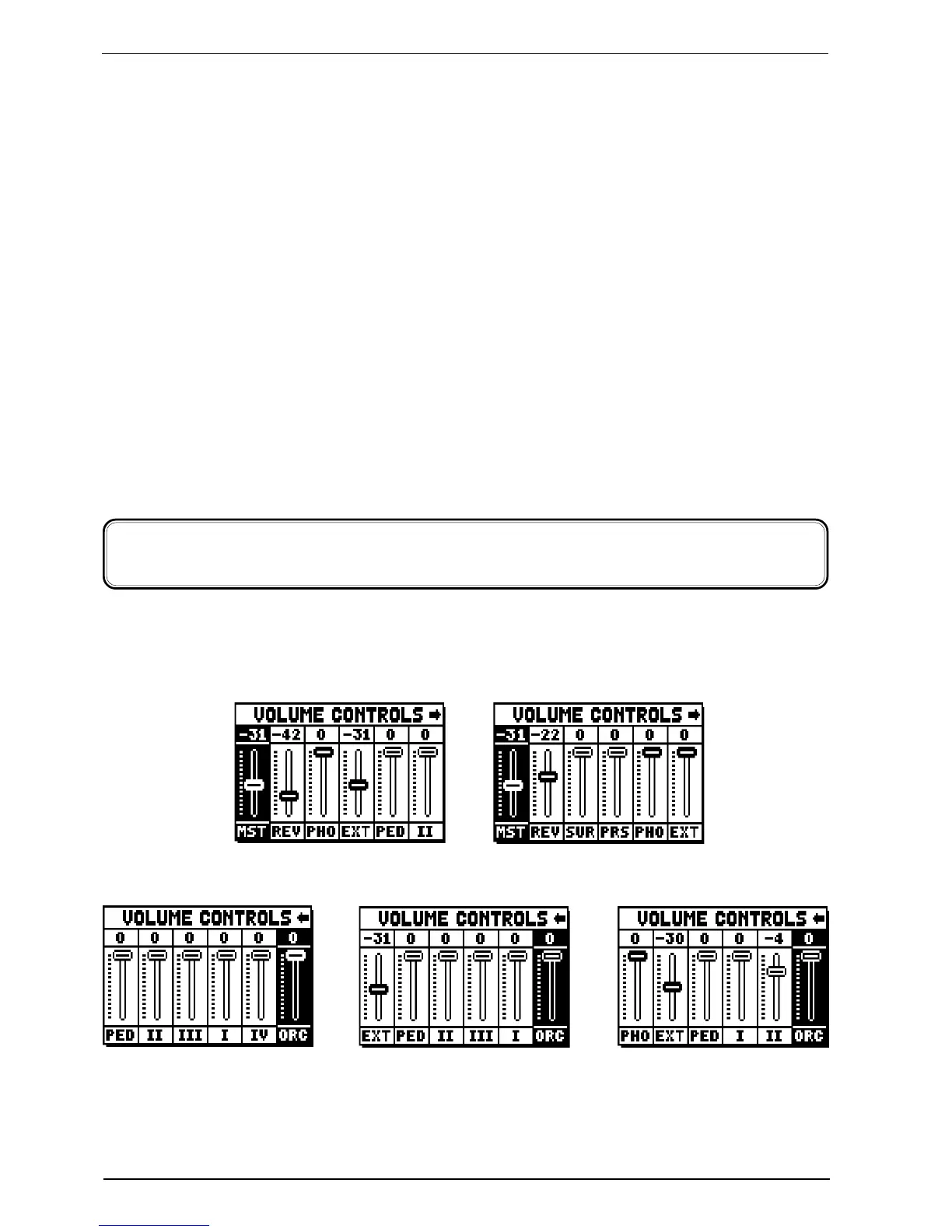
- [VOLUMES]: screen containing all the instrument’s volumes.
- [FIELD S] and [FIELD T]: buttons used to move the cursor, identified by the field in reverse.
[FIELD S] moves it in the field above or the previous field, [FIELD T] in the field below or the next field.
- [VALUE +] and [VALUE -]: buttons which regulate the values of the parameters, whether they are
numerical or alphanumerical. [VALUE +] increases, [VALUE -] decreases.
- [EXIT] and [ENTER]: access and quit the display screens and menus, or confirm or cancel
prompts made by the system. [ENTER] accesses menus/screens and confirms, [EXIT] quits menus/
screens and cancels.
4.1 ERROR MESSAGES - MAIN SCREEN
USB PORT MALFUNCTION - USB PEN IS INACTIVE, PLEASE CALL FOR SERVICE
The USB port is malfunctioning, please contact the technical assistance at the e-mail address
service@viscount.it.
This error message might also appear when accessing the FILE MANAGEMENT functions, the Sequencer
or launching an operating system update.
5. SETTING THE VOLUMES
(VOLUMES function)
3 manuals models 2 manuals models
The Physis organs allow the user to adjust all the volumes, in order to obtain a perfect sound balance among
the sections and between internal and external amplifications. To visualize the volume screen, press the
[VOLUMES] button:
o MST (Master): the organ’s overall volume, which can also be adjusted with the [MASTER VOLUME]
trimmer underneath the manuals.
o REV (Reverb): reverb effect, which can also be adjusted with the [REVERB VOLUME] trimmer
underneath the manuals.
4 manuals models
models equipped with
front and side speakers


 To Next Page