55
Viscount Physis OrgansReference Manual
o AUTO MAINPAGE: automatic return to the main video page if no display functions are used for 10
seconds.
o LCD CONTRAST: regulates the display contrast.
The second part of the menu relates to the MIDI interface settings:
o SET DATE & TIME: date and time setting (par.10.1).
o LOCK ORGAN: set the code to lock out the organ to prevent access to the instrument’s set-up screens
and the saving of combinations, the Tutti and the Crescendo (par.10.2).
o RESTORE FACT. SET (Restore factory settings): restores the factory settings (par.10.3).
o OP. SYS. UPGRADE (Operating Sytem upgrade): upgrades the operating system (par. 10.4)
o Tx AND Rx CHANNEL: MIDI transmission and reception channel set-up.
o Tx AND Rx FILTER: MIDI transmission and reception filter set-up.
o PROG. CHANGE SEND (Program Change send): saving of the combinations and transmission of
MIDI Program Change and Bank Select messages.
o KEYBOARD VELOCITY: selection of the dynamic curves of the manuals for use of the Orchestra
voices and the transmission of MIDI notes.
o COUPLED NOTES: links the channels
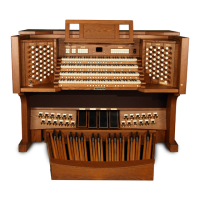
10.1 REGULATING THE INTERNAL CLOCK (SET DATE & TIME function)
The organ is equipped with an internal clock, mainly to assign date and time to files created with the FILE
MANAGEMENT functions. Select the SET DATE & TIME function from the UTILITY & MIDI menu:
o DAY: set here the current day.
o MONTH: set here the current month.
o YEAR: set here the current year.
o [last field]: adjust the current time.
When the configuration is over, press [ENTER] to save the settings.
As a pop-up says, the time adjustments will be working the next time the organ is switched on.
D
Re
C
Do
F
Fa
G
Sol
A
La
B
Si
C
Do
D
Re
E
Mi
E
Mi
A#
La#
C#
Do#
D#
Re#
-
--
-
--
-
--
-
--
SHORT
F#
Fa#
E
Mi
F
Fa
G
Sol
A
La
B
Si
C
Do
D
Re
E
Mi
G
Sol#
A#
La#
C#
Do#
D#
Re#
C
Do
-
--
-
--
D
Re
SHORT CDE


 To Next Page