EN - 7
3.2 LAYERING TWO SOUNDS (DUAL mode)
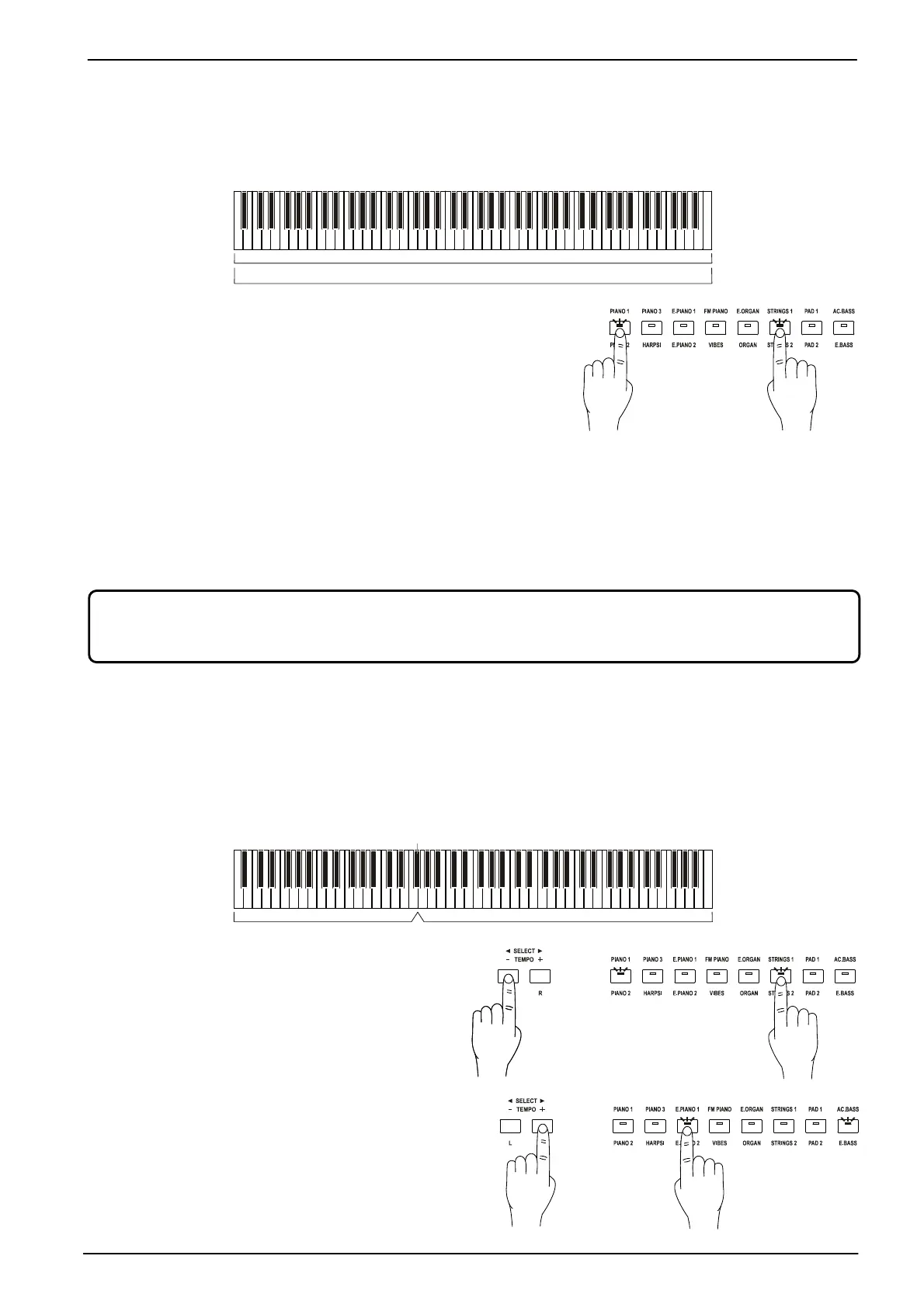
It is possible to play two sounds simultaneously across the entire range of the keyboard. This mode is called
Dual.
To activate this mode, press the button of one of the two sounds
(also two or more times, to select the alternative sound assigned
to it), hold it down and press at the same time the button
corresponding to the sound that you want to combine (again,
you can press the button two or more times).
The sound of the left button is called
Sound1,
while the right
button sound is called
Sound2.
In
Dual
mode, the reverb can be adjusted just as with a single
sound. You can also set a transposition by octave separately for
Sound1
and
Sound2.
It is also possible to
adjust the volume balance of the two sounds.
Instructions to adjust these parameters can be found in the following paragraphs.
To return to single sound mode, press the corresponding sound button.
3.3 SPLITTING THE KEYBOARD (SPLIT mode)
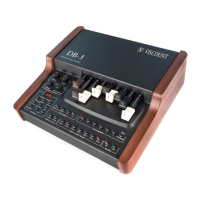
Two sounds can be assigned to two different portions of the keyboard, in order to play one with the left hand
and another with the right hand. This mode is called
Split
and the key that divides the two areas is called
Split
Point
(and it is adjustable).
(default ): F#3
From
Single
and
Dual
mode you can switch to
Split
mode using two different procedures:
- While holding the [L] button, select a sound
button. This will assign the sound to the left
side of the keyboard, while the previously
selected sound is assigned to the right side.
- While holding the [R] button, select a sound
button. This will assign the sound to the right
part of the keyboard. The left part of the
Keyboard is assigned either the A.Bass
sound or the previously selected sound.
To change the sounds of the right and left sides,
respectively, press and hold [R] or [L], and
It is not possible to layer two sounds assigned to the same buttons (e.g. Piano 1 and Piano 2).
Only Dual or Split can be called up; both cannot be used together.
+
+









 To Next Page