EN - 10
3.8 KEYBOARD TRANSPOSITION BY SEMITONES
It is possible to transpose the entire keyboard (affecting all sounds
and all modes) within a range of -6 to +6 semitones.
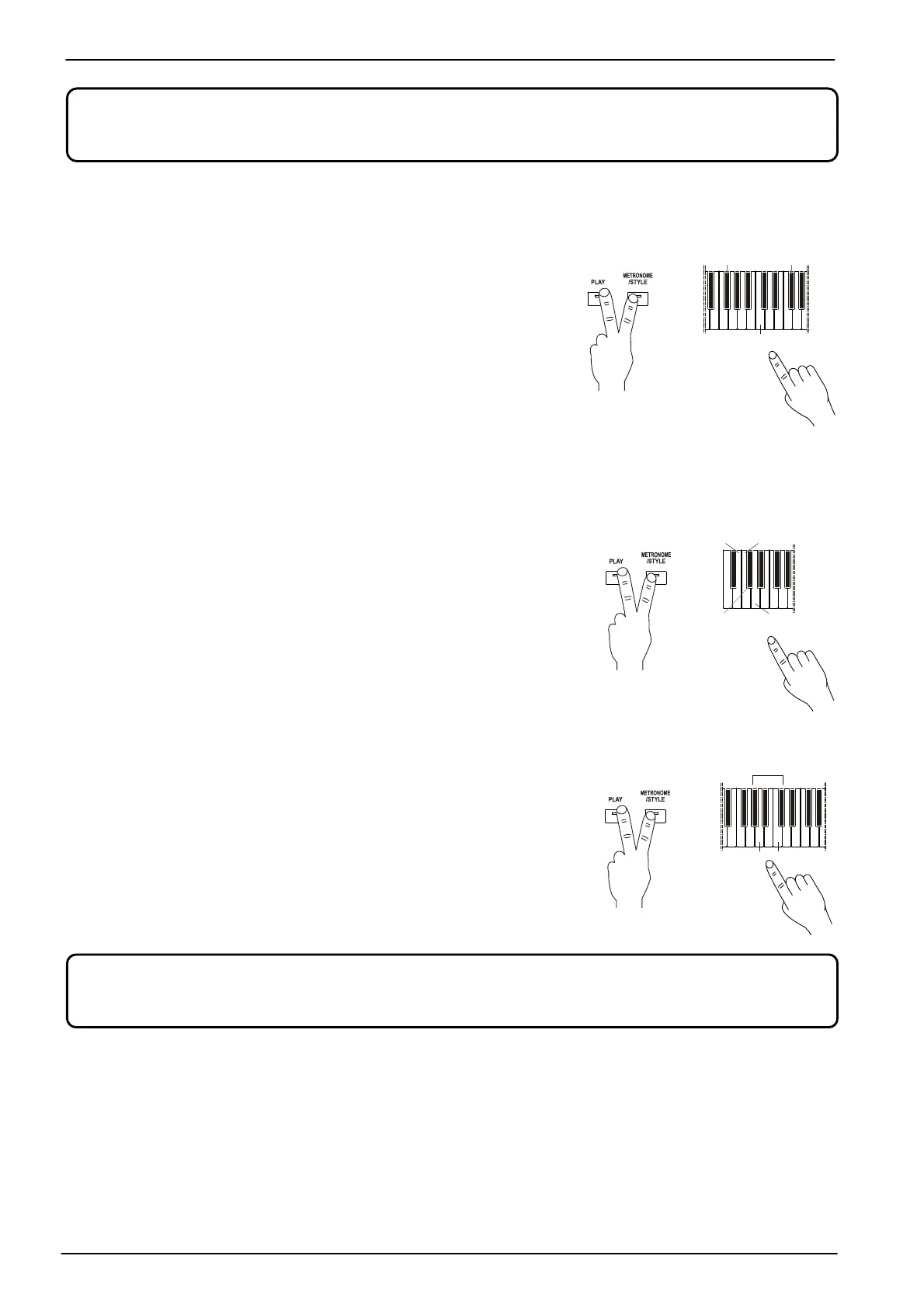
To adjust the transposition, press and hold the [PLAY] and
[METRONOME / STYLE] buttons, then simultaneously press the
keys:
- F#3 to B3: set a transposition from -6 to -1 semitones (F#3
corresponds to -6 semitones).
- C4: to restore the transpose value to 0.
- C#4 to F#4: set a transposition from +1 to +6 semitones (F#4
corresponds to +6 semitones).
3.9 FINE TUNING
The pitch of the instrument can be fine-tuned, with values ranging from
427.2 Hz to 452.6 Hz, in order to tune it perfectly with other
instruments.
To do this, press and hold the [PLAY] and [METRONOME/STYLE]
buttons, then simultaneously press the keys:
- B0: set the A4 to 440 Hz (standard pitch).
- C1: set the A4 to 442 Hz.
- C#1: at each pressure reduce the central A by 0.2 Hz.
- D1: at each pressure increase the central A by 0.2 Hz.
3.10 ADJUSTING THE STRING RESONANCE
In acoustic pianos, when the sustain pedal is pressed all the dampers
are lifted, so that all of the piano strings are free to respond to the
vibrations emitted by the notes played. As a result, all strings begin to
vibrate slightly because of a physical phenomenon known as
"sympathetic resonance". In this instrument you can adjust the intensity
of this effect.
To do so, press and hold the [PLAY] and [METRONOME/STYLE]
buttons, and press:
- A5 to B5: to increase the effect level.
- C6: to turn off the effect.
This effect is only available for Piano 1, Piano 2 and Piano 3 sounds.
The selected level is applied to all three acoustic piano sounds.
In Dual and Split mode, depth adjustment only affects Sound1.
Reverb type is the same for all the sounds, reverb depth can be set sound by sound.
+
(440 ) Hz
C#1
+
+
(-6)
(+6)









 To Next Page