Visioneer
®
7900 Maintenance
26 User Guide
Open the list of installed programs in the Windows Control panel.
■ Windows 7 and later: Open Programs and Features
Uninstalling the scanner driver:
1. In the list of installed programs click on Visioneer
®
7900 driver.
2. Click the Change/Remove or Uninstall button.
3. Click Yes when asked to confirm that you want to remove the driver.
When the driver uninstallation is complete the progress window will automatically close.
4. Turn off the scanner and unplug the USB cable.
5. Reboot the computer if you are prompted to do so.
Follow these instructions to remove any of the other software you installed with your scanner. Depending
on the software provided with your scanner, and which applications you installed during the scanner setup,
the application list may include:
■ OneTouch
■ OneTouch OCR module
Uninstalling Visioneer Acuity™:
Visioneer Acuity is automatically installed when you install the scanner driver. Visioneer Acuity is a utility
with advanced image processing options to instantly improve the visual clarity of anything you scan.
1. In the list of installed programs, select Visioneer Acuity Assets.
2. Click Yes when asked to confirm you want to remove the software.
Depending on the method of installation, and your scanner model, there may be multiple entries for
Visioneer Acuity in the installed programs list. The additional entries in this list are the image processing
libraries needed to support various scanner models. These additional items will be called “Visioneer Acuity
Assets” followed by a version number. In the scenario described here, when you want to uninstall
Visioneer Acuity make sure you select and uninstall Visioneer Acuity. If you uninstall one of the entries
labeled as an “asset” you will still need to uninstall the main Visioneer Acuity utility.
VISIONEER
®
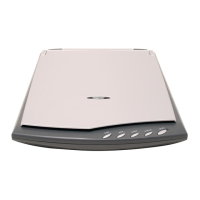
7900 SPECIFICATIONS
Scanner Specifications
Document Requirements
Document Size A4, A5, A6, B5, Letter, 8K, 16K, Postcard
Maximum scan size 8.5" x 11.7" (216 x 297 mm)
General Specifications
Optical Resolutions 1200 dpi
Bit Depth 24-bit color, 8-bit grayscale, 1-bit bitonal (black & white)
Scan Method Single pass flatbed












 To Next Page