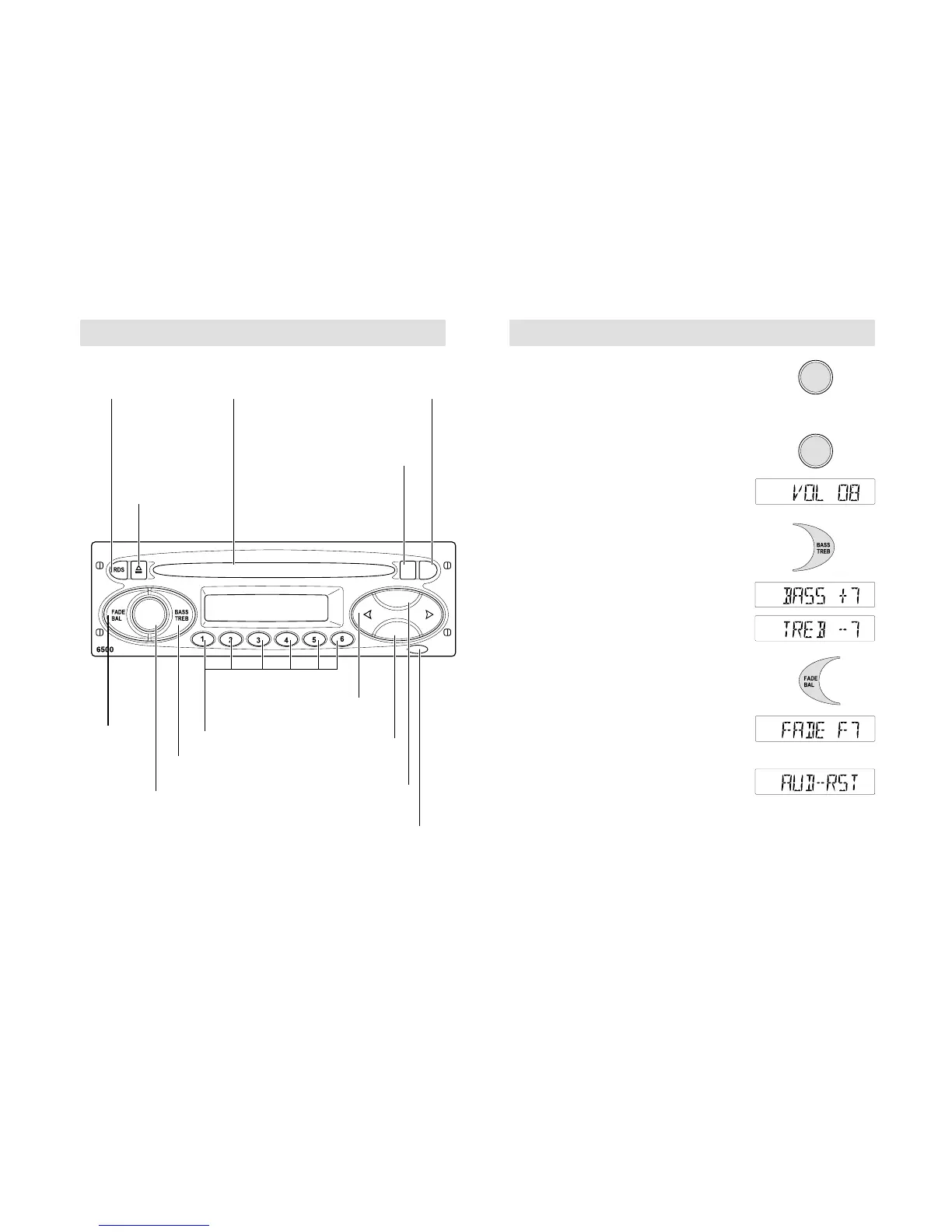
Fade/
Balance
control
Bass/Treble control
On/off and
volume
control
Station preset
buttons
Waveband/Autostore
selector
Menu button
Keycode
warning light
CD Eject
CD control
CD ApertureRadio
Data
System
(RDS)
button
Automatic tuning
/Track selection
Traffic
Information
5500/6500
ON/ OFF
Press for on/off. This button can also operate
the unit for up to one hour with the ignition
turned off. The radio automatically switches
off after one hour
VOLUME CONTROL
The display indicates the level selected.
See also Audio distortion reduction (CLIP)
page 29.
BASS/ TREBLE CONTROL
Press BASS/TREB once for bass or twice
for treble and use the volume control for
adjustment. The display indicates the
level selected.
FADE/ BALANCE CONTROL
Press FADE/BAL once for fade (front to rear)
or twice for balance (left to right) and use the
volume control for sound system adjustment.
The display indicates the level selected.
The fade function is applicable to vehicles with
front and rear speakers only
Default audio settings
Press and hold BASS/TREB for two seconds
until a display like the one shown opposite
appears. With the function switched on the
volume, bass, treble, fade and balance
settings all return to the manufacturer's
original preset levels.
18 19



 To Next Page