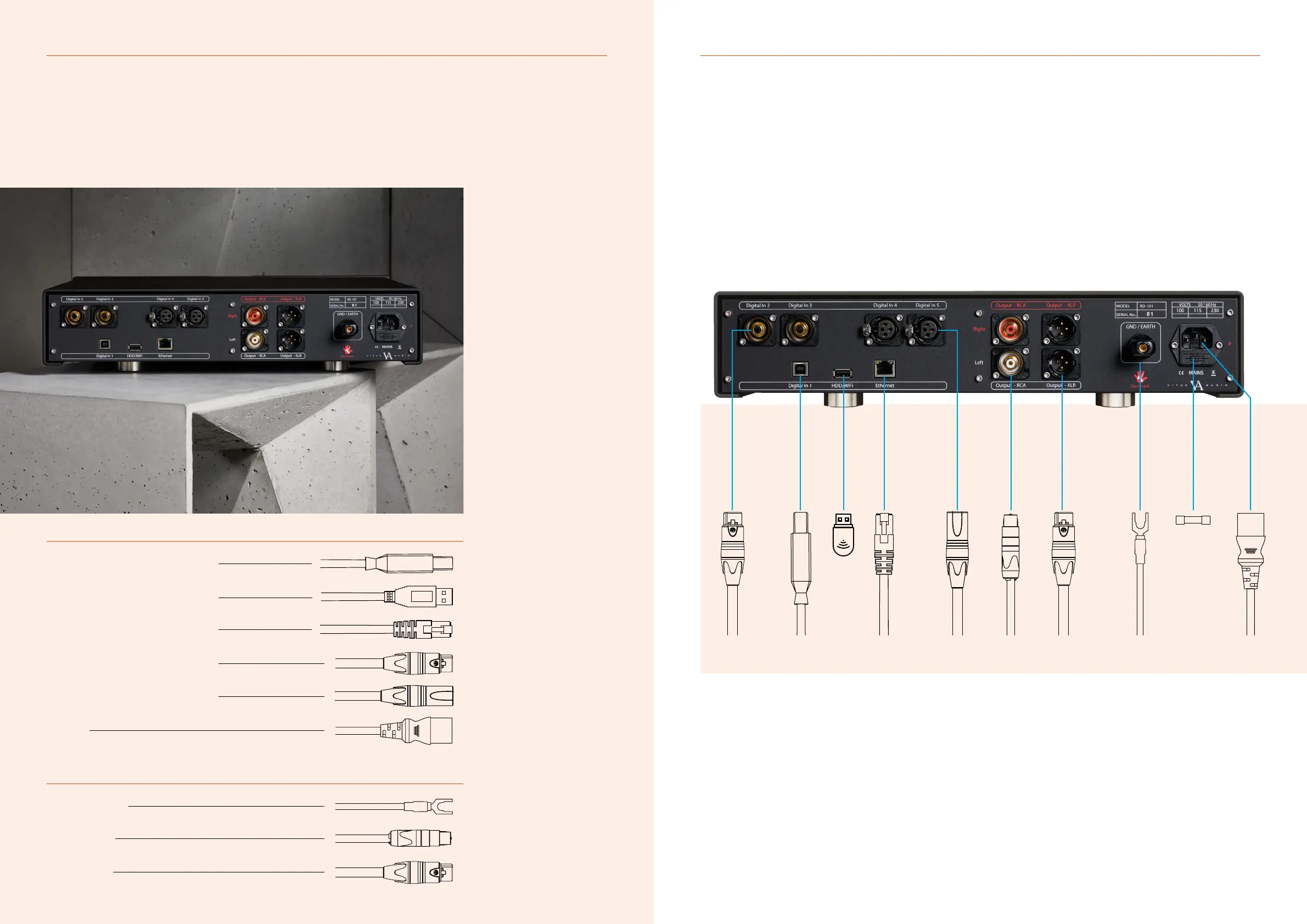
Connecting the RD-101 The rear panel
2. CONNECTING2. CONNECTING
Digital inputs
Input
WI-FI
Ethernet
Input
Input
Power
Digital inputs
USB B
USB A
RJ45
S/PDIF
AES
USB B in
WI-FI dongle in
Ethernet in
RCA
3 pin XLR
C13/C15 IEC
Outputs
Ground / Earth
Output RCA
Output XLR
Ground
RCA
3 pin XLR
12 | RD-101 Owner’s manual RD-101 Owner’s manual | 13
Digital XLR in
Ethernet RJ45 in
Digital USB in
WI-FI dongle
Analogue XLR out
Digital RCA in
Analogue RCA out
Ground
Power
Fuse
Place the RD-101 on its shelf.
Connect all the sources to the
inputs of the RD-101 labelled
INPUT 1 to 5 on the rear panel.
Connect the output of the
RD-101
Lastly connect the mains to
the DAC, after you have
connected both inputs and
outputs.
ATTENTION: Never plug in/
unplug any cables within the
whole of the system while the
RD-101 is operational. Always
set the RD-101 into standby
mode before making any system
adjustments.



 To Next Page