VIVOTEK
50 - User's Manual
Image settings
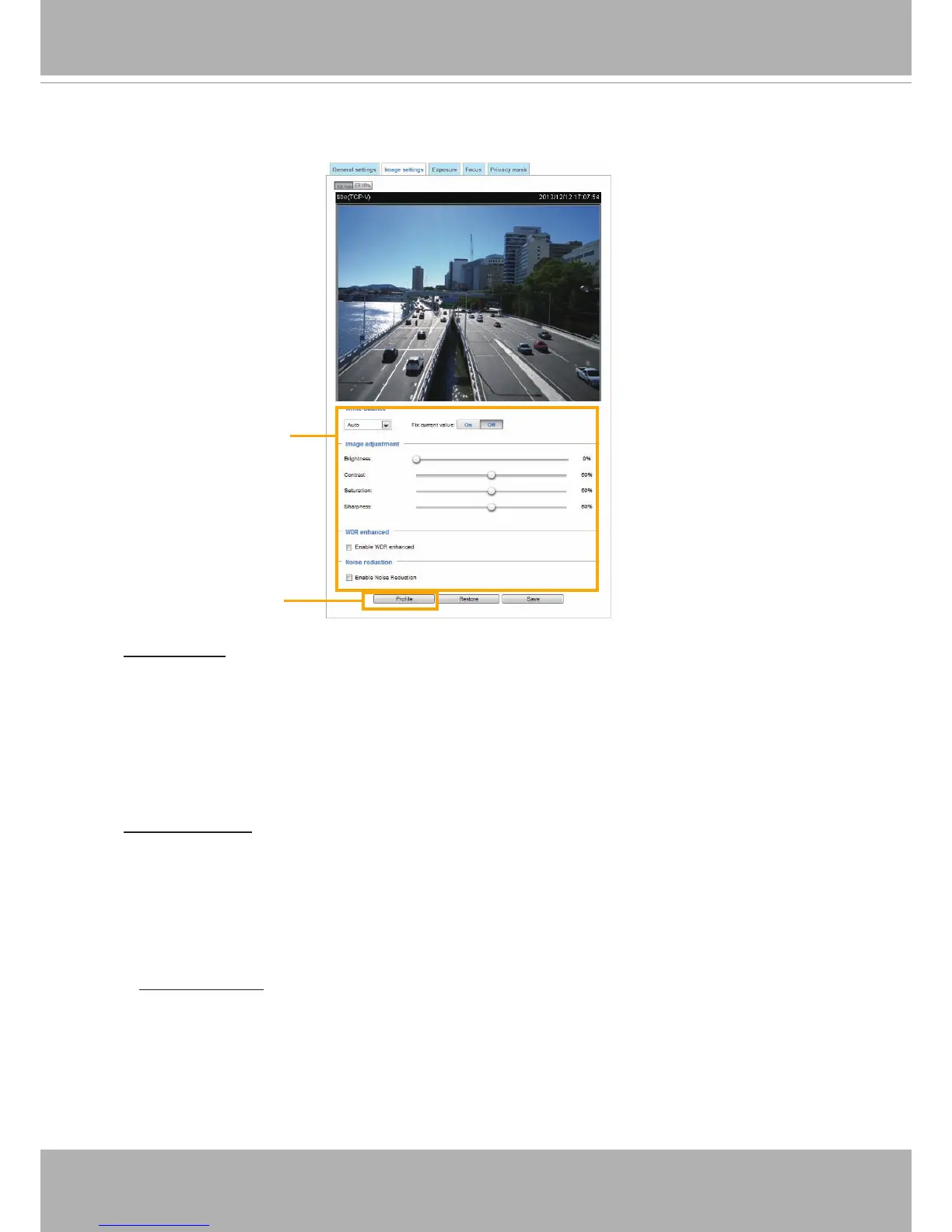
On this page, you can tune the White balance and Image adjustment.
White balance: Adjust the value for the best color temperature.
■ You may follow the steps below to adjust the white balance to the best color temperature.
1. Place a sheet of paper of white or cooler-color temperature color, such as blue, in front of the
lens, then allow the Network Camera to automatically adjust the color temperature.
2. Click the On button to Fix current value and conrm the setting while the white balance is being
measured.
■ You may also manually tune the color temperature by pulling the RGain and BGain slide bars.
Image Adjustment
■ Brightness: Adjust the image brightness level, which ranges from
0% to 100%
.
■ Contrast: Adjust the image contrast level, which ranges from 0% to 100%.
■ Saturation: Adjust the image saturation level, which ranges from 0% to 100%.
■ Sharpness:
Adjust the image sharpness level, which ranges from
0% to 100%
.
Sensor Setting 2:
For special situations
Sensor Setting 1:
For normal situations
■
WDR Enhanced: When enabled, you can select the strength of the WDR function. The Low,
Medium, High options correspond to the level of contrast between the overly-lit area and the
shaded areas. For example, the High option applies to a high contrast scenario.
The Sensitivity option applies to the response speed to the change in bright-to-dark lighting
contrast.



 To Next Page