VIVOTEK - A Leading Provider of Multimedia Communication Solutions
58 - User's Manual
Functions of History Page
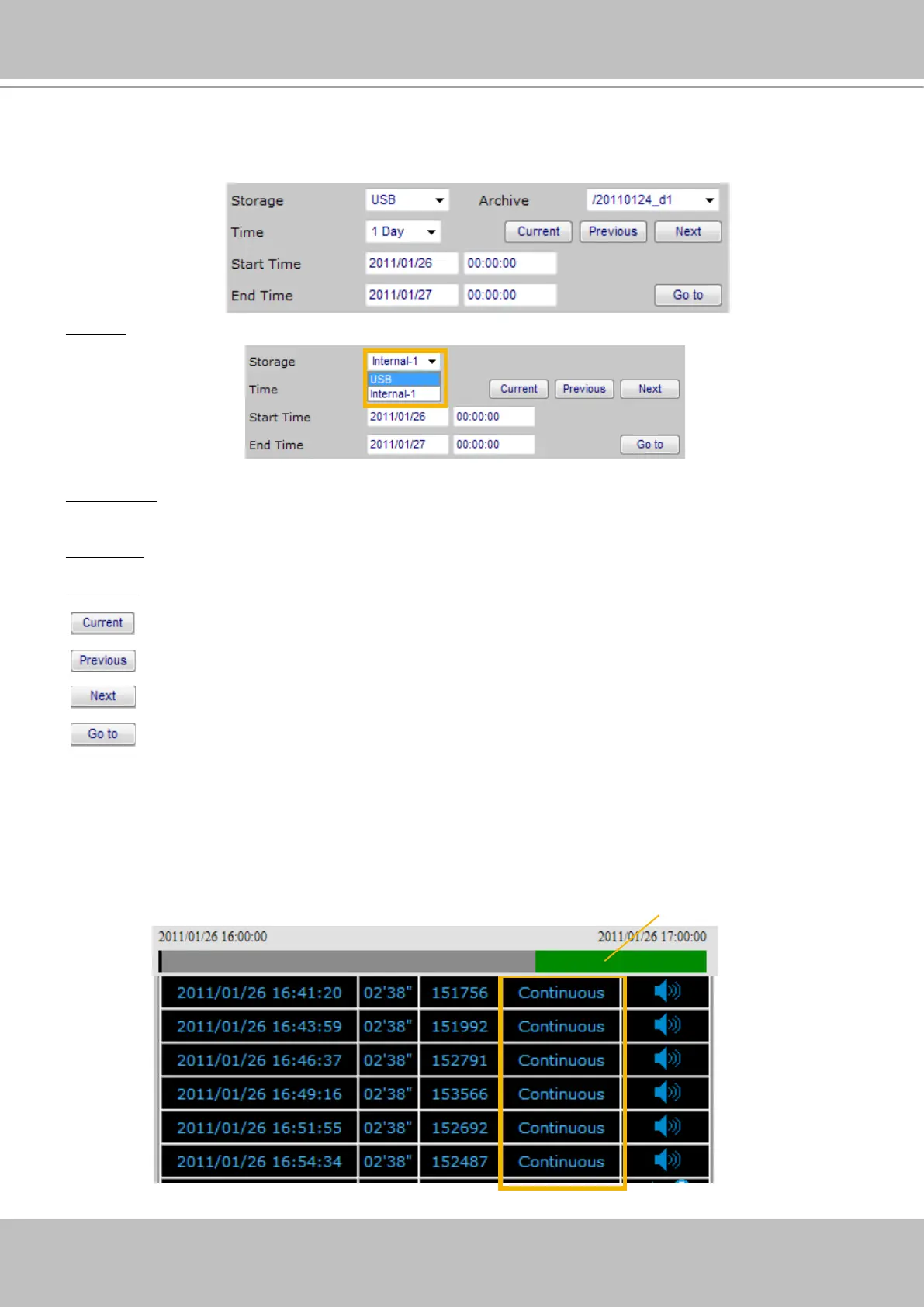
Time Picker
Storage: Select a storage device you want to review.
Select Time: Select a period of time (1 Hour, Day, 1 Week, 1 Month, or Manually), which decides the
length of histogram.
Start Time: The beginning of the selected period of time.
End Time: The end of the selected period of time.
: Click this button to go to the current period of time (current Hour, Day, Week, or Month).
: Click this button to go the last period of time (last Hour, Day, Week, or Month).
: Click this button to go the next period of time (next Hour, Day, Week, or Month).
: Manually input the time, and then click this button to go the selected period of time
(selected Hour, Day, Week, or Month).
Time Bar and Histogram / Recorded Video Clips
The recorded video clips in the selected period of time will show up on the histogram and be listed
in the recorded video clips window. In the following histogram, all recorded video clips are based on
C
ontinuous
recording (green bar). The black Time Bar refers to the current time.
Continuous recording



 To Next Page