VIVOTEK - A Leading Provider of Multimedia Communication Solutions
54 - User's Manual
Sensor Settings
Advanced mode
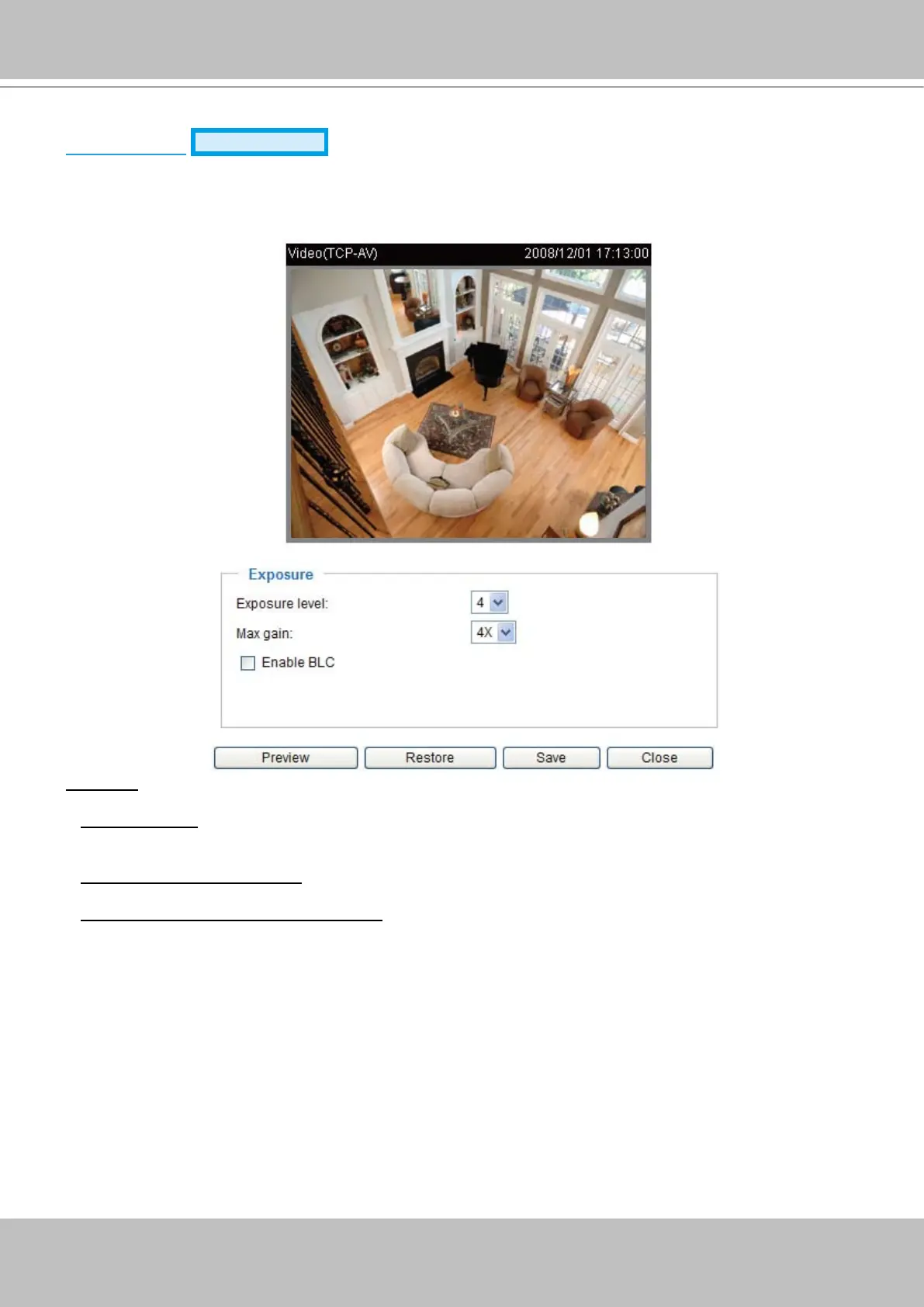
Click Sensor Settings to open the Sensor Settings page� In this page, you can set the maximum
exposure time, exposure level, AGC, and WDR (Wide Dynamic Range) settings�
You can congure two sets of sensor settings: one for normal situation; the other for special situation,
such as day/night/schedule mode�
Exposure
■ Exposure level: You can manually set up the Exposure level, which ranges from 1 to 8 (dark to bright)�
The default value is 4�
■ Max gain (Auto Gain Control):
You can manually set up the AGC level (4X or 8X). The default value is 4X.
■ Enable BLC (Back Light Compensation)
Enable it when the object is too dark or too bright to recognize� It allows the camera to adjust to the
best light conditions in any environment and automatically give the necessary light compensation�
You can click Preview to ne-tune the image, or click Restore to recall the original settings without
incorporating the changes� When completed with the settings on this page, click Save to take effect and
click Close to quit the page�


 To Next Page