VIVOTEK - A Leading Provider of Multimedia Communication Solutions
60 - User's Manual
Camera control
This section explains how to control the Network Camera’s Pan/Tilt/Zoom/Focus operation by a
control panel and set preset positions�
Preset locations
In this page, you can set preset positions for the Network Camera� You can also select some preset
positions for it to patrol. A total of 20 preset positions can be congured.
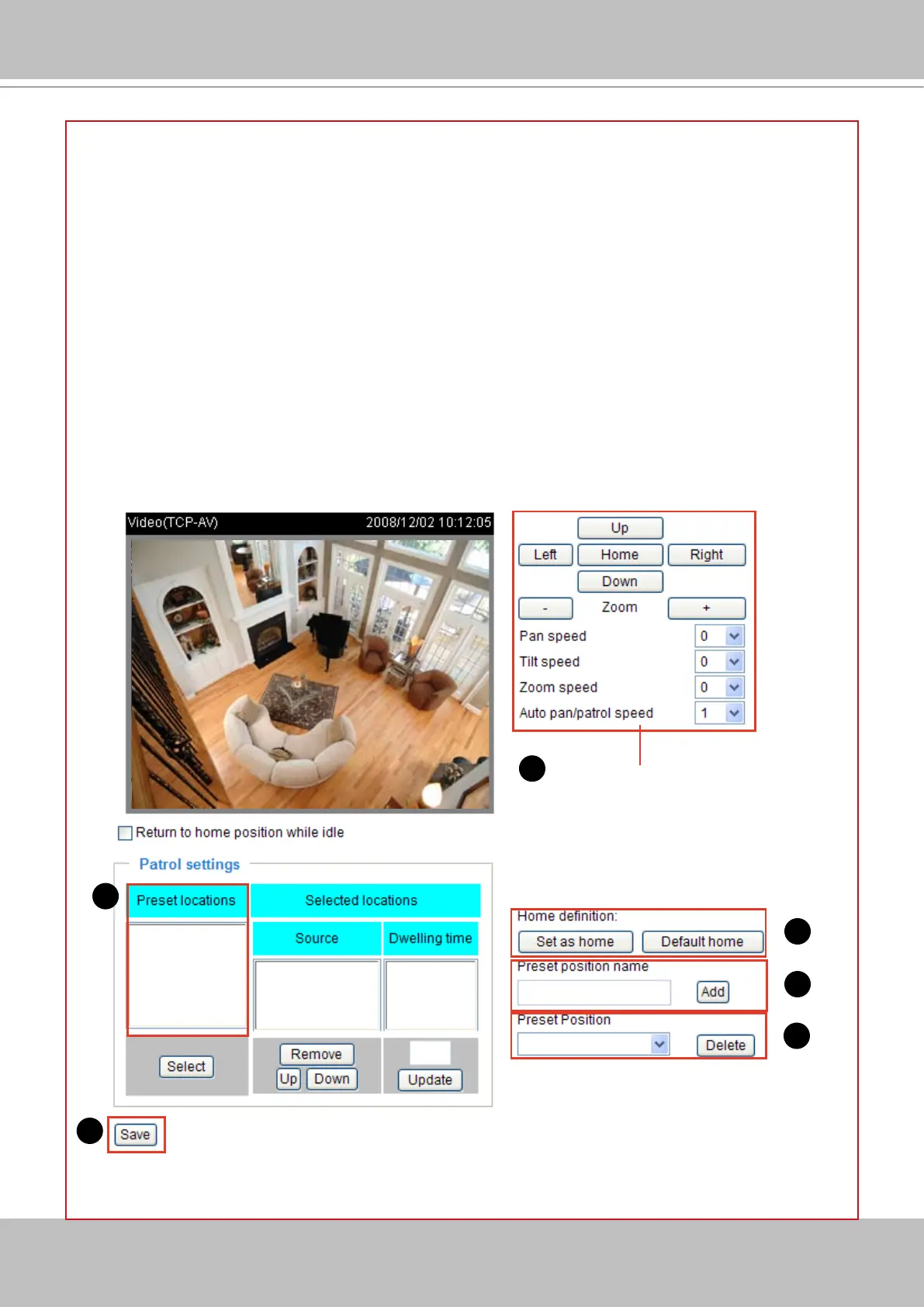
Please follow the steps below to set a preset position:
1� Adjust the shooting area to a desired position using the buttons on the right side of the window�
2� Click Set as home or Default home to dene your home denition.
3� In the Preset position name text box, enter a descriptive name for the preset position� The preset
position name allows up to forty characters� Click Add to take effect� The preset positions will show up
under the Preset location list on the left-hand side�
4� To add more preset positions, please repeat step 1~3�
5� To remove a preset position from the list, select a preset position name from the Preset Positions
drop-down list and then click Delete�
6� Click Save to take effect�
functions are the
same as the control
panel on home page
1
2
3
5
6
3


 To Next Page