VIVOTEK - A Leading Provider of Multimedia Communication Solutions
User's Manual - 61
Patrol Settings
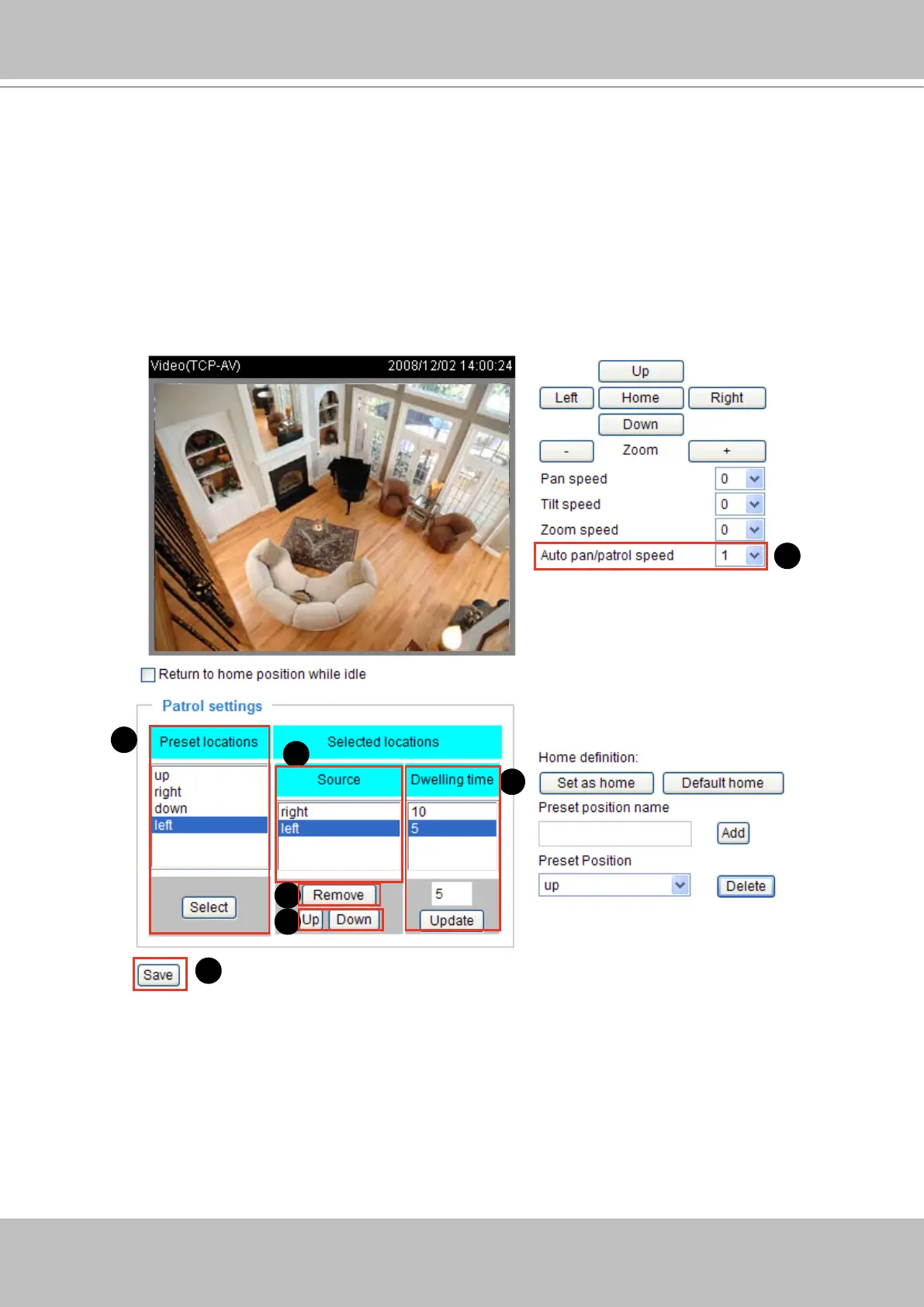
You can select some preset locations for the Network Camera to patrol�
Please follow the steps below to set a preset position:
1� Click a preset location on the list and then click Select�
2� The selected preset location will show up on the Source of Selected locations list�
3� Repeat step 1 and 2 to select more preset locations to patrol around�
4� If you want to delete a selected location, click it on the list and then click Remove�
5� Click the selected locations and then click Up or Down to arrange the order for patrolling�
6� Adjust the Auto pan/patrol speed� (1~5 seconds)
7� Set the Dwelling time for each preset location during auto patrol of the network camera� The default
value is 10 seconds� You can also manually enter a value into the blank, and then click Update�
8� Click Save to enable the settings�
1
2
4
5
6
7
8


 To Next Page