⑧
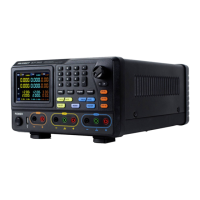
Blue Volt/CV key: Set the output voltage of CH2
Blue Curr/CC key: Set the output current of CH2
Blue ON/OFF key: Enable/disable the output of CH2
⑨
Channel 2 output connectors
⑩
Switch between All Channel mode (CH1 & CH2 & CH3) and
Dual Channel Mode (CH1 & CH2).
⑪
Channel 1 output connectors
⑫
Channel 3 output connectors
⑬
Connect as a "host device" with an external USB device, such
as connect a USB disk to the instrument.
⑭
Turn on/off the instrument
⑮
Yellow Volt/CV key: Set the output voltage of CH1
Yellow Curr/CC key: Set the output current of CH1
Yellow ON/OFF key: Enable/disable the output of CH1
⑯
Utility key: Menu of output mode, utility, info, port settings.
Record key: Save settings, auto record, and view recording.
Program key: Programmable output.
KeyLock key: Press and hold this key for 5 seconds to lock
the panel keys. Unlock method: Press and hold the key for
more than 5 seconds, and release.
Instructions for panel key indicator
ON/OFF key: The indicator will be lit after you turn on the channel.
Volt/CV key: The indicator will be lit when the channel is in Constant Voltage output
mode.
Curr/CC key: The indicator will be lit when the channel is in Constant Current output
mode.


 To Next Page