3. Quick Start
3.1 Front/Rear Panel and User Interface
3.1.1 Front Panel
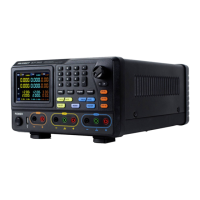
Figure 3-1 Front panel overview
①
②
Parameter input, includes the numeric keys, decimal point and
backspace key.
③
Up and down
direction key
④
Enter menu or confirm the parameter entered
⑤
Select menu or change the value, pressing it has the same
effect as pressing the enter key
⑥
Left and right
direction key
Set sub menu or move the cursor
⑦
Volt CH3 key: Set the output voltage of CH3
Curr CH3 key: Set the output current of CH3
ON/OFF CH3 key: Enable/disable the output of CH3


 To Next Page