49
e) Measuring resistance
Ensure that all objects that you wish to measure (including circuit components, circuits and com-
ponent parts) are disconnected and discharged.
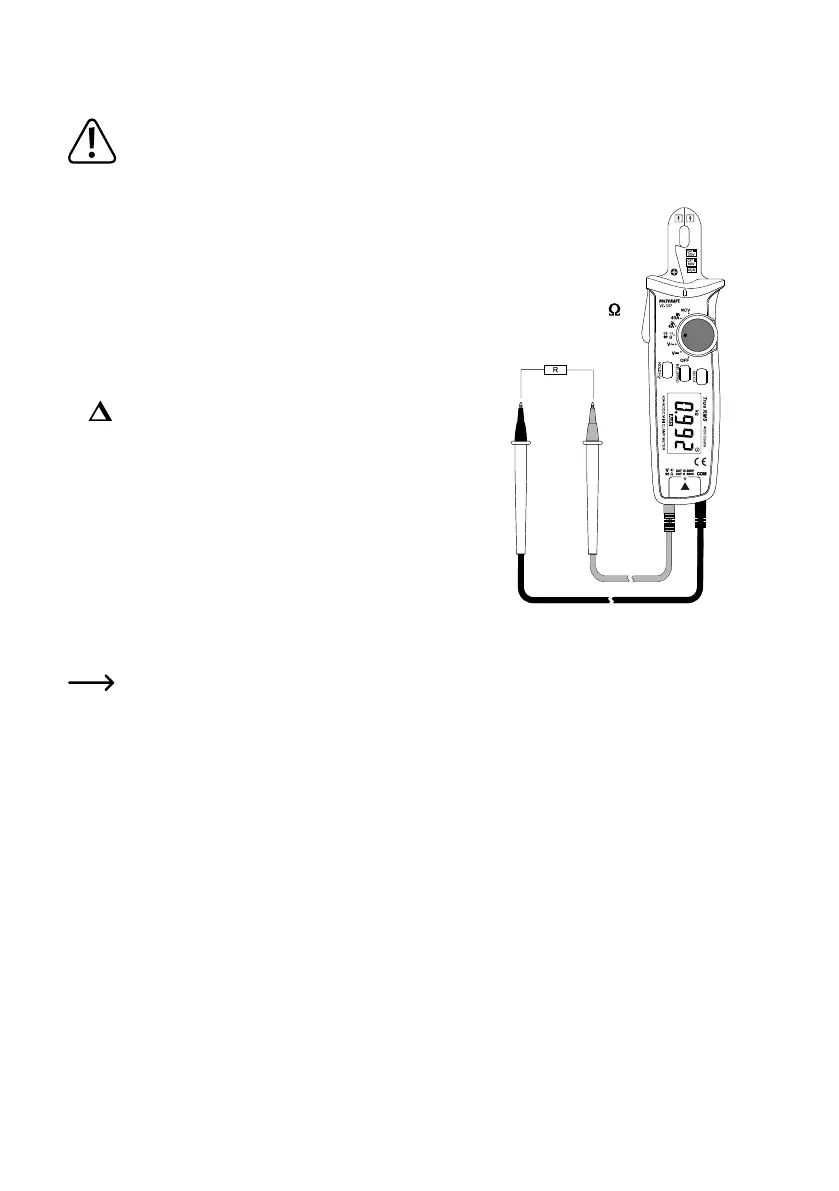
Follow the steps below to measure the resistance:
• TurnontheDMMandselectthe“Ω”measurementmode.
• InserttheredtestleadintotheΩtestsocket(7),theblacktestleadinto
the COM test socket (6).
• Check the measuring leads for continuity by connecting both measuring
probes to one another. The multimeter should show a resistance value
ofapprox0–0.5Ω(inherentresistanceofthetestleads).
• Forlow-resistancemeasurements(<400ohms),brieypressthe“REL”
key to prevent the inherent resistance of the test leads from being in-
cluded in the following resistance measurement. The display shows “
” and the main display shows 0 Ohms. Automatic range selection
(AUTO) is now disabled. For all other measurements, the inherent re-
sistance of the test leads is negligible. To deactivate the reference value
measurement, press the “REL” key for approx. 2 seconds. Automatic
range selection is now enabled.
• Connect the measuring probes to the object that you want to measure.
The measurement will be indicated on the display (provided that the
object you are measuring is not highly resistive or disconnected). Wait
until the display stabilises. This may take a few seconds for resistances
greaterthan1MΩ.
• “OL” (overload) indicates that the measuring range has been exceeded or that the circuit is broken.
• After measuring, remove the test leads from the measured object and turn the multimeter off.
When taking a resistance measurement, make sure that the points that come into contact with the measur-
ing prods are free from dirt, oil, solder and other impurities. These substances may distort the measure-
ment.






 To Next Page