13
LCD Setting
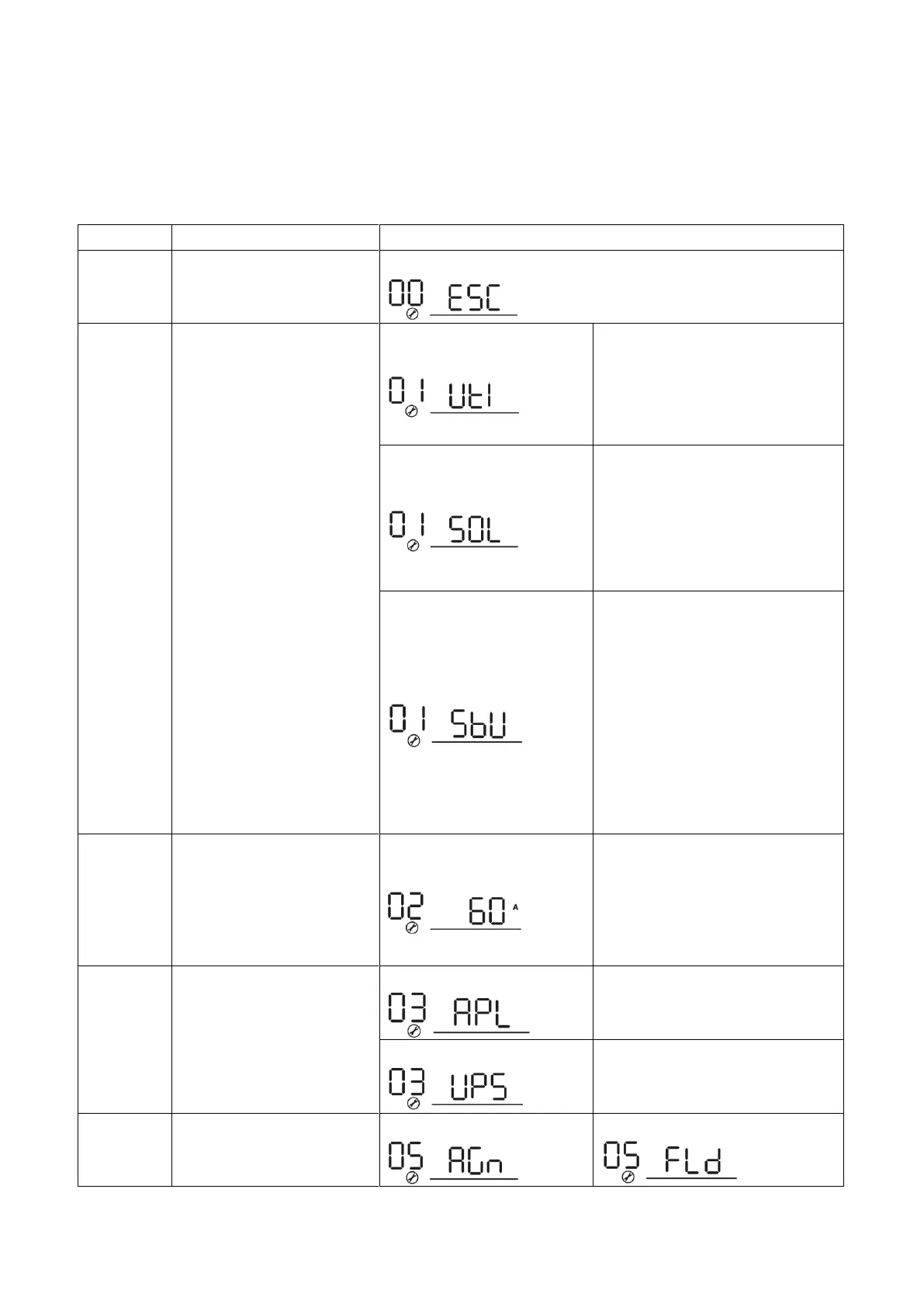
After pressing and holding ENTER button for 3 seconds, the unit will enter setting mode. Press “UP” or “DOWN”
button to select setting programs. And then, press “ENTER” button to confirm the selection or ESC button to
exit.
Setting Programs:
Output source priority:
To configure load power
source priority
Utility will provide power to the
loads as first priority.
Solar and battery energy will
provide power to the loads only
when utility power is not available.
Solar energy provides power to
the loads as first priority.
If solar energy is not sufficient to
power all connected loads, Utility
energy will supply power to the
loads at the same time.
Solar energy provides power to
the loads as first priority.
If solar energy is not sufficient to
power all connected loads, battery
energy will supply power to the
loads at the same time.
Utility provides power to the loads
only when battery voltage drops
to either low-level warning voltage
or the setting point in program 12.
Maximum charging current:
To configure total charging
current for solar and utility
chargers.
(Max. charging current =
utility charging current +
solar charging current)
Setting range is from 10A to 100A.
Increment of each click is 10A.
If selected, acceptable AC input
voltage range will be within
90-280VAC.
If selected, acceptable AC input
voltage range will be within
170-280VAC.



 To Next Page