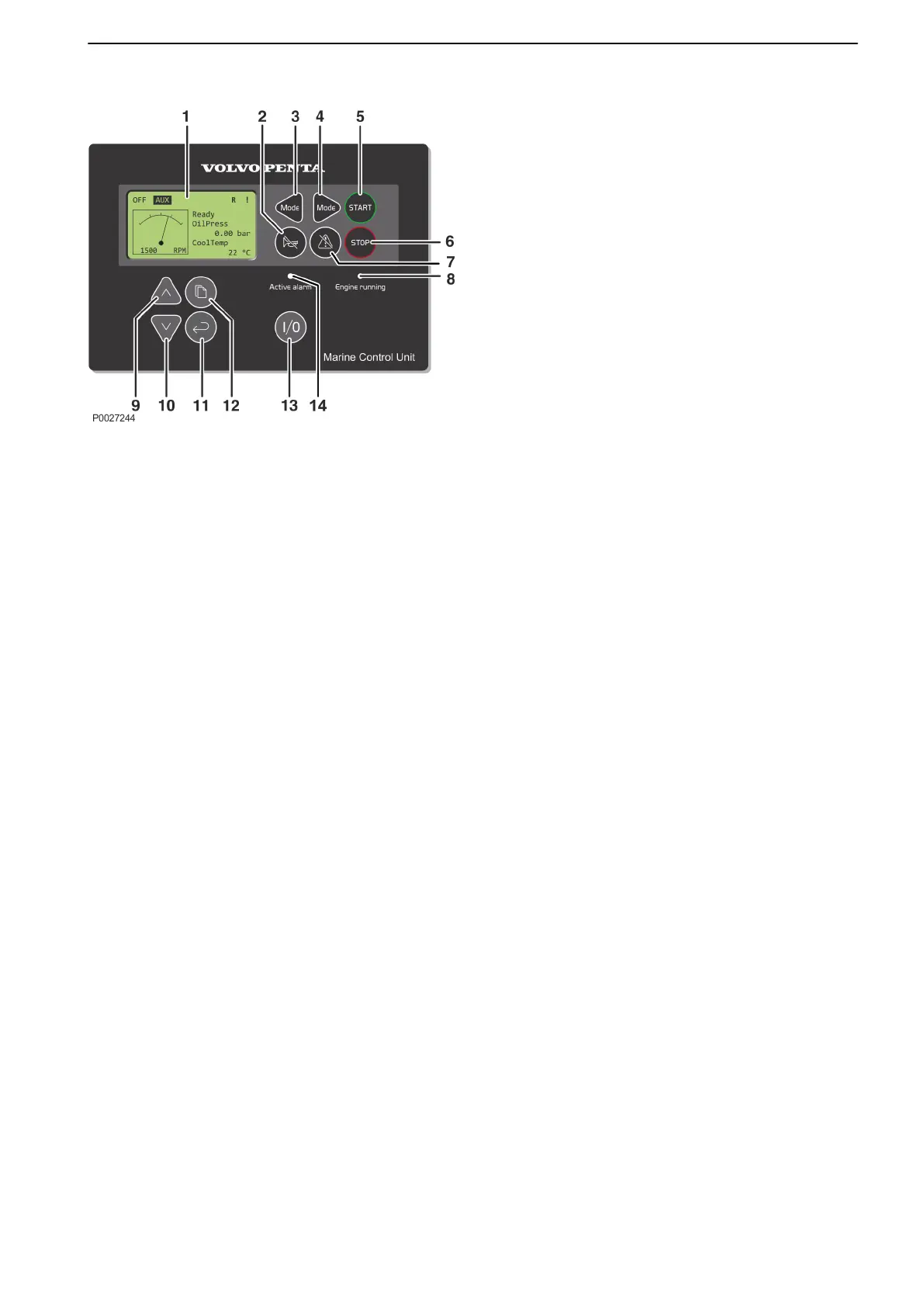
MCU panel
The MCU, Marine Control Unit, controls the engine and
shows engine information and alarms.
1 Display
2 Acknowledgement of audible alarms
3 Changing modes, switching to OFF
4 Changing modes, switching to
AUX/PRP/EME/HBR
5 Start button
6 Stop button
7 Acknowledge selection, acknowledge alarm
8 Green lamp; indicates engine is running
9 Up button; selecting and increasing
10 Down button; selecting and decreasing
11 Enter; confirming selection
12 Page; switching windows between Measurement
(engine data), Adjustment and History.
13 I/O button; varied function depending on
installation. Can be set to any function when
installing.
14 Red lamp; indicates that there is an alarm.
The lamp flashes when a new alarm occurs. The
lamp shines continuously when an alarm is active
and acknowledged.
Instruments and Controls
47710406 10-2018 © AB VOLVO PENTA 31











 To Next Page