Instrument panels
20 Left hand instrument panel
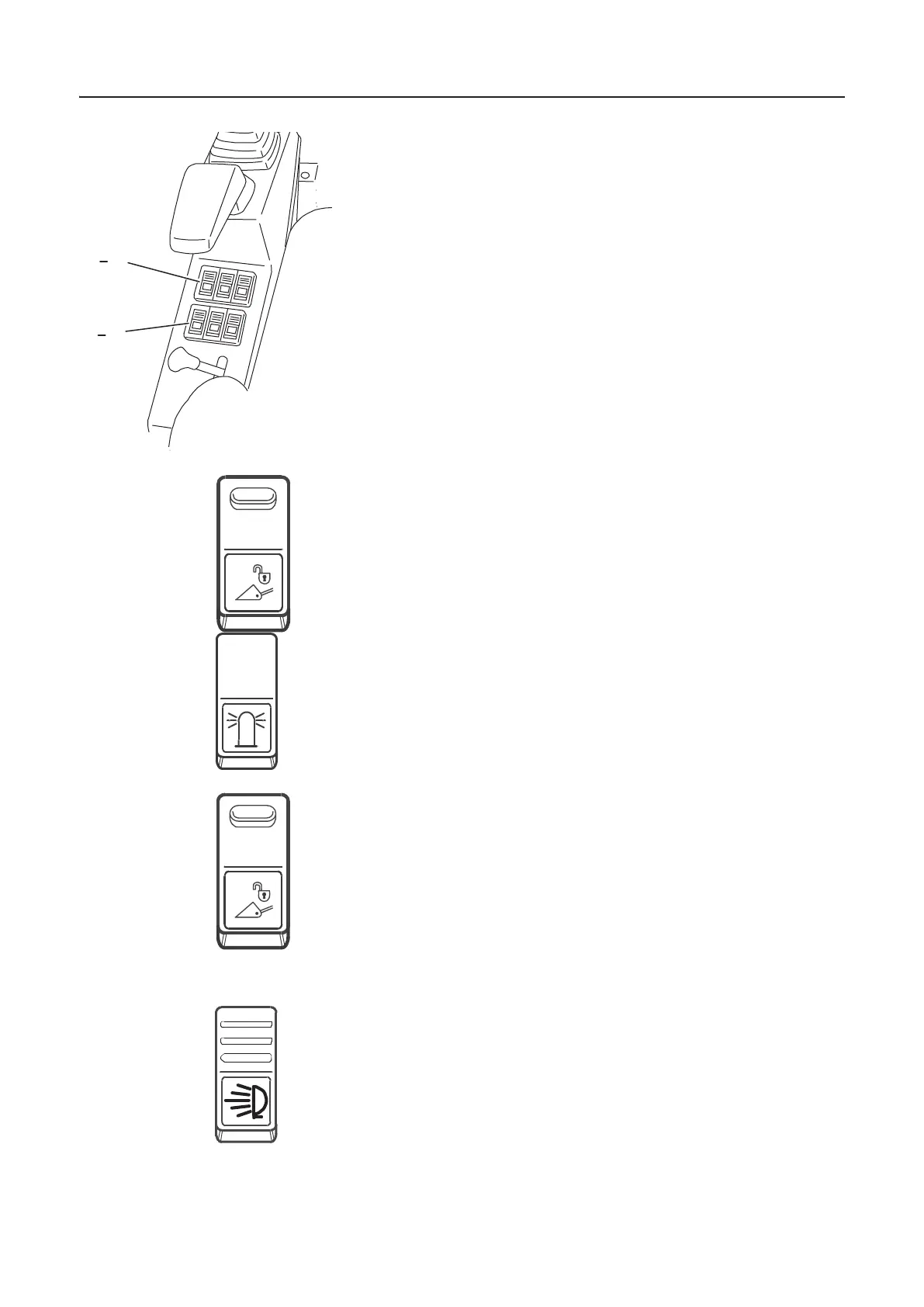
Left hand instrument panel
The left hand instrument panel contains switches for the ope-
ration of attachments and optional equipment.
1 Quick release system unlocking switch (option).
2 Switch for rotating beacon (option).
3 Quick release system unlocking switch (option).
4 Reserve (option).
5 Switch for working head lights.
6 Reserve (option).
1 Quick release system unlocking switch (option)
– Switch to unlock the quick release system. This function is
activated by simultaneous pressing of the two unlocking
switches.
2 Switch for rotating beacon (option)
– Operation switches the rotating beacon on and off.
NOTE! When shutting the engine down while the rotating be-
acon is on, the rotating beacon will stay on.
3 Quick release system unlocking switch (option)
– Switch to unlock the quick release system. This function is
activated by simultaneous pressing of the two unlocking
switches.
4 Reserve (option).
5 Switch for working lights on cabin
– When actuated the working lights on the cab can be swit-
ched on and off.
NOTE! The working lights can only be switched on if the igni-
tion has been activated (running position/position 2). If the
excavator is fitted with a protection roof this switch also acti-
vates the rear working light.
6 Reserve (option).
1 3
6
1012102
L57149
L57150
L57149
1012185


 To Next Page