12
8” MONITOR REAR SEAT VIDEO HEADREST SYSTEM Owner’s Manual
HR8D
The following section describes how to
adjust and set settings using the ve setup
screens:
Using the System Menu
Navigating and selecting available settings
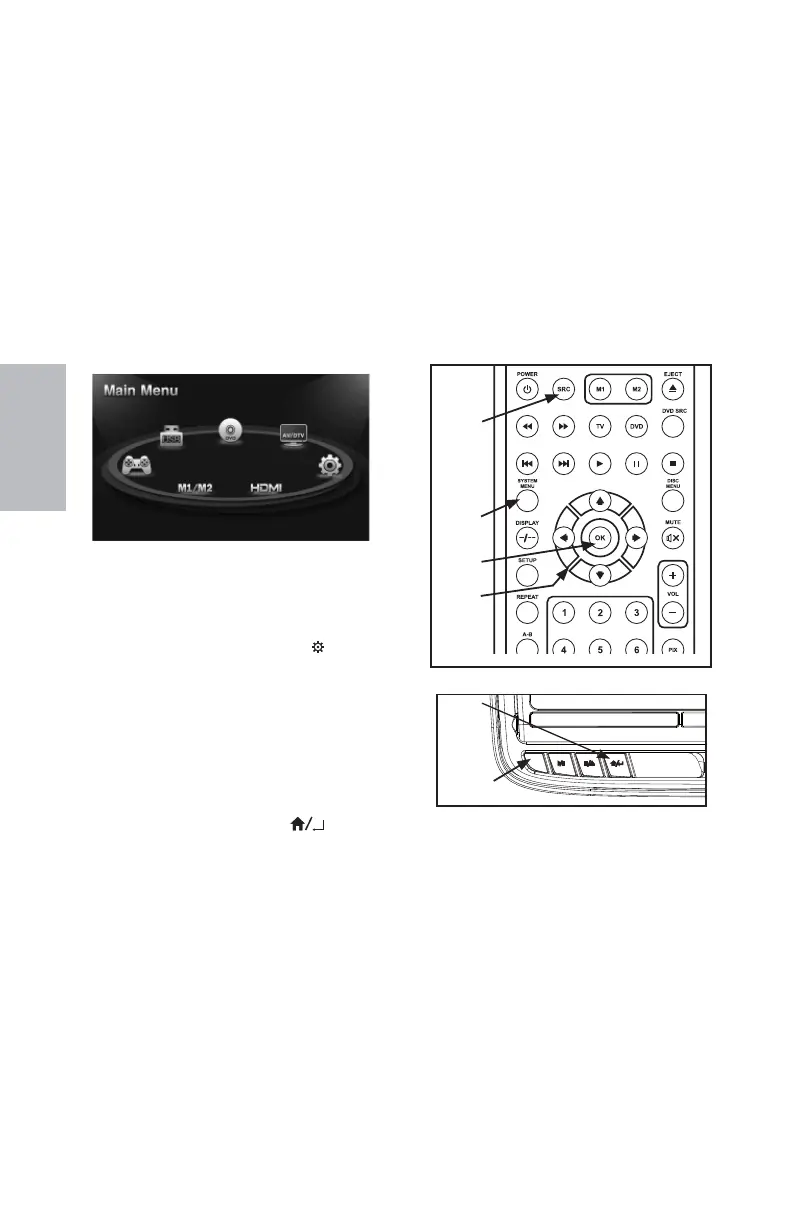
in the SYSTEM MENU is accomplished using
the Remote Control buttons (Figure 14) or
the Front Panel buttons (Figure 15).
Follow the steps outlined in this section to
select and customize each of the adjustable
Sub-Menu functions and a Settings option
listed above in the MAIN MENU, refer to the
sections that apply.
MAIN MENU System Sources and
Settings
The MAIN MENU is used to access and
change the AV source between USB,
DVD, AV/DTV, HDMI/MHL, M1/M2, and
GAME* (The SETTINGS menu is also
accessed through the MAIN MENU.
There are two ways to access the MAIN
MENU screen (Figure 13): * GAME Optional
• From the front panel press the SOURCE
(S) button. (Figure 15)
• From the Remote Control press the SRC
button (Figure 14).
The SYSTEM MENU allows the user to
personalize the HR8D Rear Seat Video
Headrest System settings. This menu is
accessed by selecting the gear (
) icon in
the MAIN MENU. The MAIN MENU is used
in the initial setup to adjust the picture
quality and customize adjustable functions.
Once the initial settings are customized,
they will remain the same until modi ed
or reset to the factory default settings.
There are two ways to access the SYSTEM
MENU:
• From the front panel press the
HOME / MENU SELECT (
) button.
(Figure 15)
• From the Remote Control press
the SYSTEM MENU or PIX button
(Figure 14).
NOTE: SYSTEM MENU changes are best
made without a DVD inserted into the unit.
HOME
/ MENU
SELECT
(ENTER)
BUTTON
HR8D Main Menu
Figure 13
Figure 14
SYSTEM
MENU
BUTTON
OK
BUTTON
UP, DOWN,
LEFT, &
RIGHT
DIRECTION
BUTTONS
SOURCE
BUTTON
HR8D SYSTEM SETUP MENUS
SOURCE
BUTTON
Figure 15
128-9406B HR8D, HR8A and HR8AD AUDIOVOX 05-20-2015.indd 112128-9406B HR8D, HR8A and HR8AD AUDIOVOX 05-20-2015.indd 112 5/20/2015 5:03:23 PM5/20/2015 5:03:23 PM



 To Next Page