38
8” MONITOR REAR SEAT VIDEO HEADREST SYSTEM Owner’s Manual
ANDROID
Connecting to Wi-Fi®
The Wi-Fi® connection on the HR8AD and
HR8A allows the user to connect to the
Internet.
Connecting to Wi-Fi in a vehicle requires
a Wi-Fi hot spot. This may be available
at a local business, home driveway or is
available with some cell phone plans.
Consult your cell phone manual or contact
your provider to nd out how to use your
phone as a hotspot. Data charges will
apply. Streaming video such as Net ix
or other streaming content providers
can consume large amounts of data.
Streaming content in a moving vehicle
may result in bu ering of the video which
is dependent on the cell phone network
signal strength. App downloads and
updates can be done when connected to
your home network or when connected to
an available hot spot.
To connect the HR8AD and HR8A to
the Internet via Wi-Fi®:
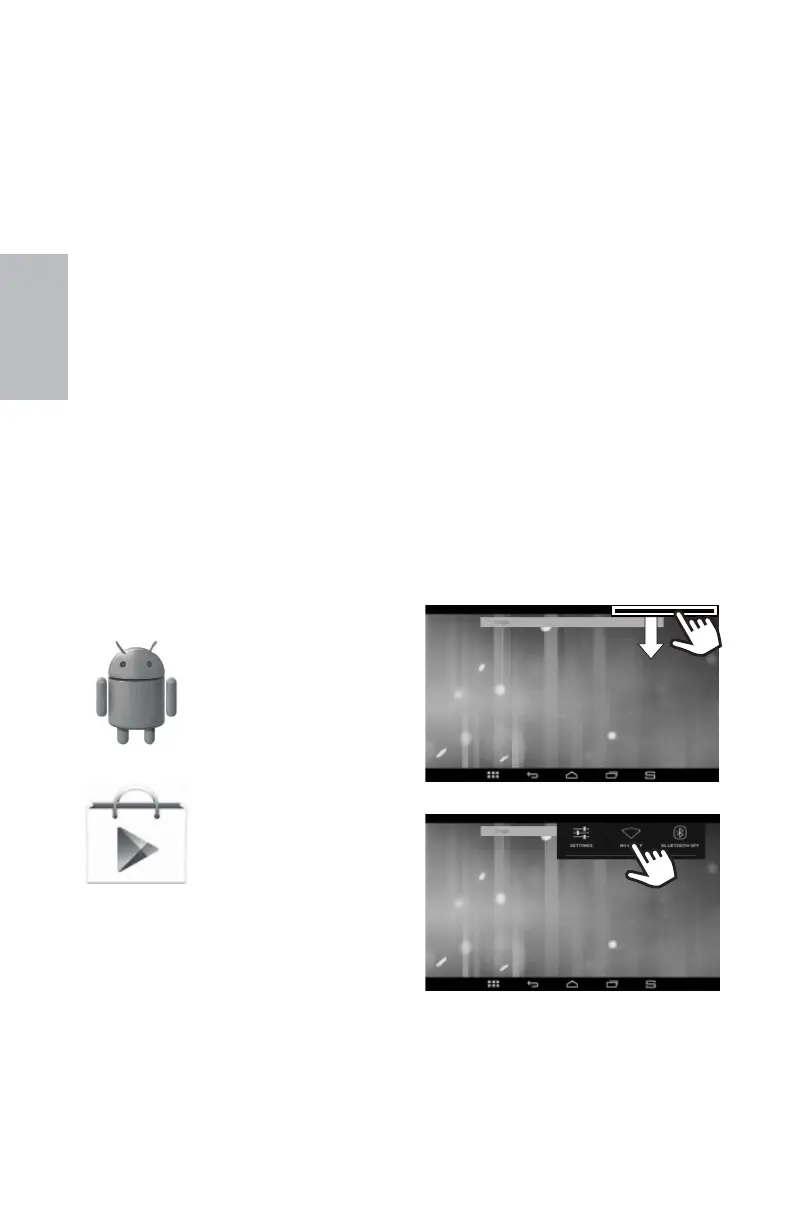
Touch and drag the top bar (right side)
(Figure 56) to access the Wi-Fi Settings
icon. (Figure 57)
1. Tap the Wi-Fi Settings icon.
2. Highlight Wi-Fi in the Settings menu.
3. Touch and slide the ON/OFF
Wi-Fi switch to ON to view available
networks. (Figure 58)
To access ANDROID mode select the
ANDROID icon on the MAIN MENU (
HR8AD
page 18 and HR8A page 24).
Setting Up a Google™ Account
A Google™ account allows access to
all your personal information from any
computer or mobile device.
Google Play™: Google Play™ allows
access to all your favorites such as movies,
books, music, magazines, apps, and more.
Synchronize and back up: Makes your
information accessible across all
computers and mobile devices.
Access Anywhere: Check all your personal
information from any computer or mobile
device such as email, calendar, contacts, etc.
Getting Started with the HR8AD
and HR8A
When prompted, sign in using the email
address and password created for your
Google™ account.
An email address from the following
services allows access to Google play:
Launching Google Play™
Anything purchased on Google Play™
using the HR8AD and HR8A will be
available on any of your Android™ devices.
NOTE: Previous Google Play™ purchases
are available on the HR8AD and HR8A as
long as the same Google™ account is used.
Google, Google Play, Gmail, Google Apps,
Google Plus, YouTube, and Adwords are
trademarks of Google Inc.
Android is a trademark of Google inc.
To launch the Google
Play Store app, touch the
Play Store icon on your
Home screen.
• Gmail™
• Google Apps™
• Google Plus™
• YouTube™
• Adwords™
Figure 57
HR8AD/HR8A ANDROID MODE
Figure 56
128-9406B HR8D, HR8A and HR8AD AUDIOVOX 05-20-2015.indd 538128-9406B HR8D, HR8A and HR8AD AUDIOVOX 05-20-2015.indd 538 5/20/2015 5:03:35 PM5/20/2015 5:03:35 PM


 To Next Page