25
8” MONITOR REAR SEAT VIDEO HEADREST SYSTEM Owner’s Manual
HR8A
SYSTEM SUBMENUS
1. Press the SYSTEM MENU button on the
Remote Control (Figure 35) or touch
the SETTINGS (
) icon to display the
SYSTEM MENU.
2. Use the UP, DOWN, LEFT and RIGHT
direction buttons to select and enter the
desired SYSTEM SUB-MENU:
• PICTURE
• WFMM (Only M1 Mode)
• LANGUAGE
• DEFAULT Android
• IR TRANSMITTER
NOTE: Selected items in the SYSTEM
MENU and the Sub-Menus will be
highlighted in orange.
3. Use the UP, DOWN, LEFT and RIGHT
direction buttons to adjust or select an
item in the Sub-Menu screen and then
press the OK button on the Remote
Control (Figure 35).
4. Touch the Home icon on the screen to
return to the MAIN Menu and save the
setting.
NOTE: The system will exit the SYSTEM
MENU screen or the SYSTEM SUBMENU
screens and return to the MAIN MENU
after 6 seconds if no selection is made.
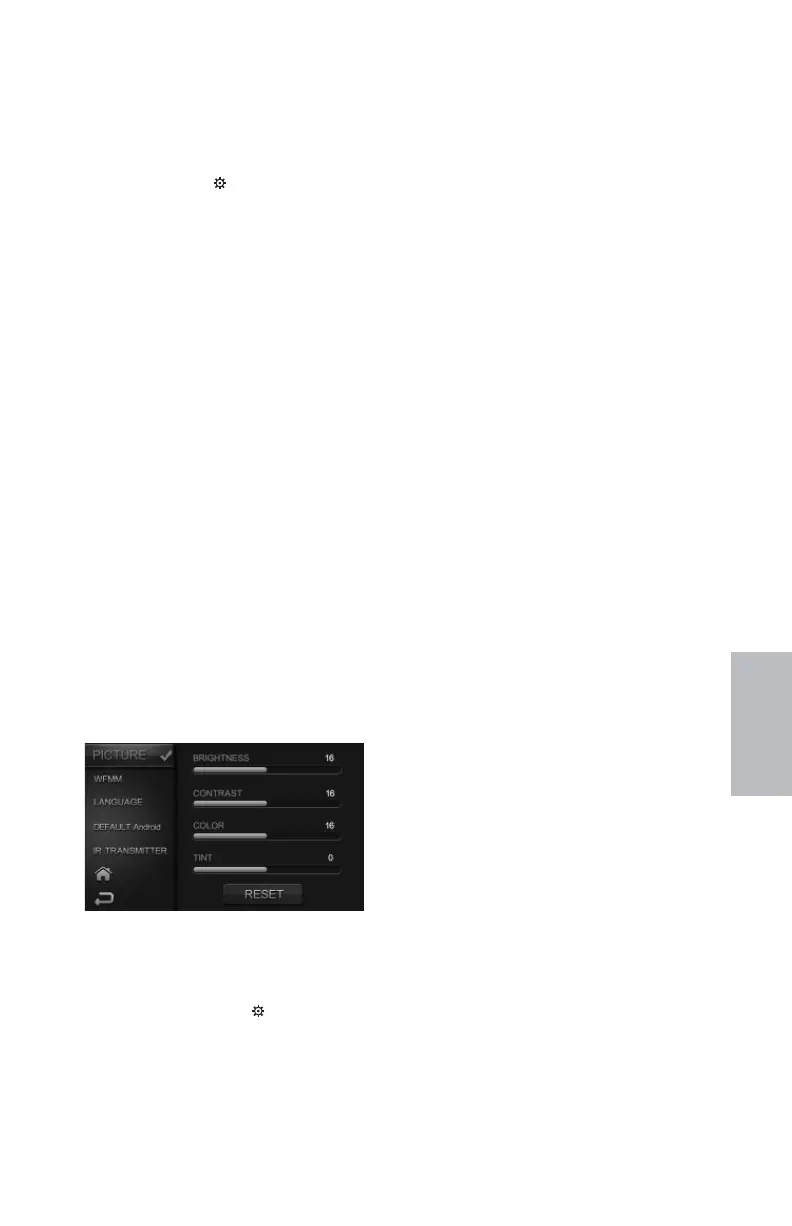
PICTURE CONTROL
HR8A Picture Control Menus
Figure 36
PICTURE CONTROL from the Touch
Screen (M1 and M2):
1. Touch the SETTINGS ( ) icon to display
the SYSTEM MENU
2. Touch PICTURE to select
BRIGHTNESS, CONTRAST, COLOR
or TINT to adjust the level of the
picture setting chosen. (Figure 36)
HR8A SYSTEM SETUP SUBMENUS
NOTE: Levels are set from “0” to “32” for
Brightness, Contrast and Color. The level
for Tint is set from “-16” to “+16” . No Tint
Control in PAL Mode.
3. Touch the Home icon on the
screen to return to the MAIN
Menu and save the setting.
NOTE: The system will exit the SYSTEM
MENU screen or the SYSTEM SUBMENU
screens and return to the MAIN MENU
after 6 seconds if no selection is made.
PICTURE CONTROL from the Remote
Control:
1. Select “M1” or “M2” on the Remote
Control.
2. Press the SYSTEM MENU or PIX button to
enter PICTURE CONTROL Figure 36.
3. Use the UP/DOWN direction buttons to
select one of the ve selections in the
Sub-Menu (Brightness, Contrast, Color,
Tint and Reset).
4. Use the LEFT and RIGHT direction
buttons, adjust the level of
the picture setting chosen.
NOTE: Levels are set from “0” to “32”
for Brightness, Contrast and Color. The
levels for Tint is set from “-16” to “+16”.
There is no Tint adjustment in PAL Mode.
5. Select Reset to return the picture setting
control back to factory defaults.
128-9406B HR8D, HR8A and HR8AD AUDIOVOX 05-20-2015.indd 525128-9406B HR8D, HR8A and HR8AD AUDIOVOX 05-20-2015.indd 525 5/20/2015 5:03:30 PM5/20/2015 5:03:30 PM


 To Next Page