39
8” MONITOR REAR SEAT VIDEO HEADREST SYSTEM Owner’s Manual
ANDROID
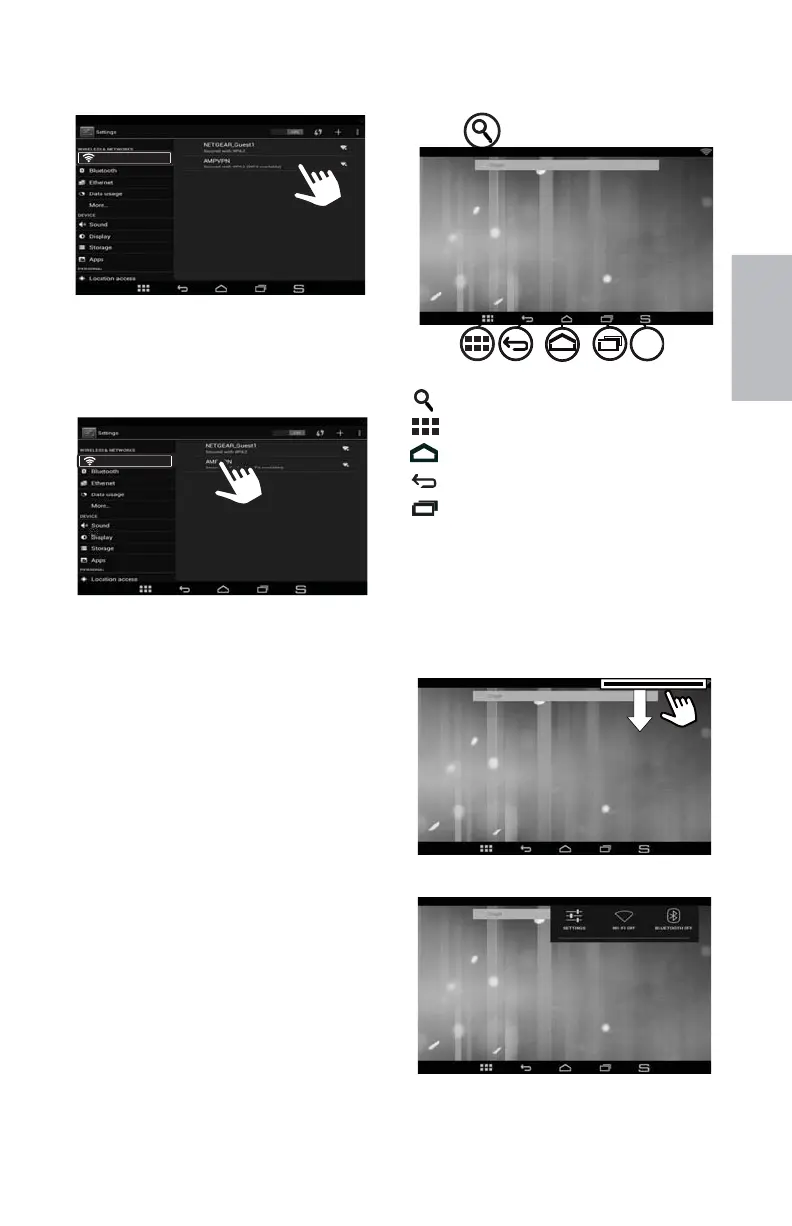
4. Select an available Wi-Fi network to
connect to the Internet. A secured
network will require a password to
be entered. Enter the password if
required. (Figure 59)
5. Tap the Connect button.
NOTE: If the HR8AD or HR8A is being used
in a vehicle with a cell phone hot spot to
access the Internet, data charges may
apply.
NAVIGATING THE HOME
SCREEN
The Home screen consists of ve panels
(the home panel, plus four additional
panels). These panels extend beyond
the display panel width to provide more
space for adding shortcuts, widgets, and
folders. To access these panels slide your
nger horizontally across the Home screen
to scroll to the left or right side panels.
(Figure 60)
Figure 58
Tap to search the Internet
Tap to access apps and widgets
Tap to go to the Home screen
Tap to go back one level or exit
Tap to switch to an open
application
Tap to go to the MAIN screen
Figure 60
Figure 61
Figure 62
HR8AD/HR8A ANDROID MODE (continued)
Touch and drag the top bar (right side)
to check SETTINGS, Wi-Fi and BLUETOOTH
DISPLAY setting events
. (Figure 61 and
Figure 62)
Figure 59
S
WI-FI
WI-FI
128-9406B HR8D, HR8A and HR8AD AUDIOVOX 05-20-2015.indd 539128-9406B HR8D, HR8A and HR8AD AUDIOVOX 05-20-2015.indd 539 5/20/2015 5:03:37 PM5/20/2015 5:03:37 PM



 To Next Page