21
8” MONITOR REAR SEAT VIDEO HEADREST SYSTEM Owner’s Manual
HR8AD
HR8AD SYSTEM SETUP SUBMENUS (continued)
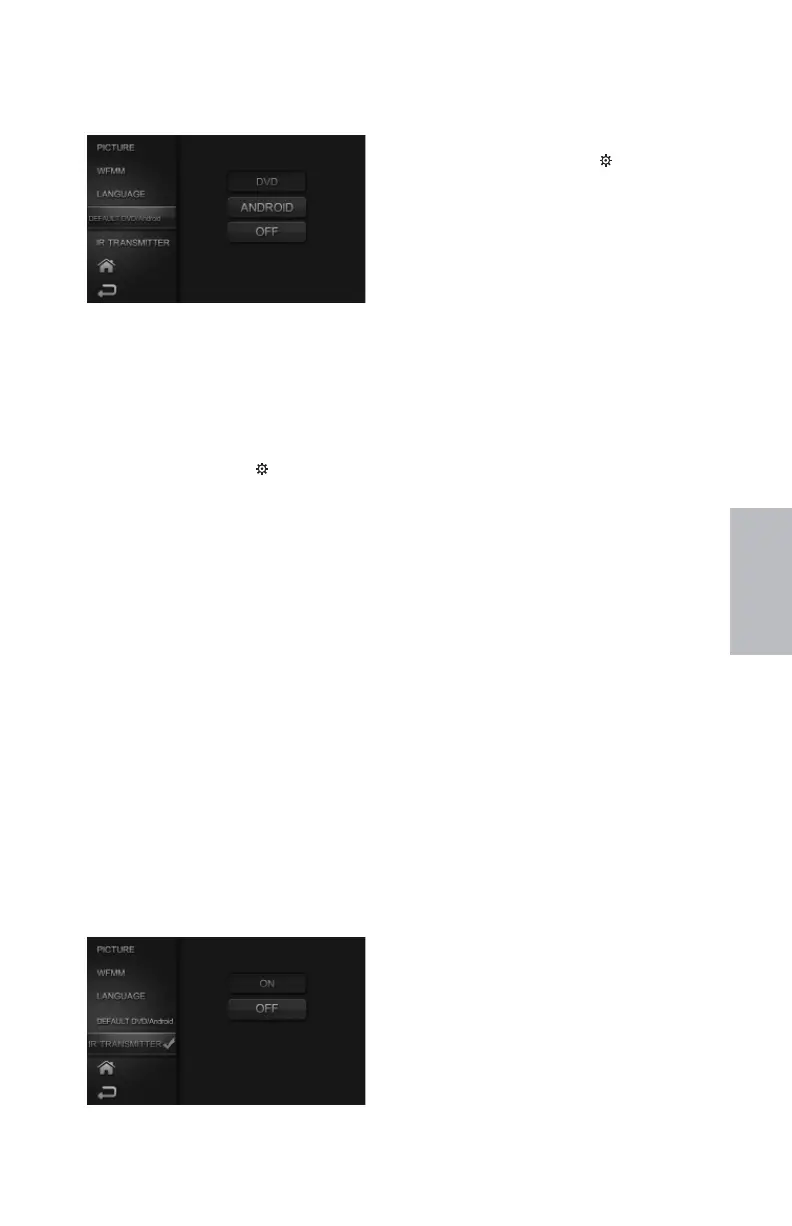
DEFAULT DVD/ANDROID
Default DVD/Andriod Sub-Menu, Figure 30
With DVD selected, the monitor will default to
DVD Mode each time the system is turned ON.
For example, if the user is playing a game and the
system is turned OFF, the next time the system is
turned ON, it will power up in DVD Mode.
Default DVD/ANDROID from the Touch
Screen:
1. Touch the SETTINGS ( ) icon to display
the SYSTEM MENU.
2. Touch DEFAULT DVD/ANDROID and
select DVD, ANDROID or OFF (Figure 30)
3. Touch the Home icon on the screen to
return to the MAIN Menu and save the
setting.
Default DVD/ANDROID from the Remote
Control:
1. Select “M1” or “M2” on the Remote Control.
2. Press the SYSTEM MENU or PIX button to
enter the SYSTEM MENU.
3. Use the UP and DOWN direction buttons to
select DEFAULT DVD/ANDROID and press
the OK button to enter the Default DVD
sub-menu. (Figure 30)
4. Use the UP and DOWN direction
buttons to highlight ON/OFF and
press the ENTER button to enter the
sub-menu. (Figure 30)
5. Use the UP and DOWN direction buttons
to highlight ON or OFF and press the OK
button to make the selection.
IR TRANSMITTER ON/OFF
IR Transmitter Sub-Menu, Figure 31
IR Transmitter ON/OFF from the Touch
Screen:
1. Touch the SETTINGS ( ) icon to display
the SYSTEM MENU.
1. Touch IR TRANSMITTER and then touch
ON or OFF to select the desired setting.
(Figure 31)
2. Touch the Home icon on the screen to
return to the MAIN Menu and save the
setting. When ON is selected, IRT ON
will be displayed on the SYSTEM MENU
screen. When OFF is selected, IRT OFF
will be displayed on the SYSTEM MENU
screen.
IR Transmitter ON/OFF from the
Remote Control:
1. Select “M1” or “M2” on the Remote
Control.
2. Press the IRT ON/OFF button to enter
the Sub-menu.
3. Use the UP and DOWN direction
buttons to highlight ON or OFF and
press the OK button to enter selection.
When ON is selected, IRT ON will
be displayed on the SYSTEM MENU
screen. When OFF is selected, IRT OFF
will be displayed on the SYSTEM MENU
screen.
or
1. Select “M1” or “M2” on the Remote
Control.
2. Press the SYSTEM MENU or PIX button
to enter SYSTEM MENU.
3. Use the UP and DOWN direction
buttons to highlight IR TRANSMITTER
and press the OK button to enter the
sub-menu. (Figure 31)
4. Use the UP and DOWN direction
buttons to highlight ON or OFF and
press the OK button to enter selection.
When ON is selected, IRT ON will be
displayed on the SYSTEM MENU screen.
When OFF is selected, IRT OFF will be
displayed on the SYSTEM MENU screen.
128-9406B HR8D, HR8A and HR8AD AUDIOVOX 05-20-2015.indd 521128-9406B HR8D, HR8A and HR8AD AUDIOVOX 05-20-2015.indd 521 5/20/2015 5:03:28 PM5/20/2015 5:03:28 PM



 To Next Page