41
8” MONITOR REAR SEAT VIDEO HEADREST SYSTEM Owner’s Manual
ANDROID
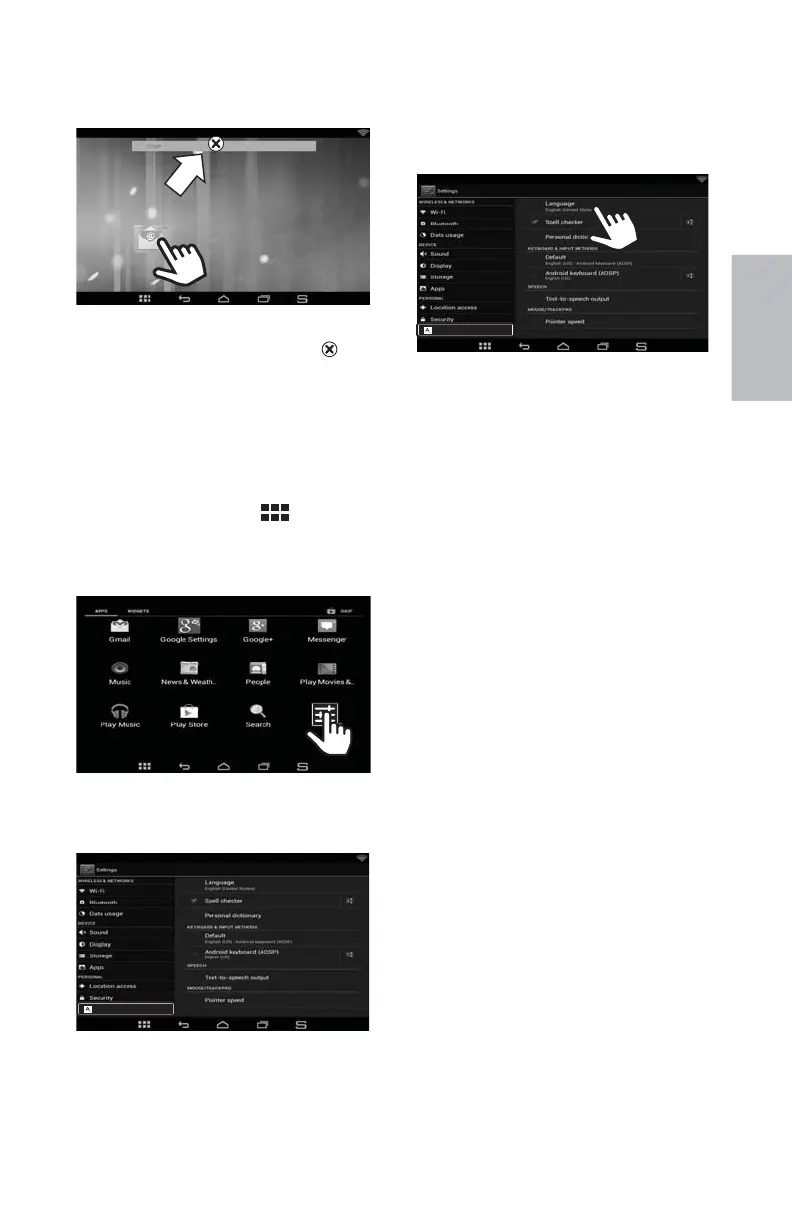
2. Drag the icon to the Remove ( ) icon
at the top of the screen and release.
NOTE: This will not delete the app or
widget, it will just remove the shortcut
from the Home screen.
Language Selection
To access the Language and Input
Controls:
1. Tap the App Drawer
(
) icon in the
lower left hand corner of the screen.
(Figure 63)
2. Select the Settings Menu app.
(Figure 68)
3. Scroll down the settings options. Select
Language & input.
(Figure 69)
Remove
HR8AD/HR8A ANDROID MODE (continued)
Figure 67
Figure 68
4. From there, select the desired language,
spell check, Text-to-speech controls,
and mouse pointer speed.
(Figure 70)
To access the full English language Audiovox
HR8AD and HR8A Android™ User Manual,
please visit www.voxxelectronics.com
Figure 69
Figure 70
Language & input
Language & input
128-9406B HR8D, HR8A and HR8AD AUDIOVOX 05-20-2015.indd 541128-9406B HR8D, HR8A and HR8AD AUDIOVOX 05-20-2015.indd 541 5/20/2015 5:03:38 PM5/20/2015 5:03:38 PM


 To Next Page