EasyManua.ls Logo

VTech Kidizoom Smart Watch DX2 - User Manual

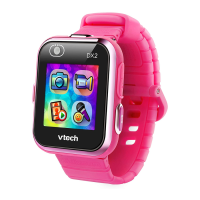
VTech Kidizoom Smart Watch DX2
28 pages
Print Icon
To Next Page IconTo Next Page
Loading...
Parent’s Guide
91-003342-007 UK

Questions and Answers

  • P
    Paula BirdJul 28, 2025
    What to do if my VTech Kidizoom Smart DX2 Watch has stopped working?
    • M
      myersmartinJul 28, 2025
      If your VTech Watch has stopped working, turn the Master Power Switch OFF for 30 seconds. Then, turn the Master Power Switch ON again and press the Home Button to turn the watch back on. It should now work properly.
  • C
    Carmen HessAug 4, 2025
    What to do if the screen is not working correctly on my VTech Kidizoom Smart DX2?
    • M
      Michael RoweAug 4, 2025
      If the screen on your VTech Watch isn't working correctly, turn the Master Power Switch OFF for 30 seconds. Turn the Master Power Switch ON again, then press the Home Button to turn the watch on. The screen should now function normally.
  • E
    Erin JonesAug 12, 2025
    What to do if I cannot view videos or photos loaded from a computer on VTech Kidizoom Smart DX2 Watch?
    • J
      John GonzalezAug 12, 2025
      Make sure that photos are in the DOWNLOAD\PHOTO folder, and videos are in the DOWNLOAD\VIDEO folder on your Kidizoom® Smart Watch DX2. Also, ensure that your files are in the correct format: photos should be in Standard Baseline JPEG, and videos should be in AVI (motion JPEG) created by Kidizoom® Smart Watch DX2.
  • P
    Pamela WatsonAug 19, 2025
    Why are the pictures from my VTech Kidizoom Smart DX2 Watch not clear?
    • A
      Albert EricksonAug 19, 2025
      If the images taken with your VTech Watch are not clear, ensure the lighting conditions of the shooting environment are good. Also, check if the camera lens is clean. If there's dust or dirt, refer to the Care and Maintenance section for steps on cleaning the lens.

Summary

Introduction to Kidizoom Smart Watch DX2

Product Layout and Buttons

Details the physical components and buttons of the Kidizoom Smart Watch DX2.

Included Package Contents

Lists all items provided in the Kidizoom Smart Watch DX2 package.

Product Specifications

Getting Started with Your Smart Watch

Master Power Switch Operation

Instructions on how to operate the master power switch for the watch.

Battery Recharging Guide

Steps for connecting the watch to a computer to recharge the battery.

Understanding Battery Life

Information on expected battery duration and factors affecting it.

Battery Maintenance Tips

Recommendations for maintaining the watch battery's performance.

Battery Notice and Precautions

Splash Proofing and Usage

Using the Kidizoom Smart Watch DX2

Guidance on how to use the watch and its basic functions.

Automatic Screen Off Feature

Explains the automatic screen shut-off feature and its settings.

Connecting to a Computer

System Requirements for Computer Connection

Watch Activities and Features

Clock Display Options

How to view and interact with different clock faces on the watch.

Home Menu Overview

Navigating and accessing various applications from the main menu.

Camera, Video, and Playback

Using the camera, recording videos, and reviewing captured media.

Voice Recorder and Games

Recording audio and playing built-in games like Mousy Maze.

Monster Detector Game

Instructions for playing the Monster Detector game, including modes.

Brain Booster and Silly Yourself

Engaging logic games and creating fun photo effects.

Photo Clock Face Maker

Creating custom clock faces from personal photos.

Sound Shaker, Pedometer, and Alarm

Using sound effects, tracking steps, and setting alarms.

Timer, Stopwatch, Calendar, Time Master

Utilizing time-based tools and learning to tell time.

Downloads and System Settings

Managing content downloads and adjusting system preferences.

Date, Time, 3 D Effects, Wallpaper

Customizing watch settings like date, time, effects, and wallpaper.

Video Resolution and Parental Controls

Adjusting video settings and managing parental controls.

Action Challenge Games

Super Run

Instructions for the Super Run activity in Action Challenge.

Crazy Dance

Instructions for the Crazy Dance activity in Action Challenge.

Funky Jump

Instructions for the Funky Jump activity in Action Challenge.

Care and Maintenance

Troubleshooting Common Issues

Product Registration

Product Warranty Information

VTech Kidizoom Smart Watch DX2 Specifications

General IconGeneral
Memory256 MB internal memory
Age Range4 to 12 years
DisplayColor touchscreen
BatteryRechargeable lithium-ion
ConnectivityMicro USB
FeaturesGames, photo effects, motion sensor
Water ResistanceSplash proof
CompatibilityWorks with VTech Learning Lodge

Related product manuals