- 8 -
VWR Collection PH-130 pH-meter instruction manual v1.0x
6.2. Stabilised reading
The stabilised reading signalisation is active only for the reading marked with
a frame. If the measured value meets the criterium of the stabilised reading, it
is signalised by green colour of the frame and additionally with a sound, if it
has been activated. In this mode the meter does not record changes of the
measured value in a certain range and does not display them. The meter
leaves the stabilised reading mode after exceeding this range, the frame
changes its colour to white and the meter displays the current measurement
value.
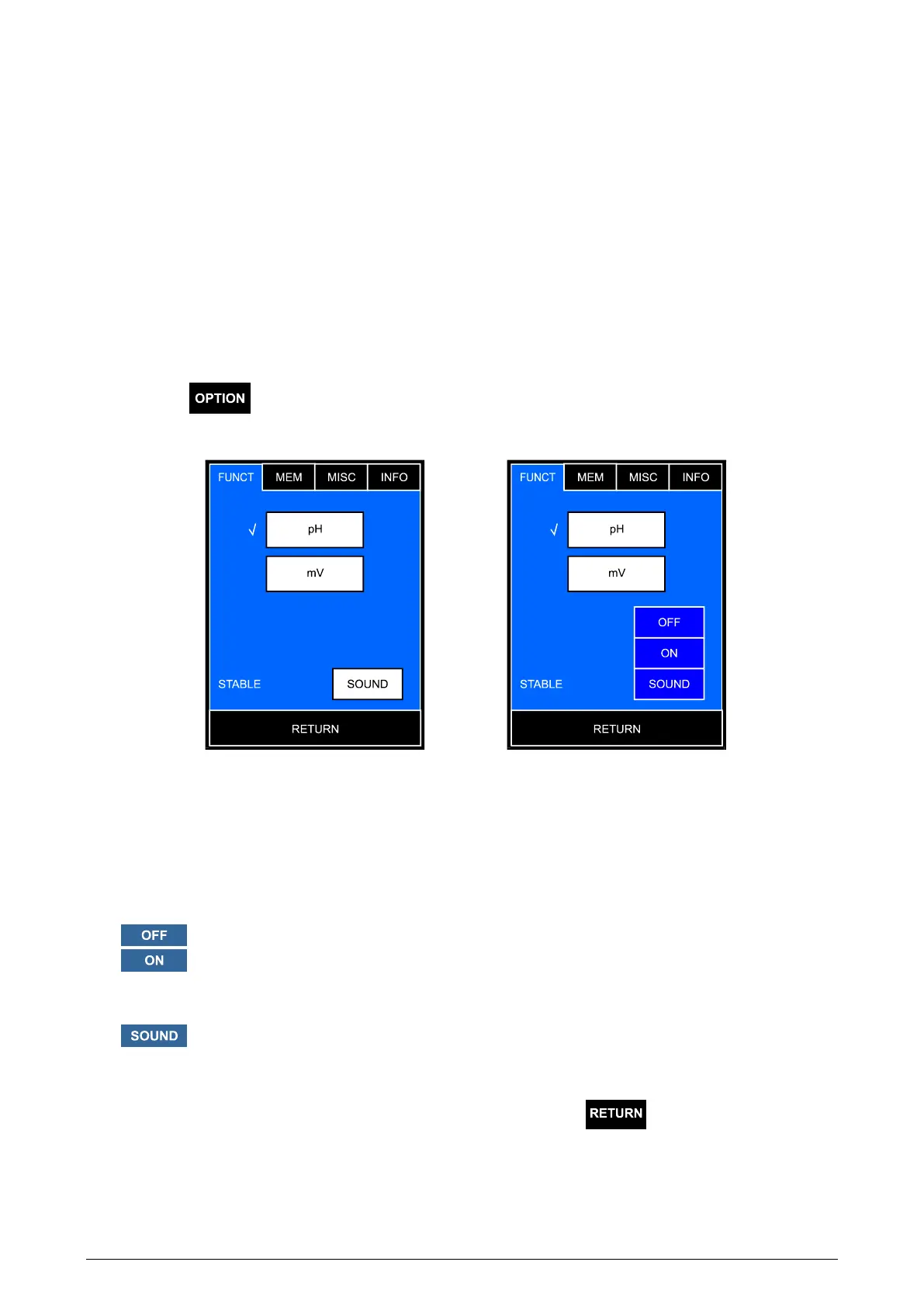
To choose the stabilised reading signalisation, on the measurement screen
press the button, the options screen will display with the FUNCTIONS
tab open containing the previously set configuration (Pic. 4A).
A B
Pic. 4
The window for choosing the stabilised reading signalisation mode is placed
below (Pic. 4B):
- the stabilised reading signalisation is off;
- the stabilised reading signalised with changing the frame
colour from white to green (only for reading marked with a
frame);
- the stabilised reading signalised by colour change and a
sound.
Return to the measurement screen by pressing the
button.



 To Next Page