- 13 -
10.1. Calibration in buffer solutions
When the electrode is prepared for the measurement, start the calibration in
the buffer solutions. The buffers may be applied randomly.
To start calibration:
- connect the pH electrode and temperature probe to the F and t connector
respectively (Pic. 2);
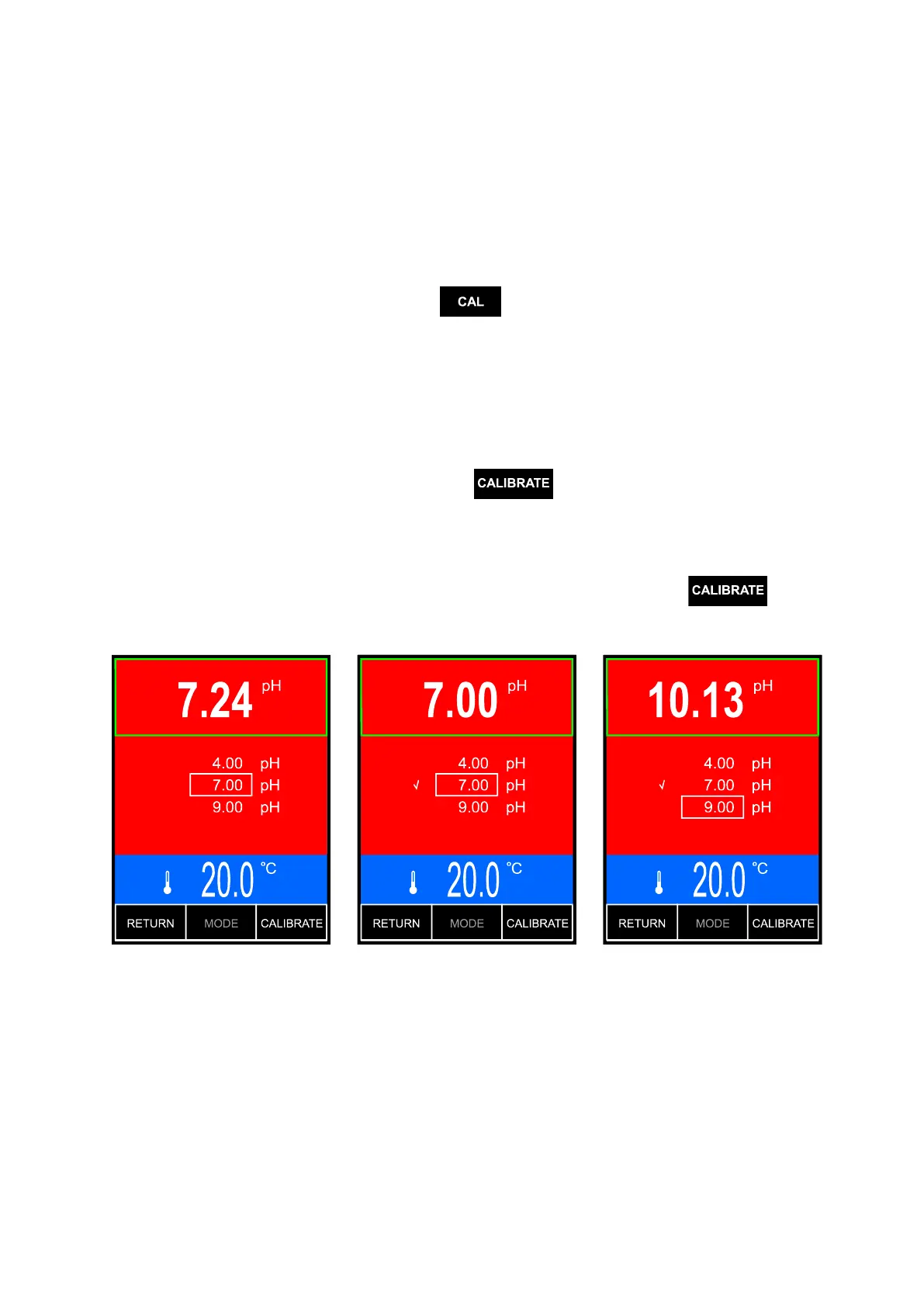
- enter the calibration mode: on the measurement screen mark the pH result
with a frame, press and hold the button until the background turns
red (Pic. 6.A). The previous electrode characteristic is erased;
- put the pH electrode and temperature probe into the solution; do not touch
the vessel‘s walls and bottom. It is advisable to use an electrode holder.
The meter will mark the detected buffer‘s value with frame;
- wait until the reading stabilises (it will be probably slightly different than the
calibration point value).
When the reading stabilises, press the
button. Next to the detected
buffer value an indicator will appear, what informs that the calibration value
has been recorded. Simultaneously, the measurement value will be adjusted
to the detected buffer value (Pic. 6.B). If the reading is still different than the
solution value, wait until the reading stabilises and press the
button
again.
A B C
Pic. 6.



 To Next Page