11 Appendix IV
112
WABCO Maintenance Manual MM-0112 (Revised 07-18)
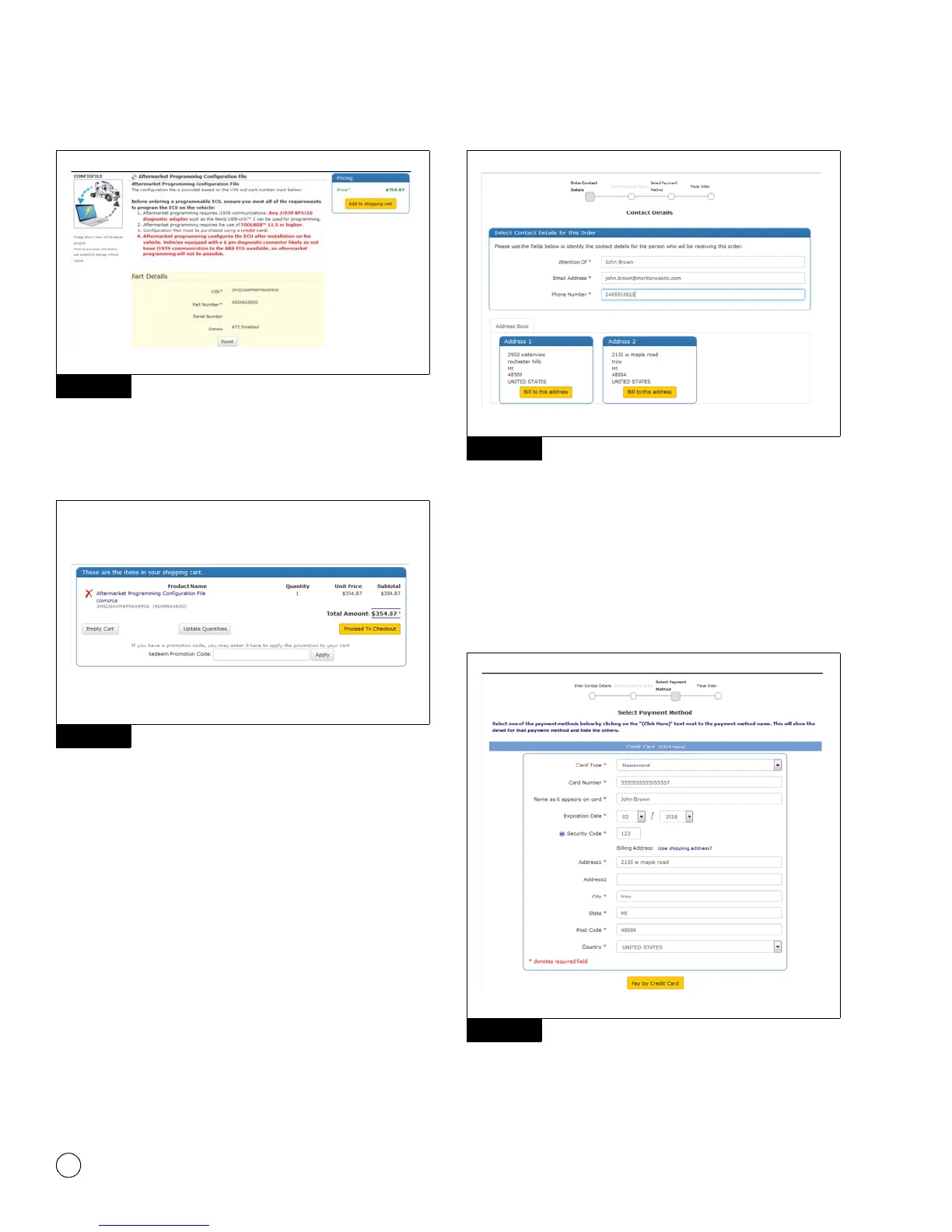
Figure 11.5
After the configuration file has been added to the shopping cart, the
shopping cart will be displayed. Clicking Proceed to Checkout will
step through the configuration file purchase process. Figure 11.6.
Figure 11.6
The first step in the checkout process is to verify contact
information. The information will automatically populate based on
login information; all fields can be edited. When the correct contact
details are displayed, click Bill to this address. Figure 11.7.
Figure 11.7
The select payment method screen appears next. Enter the credit
card information for the purchase, or select an alternative payment
method. Once the information is entered, click Pay by Credit Card.
NOTE: Purchasing the configuration file by credit card is
recommended for immediate download of the configuration file.
Users of other payment methods may experience a delay while
payment is processed. Figure 11.8.
Figure 11.8
Figure 11.5
Figure 11.6
Figure 11.7
Figure 11.8
4012635a
4012636a



 To Next Page