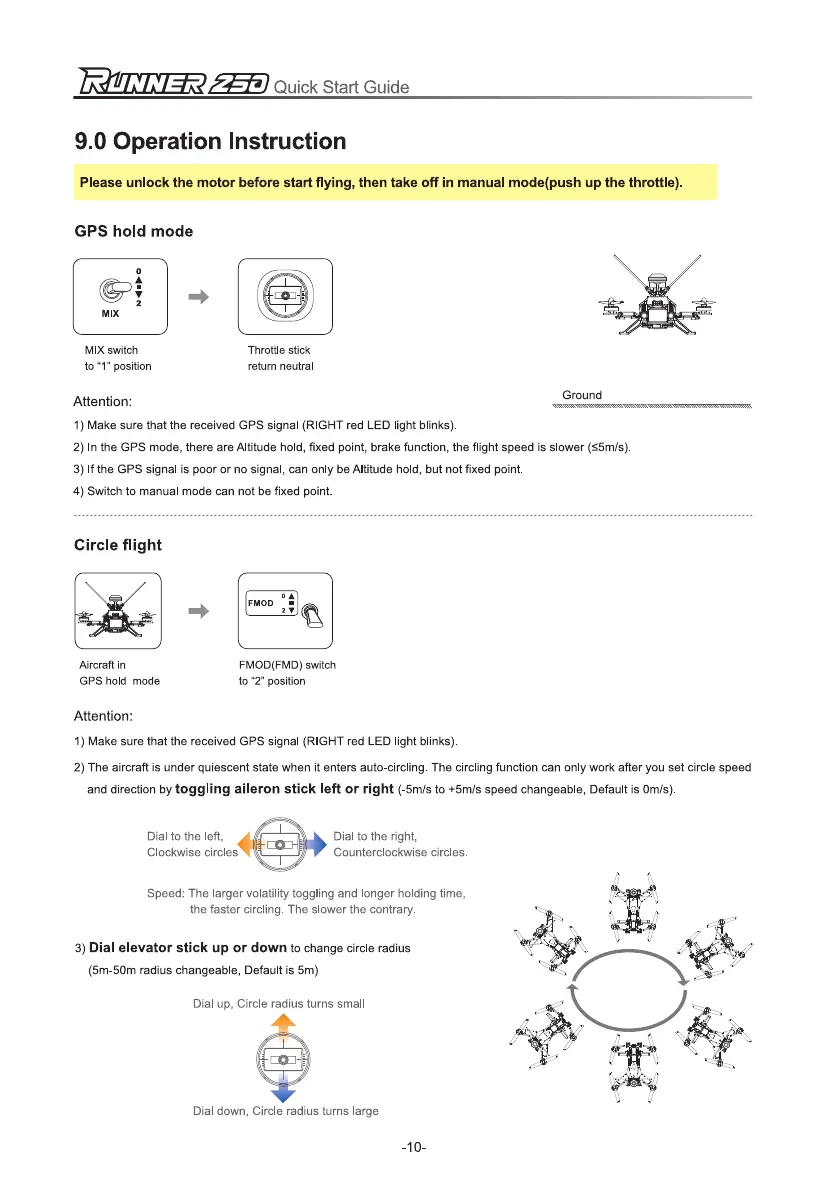
Dial to the right,
y
Counterclockwise circles.
Speed: The larger volatility toggling and longer holding time,
the faster circling. The slower the contrary.
3)
Dial elevator stick up or down
to change circle radius
(5m-50m radius changeable, Default is 5m)
Dial up, Circle radius turns small
Dial to the left,
Clockwise circles
Z
r
i2=50
Quick Start Guide
9.0 Operation Instruction
Please unlock the motor before start flying, then take off in manual mode(push up the throttle).
GPS hold mode
MIX switch
to "1" position
Throttle stick
return neutral
Attention:
1)
Make sure that the received GPS signal (RIGHT red LED light blinks).
2)
In the GPS mode, there are Altitude hold, fixed point, brake function, the flight speed is slower (55m/s).
3)
If the GPS signal is poor or no signal, can only be Altitude hold, but not fixed point.
4)
Switch to manual mode can not be fixed point.
Circle flight
Ground
Aircraft in
GPS hold mode
FMOD(FMD) switch
to "2" position
Attention:
1)
Make sure that the received GPS signal (RIGHT red LED light blinks).
2)
The aircraft is under quiescent state when it enters auto-circling. The circling function can only work after you set circle speed
and direction by
toggling aileron stick left or right
(-5m/s to +5m/s speed changeable, Default is Om/s).
Dial down, Circle radius turns large
-10-



 To Next Page