Manual Mode
Return TO Home
GPS-hold Mode
o
t
•
;
2
ri 7
FMOD(FMD)
Switch to "1"
Position: Hyper IOC Mode
[22100 t
•
FMOD(FMD) Switch to "2"
Position: Circle Flight Mode
MIX Switch to "0"
MIX Switch to "1"
MIX Switch to "2"
0 •
FMOD •
2 •
Up
Forward
Backward
Turn
Left
4
When aircraft backward, the left/right turn indicator lights will be solid.
When aircraft turn left, the left turn indicator light will flash.
When aircraft turn right, the right turn indicator light will flash.
When aircraft lean left, the left turn indicator light will be solid.
When aircraft lean right, the right turn indicator light will be solid.
Left Stick
Right Stick
Z
r
i2=50Z
Quick Start Guide
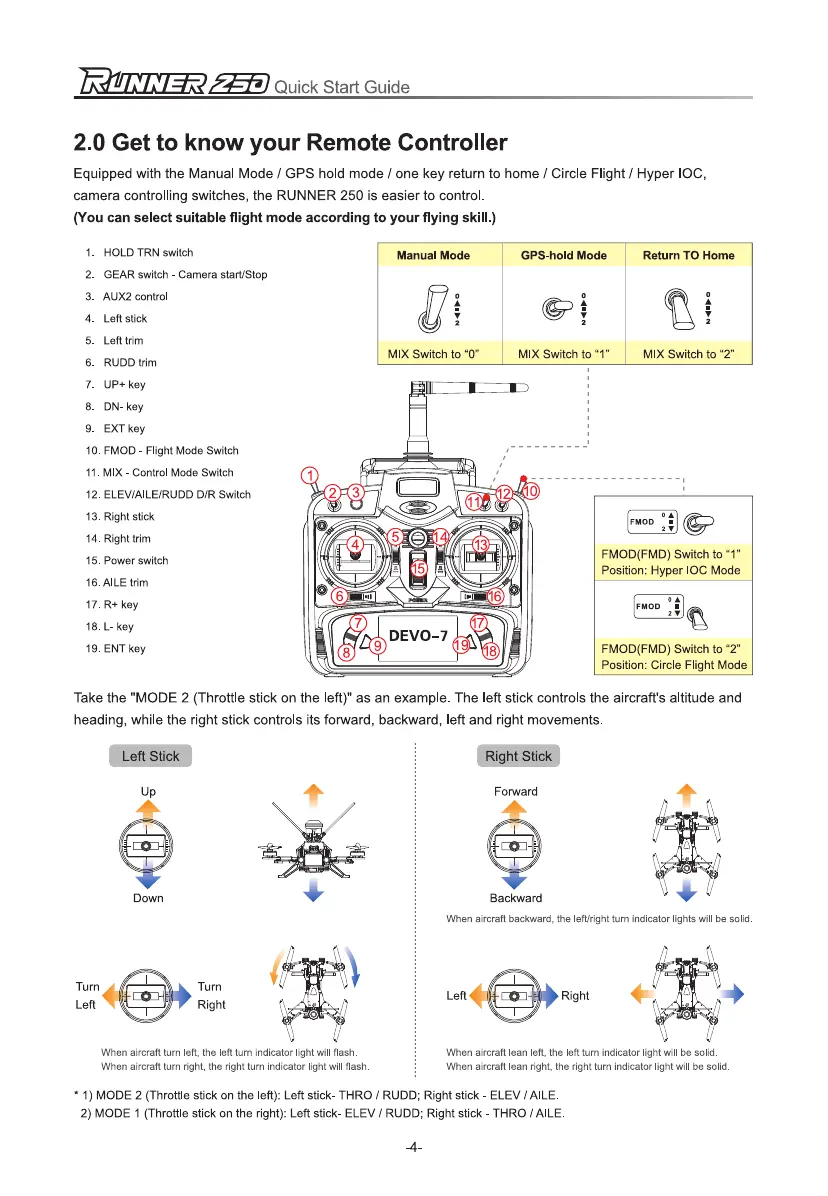
2.0 Get to know your Remote Controller
Equipped with the Manual Mode / GPS hold mode / one key return to home / Circle Flight / Hyper IOC,
camera controlling switches, the RUNNER 250 is easier to control.
(You can select suitable flight mode according to your flying skill.)
1.
HOLD TRN switch
2.
GEAR switch - Camera start/Stop
3.
AUX2 control
4.
Left stick
5.
Left trim
6.
RUDD trim
7.
UP+ key
8.
DN- key
9.
EXT key
10.
FMOD - Flight Mode Switch
11.
MIX - Control Mode Switch
12.
ELEV/AILE/RUDD D/R Switch
13.
Right stick
14.
Right him
15.
Power switch
18. AILE trim
17.
R+ key
18.
L- key
19.
ENT key
Take the "MODE 2 (Throttle stick on the left)" as an example. The left stick controls the aircraft's altitude and
heading, while the right stick controls its forward, backward, left and right movements.
* 1) MODE 2 (Throttle stick on the left): Left stick- THRO / RUDD; Right stick - ELEV /AILE.
2) MODE 1 (Throttle stick on the right): Left stick- ELEV / RUDD; Right stick - THRO / AILE.
-4-



 To Next Page