HOME
C=L
i
Quick Start Guide
Hyper IOC Mode
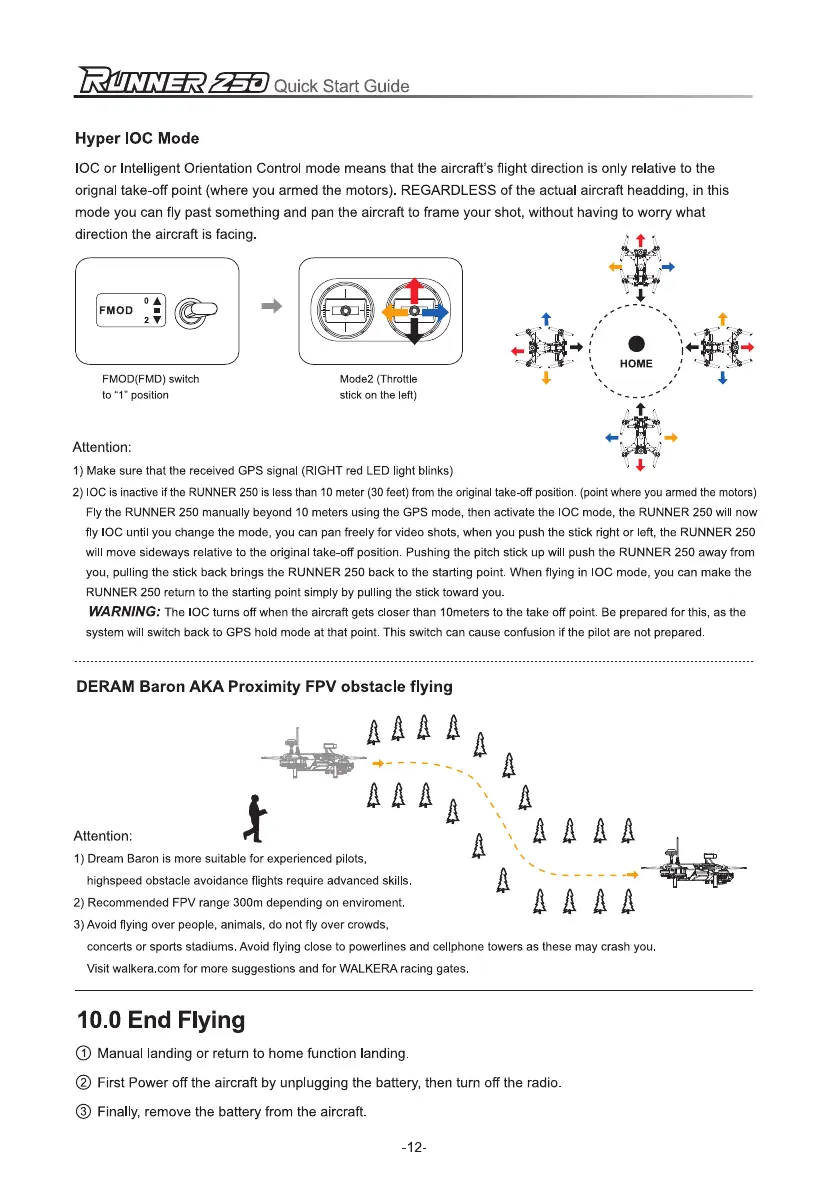
IOC or Intelli
g
ent Orientation Control mode means that the aircraft's fli
g
ht direction is only relative to the
ori
g
nal take-off point (where you armed the motors). REGARDLESS of the actual aircraft headdin
g
, in this
mode you can fly past somethin
g
and pan the aircraft to frame your shot, without havin
g
to worry what
direction the aircraft is facin
g
.
FMOD(FMD) switch
to "1" position
Mode2 (Throttle
stick on the left)
Attention:
1)
Make sure that the received GPS signal (RIGHT red LED light blinks)
2)
IOC is inactive if the RUNNER 250 is less than 10 meter (30 feet) from the original take-off position. (point where you armed the motors)
Fly the RUNNER 250 manually beyond 10 meters using the GPS mode, then activate the IOC mode, the RUNNER 250 will now
fly IOC until you change the mode, you can pan freely for video shots, when you push the stick right or left, the RUNNER 250
will move sideways relative to the original take-off position. Pushing the pitch stick up will push the RUNNER 250 away from
you, pulling the stick back brings the RUNNER 250 back to the starting point. When flying in IOC mode, you can make the
RUNNER 250 return to the starting point simply by pulling the stick toward you.
WARNING:
The IOC turns off when the aircraft gets closer than 10meters to the take off point. Be prepared for this, as the
system will switch back to GPS hold mode at that point. This switch can cause confusion if the pilot are not prepared.
DERAM Baron AKA Proximity FPV obstacle flying
4
4
0E
AAAA
A
A
Attention:
ft
LiLtAA
A AAAA
1)
Dream Baron is more suitable for experienced pilots,
highspeed obstacle avoidance flights require advanced skills.
2)
Recommended FPV range 300m depending on enviroment.
AAAA
3)
Avoid flying over people, animals, do not fly over crowds,
concerts or sports stadiums. Avoid flying close to powerlines and cellphone towers as these may crash you.
Visit walkera.com
for more suggestions and for WALKERA racing gates.
10.0 End Flying
0 Manual landin
g
or return to home function landin
g
.
0 First Power off the aircraft by unplu
gg
in
g
the battery, then turn off the radio.
® Finally, remove the battery from the aircraft.
-12-



 To Next Page