11.2 TX5834(FCC)/TX5835(CE) Video transmitting channel selection
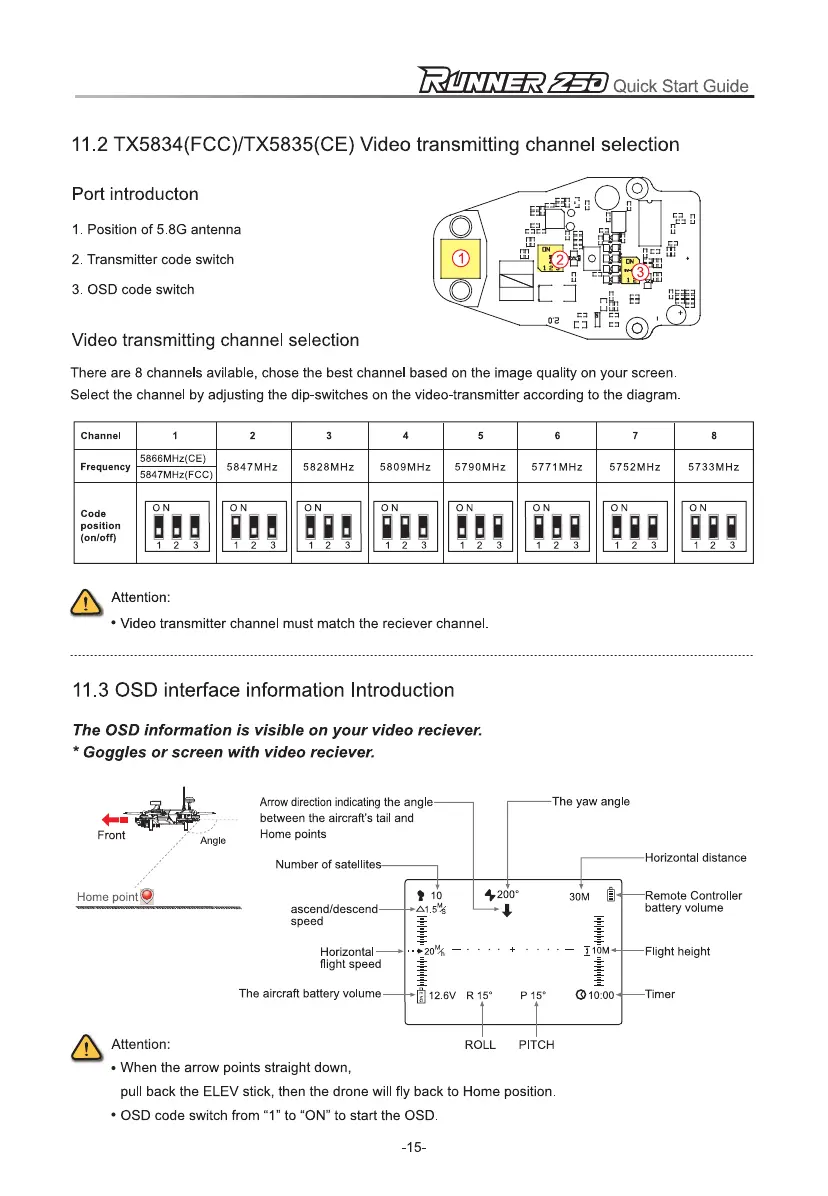
Port introducton
1.
Position of 5.8G antenna
2.
Transmitter code switch
3.
OSD code switch
Video transmitting channel selection
There are 8 channels avilable, chose the best channel based on the image quality on your screen.
Select the channel by adjusting the dip-switches on the video-transmitter according to the diagram.
Channel
1
2
3
4
5
6
7
8
Frequency
5866MHz(CE)
5847MHz 5828MHz 5809MHz 5790MHz 5771MHz
5752MHz 5733MHz
5847MHz(FCC)
Code
position
(on/off)
ON
1 1
1
2
3
ON
lil
I!
15
1
2
3
ON
11 il 1
1
2
3
ON
lil
lil
15
1
2
3
ON
15
51
lil
1
2
3
ON
lil
15
lil
1
2
3
ON
51
il
il
1
2
3
ON
il
il
li
1
2
3
Q
Attention:
•
Video transmitter channel must match the reciever channel.
11.3 OSD interface information Introduction
The OSD information is visible on your video reciever.
* Goggles or screen with video reciever.
Arrow direction indicating the angle
between the aircraft's tail and
Home points
The yaw angle
Number of satellite
Horizontal distance
0
t
10
.c.1.5"4
-T-
$200°
1
30M
ascend/descend
speed
-1-
-
Horizontal
flight speed
Item
The aircraft battery volume
12.6V
LJ
R 15°
P 15°
010:00
Attention:
ROLL
PITCH
^ Remote Controller
battery volume
Flight height
Timer
•
When the arrow points straight down,
pull back the ELEV stick, then the drone will fly back to Home position.
•
OSD code switch from "1" to
"ON"
to start the OSD.
-15-



 To Next Page