GEAR
C
o
•
•
1
GEAR
r
Zr=LEI Quick Start
Guide
12.0 Camera(1920x1080P) Instructions
Tips:
•
A Micro SD card must be inserted into the camera before power on and removed after power off.
(A hi
g
h speed SD card is recommended.)
•
Insert the Micro SD card, after the camera power on, the red indicator will keeps solid.
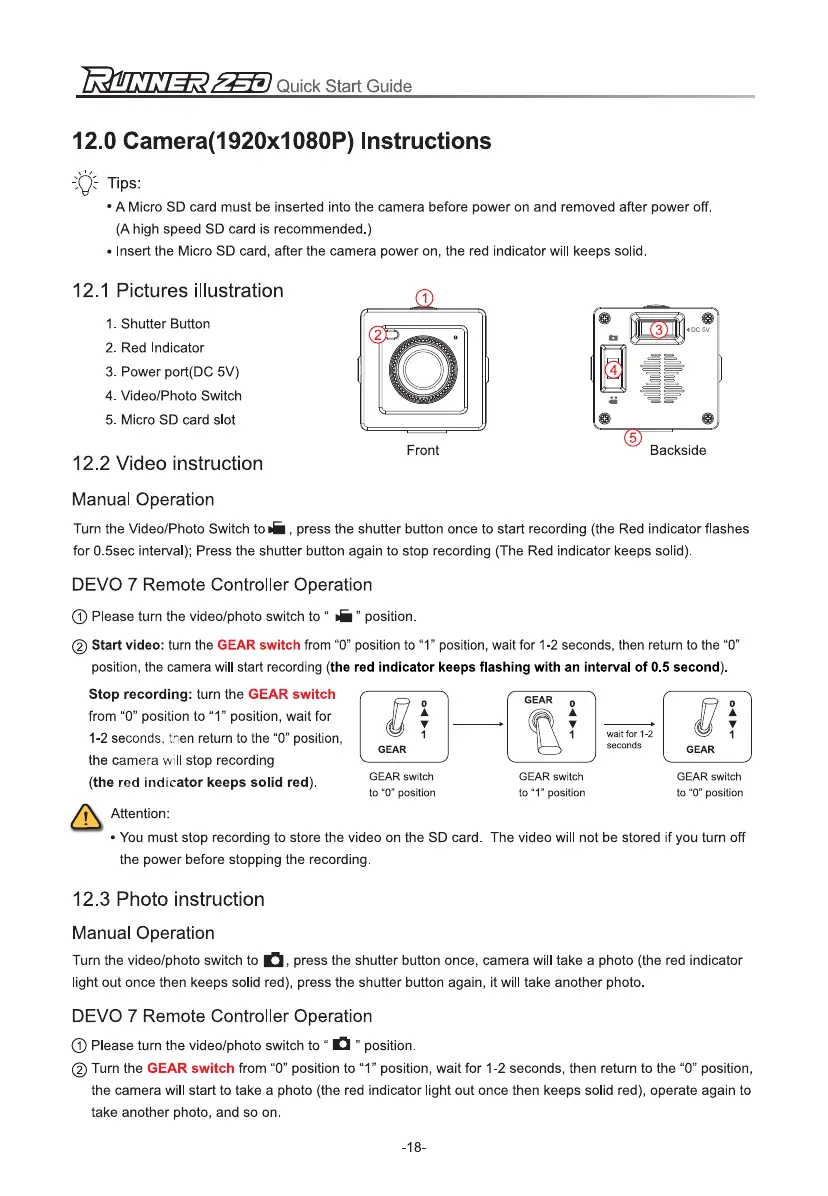
12.1 Pictures illustration
'0
et
•
00
sv
1.
Shutter Button
2.
Red Indicator
3.
Power port(DC 5V)
4.
Video/Photo Switch
5.
Micro SD card slot
IV
sr
0,
° Backside
Front
12.2 Video instruction
Manual Operation
Turn the Video/Photo Switch to oi , press the shutter button once to start recordin
g
(the Red indicator flashes
for 0.5sec interval); Press the shutter button a
g
ain to stop recordin
g
(The Red indicator keeps solid).
DEVO 7 Remote Controller Operation
C) Please turn the video/photo switch to " rG
"
position.
0
Start video:
turn the
GEAR switch
from "0" position to "1" position, wait for 1-2 seconds, then return to the "0"
position, the camera will start recordin
g
(the red indicator keeps flashing with an interval of 0.5 second).
wait for 1-2
seconds
Stop recording:
turn the
GEAR switch
from "0" position to "1" position, wait for
1-2 seconds, then return to the "0" position,
the camera will stop recordin
g
(the red indicator keeps solid red).
GEAR switch
to "0" position
GEAR
0
•
•
1
GEAR switch
to "1" position
GEAR switch
to "0" position
Qj
Attention:
•
You must stop recordin
g
to store the video on the SD card. The video will not be stored if you turn off
the power before stoppin
g
the recordin
g
.
12.3 Photo instruction
Manual Operation
Turn the video/photo switch to
el,
press the shutter button once, camera will take a photo (the red indicator
li
g
ht out once then keeps solid red), press the shutter button a
g
ain, it will take another photo.
DEVO 7 Remote Controller Operation
0 Please turn the video/photo switch to " C
"
position.
0 Turn the
GEAR switch
from "0" position to "1" position, wait for 1-2 seconds, then return to the "0" position,
the camera will start to take a photo (the red indicator li
g
ht out once then keeps solid red), operate a
g
ain to
take another photo, and so on.
-18-



 To Next Page