37
End of a sterilization cycle
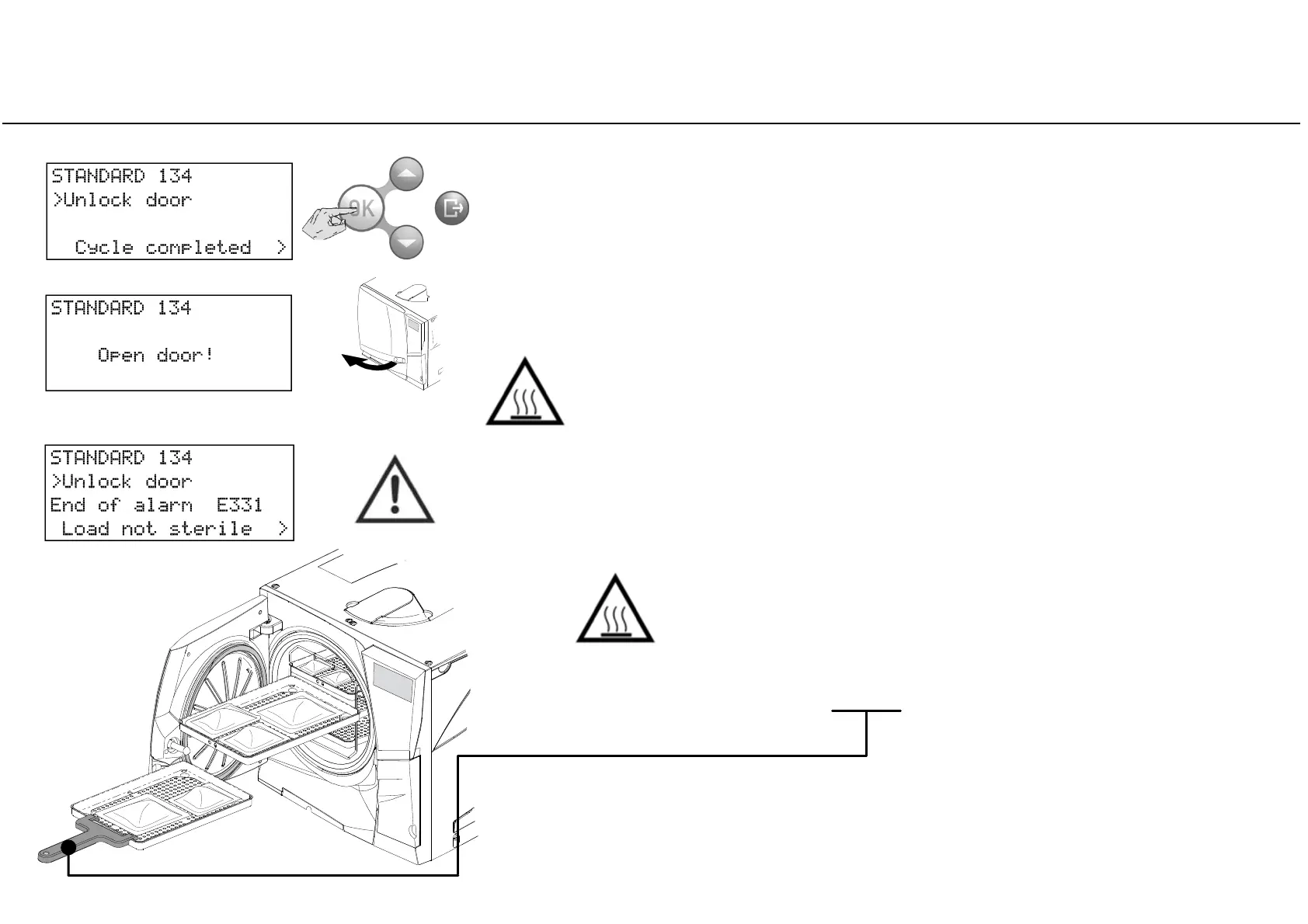
When a cycle is successfully finished, the “CYCLE COMPLETED” message appears on
the screen and the “Unlock door” option is preceded by the cursor.
At this stage you can press DOWN or UP until the INFO option appears; confirm INFO to access cycle parameters
for mechanical sterilization monitoring (see previous pages).
This is only possible prior to unlocking the chamber door.
If an alarm message appears at the end of the cycle, consult Chapter 8
(Troubleshooting) of the Instructions for Use and, if the problem persists, call for
technical service.
Remove the load from the chamber.
When the door is unlocked, remove the load from the sterilization
chamber and then stock it in a specific area.
WARNING! THE LOAD AND THE STERILIZER ARE HOT!
Always use the tray holder (or cassette holder or gloves for high
temperatures or adequate protection) to remove the load!
Do not touch the chamber, the inner porthole and the internal
fittings as long as they are hot.
Confirm (OK) to unlock the door (the cursor near the “padlock” icon disappears).
Wait the door to unlock, then open the chamber door.
WARNING!
When you open the door, pay attention to possible steam
sprays: Risk of burns!



 To Next Page