EasyManua.ls Logo

Wansview Q1 - SD;TF Record and Playback

Wansview Q1
55 pages
Print Icon
To Next Page IconTo Next Page
To Previous Page IconTo Previous Page
Loading...
2.4 SD/TF Record and Playback
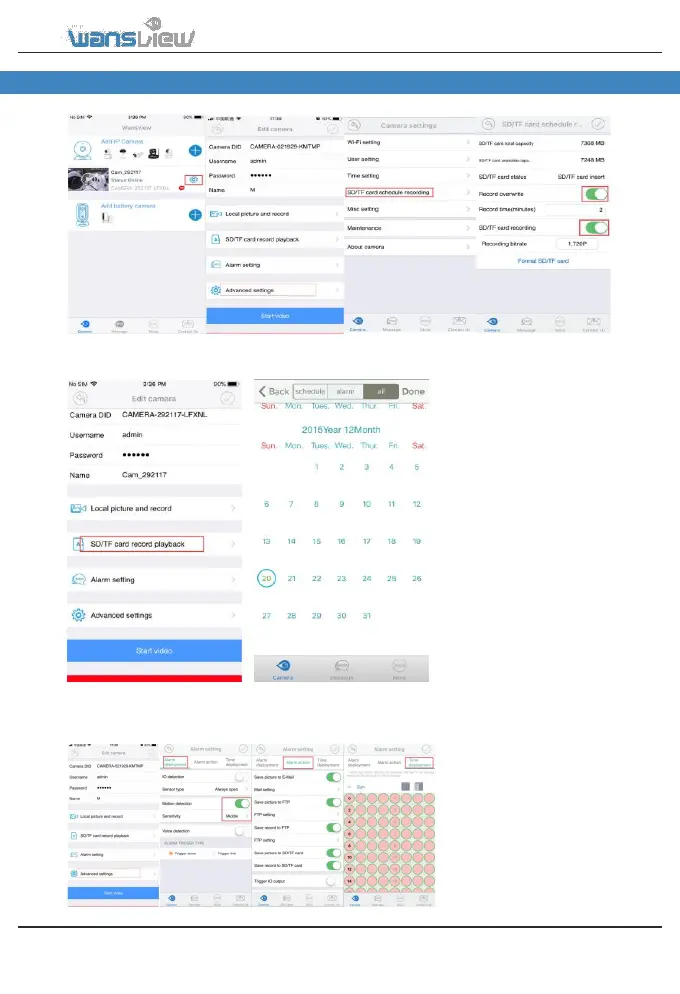
SD Card Recording
Playback recorded video in the SD card
If a SD Card is
installed in the
camera, from the
Advanced Settings
users can choose to
record or not on the
SD card by
switching the SD/TF
Recording button.
To view recordings,
access to SD/TF Record
and Playback. Choose a
day in the calendar, then
select Schedule or
Alarm click Done to see
the list of recorded
video on the SD card.
2.5 Alarm Setting
The IP Camera begins
recording when it detects movement/audio and stops recording in 30 sec. In this section, users
can customize the motion detection feature. This feature can be set on the app or in the web
interface. Motion is detected by changes in the pixels of the images.
Please note that motion
detection doesn’t work
through windows. In this
case we recommend to
connect an external motion
sensor out of the window
using the IO alarm port.
Access to“AlarmSetting” to set
Alarm Deployment,Alarm Action
and TimeDeployment.
www.wansview.com 15

Table of Contents

Related product manuals