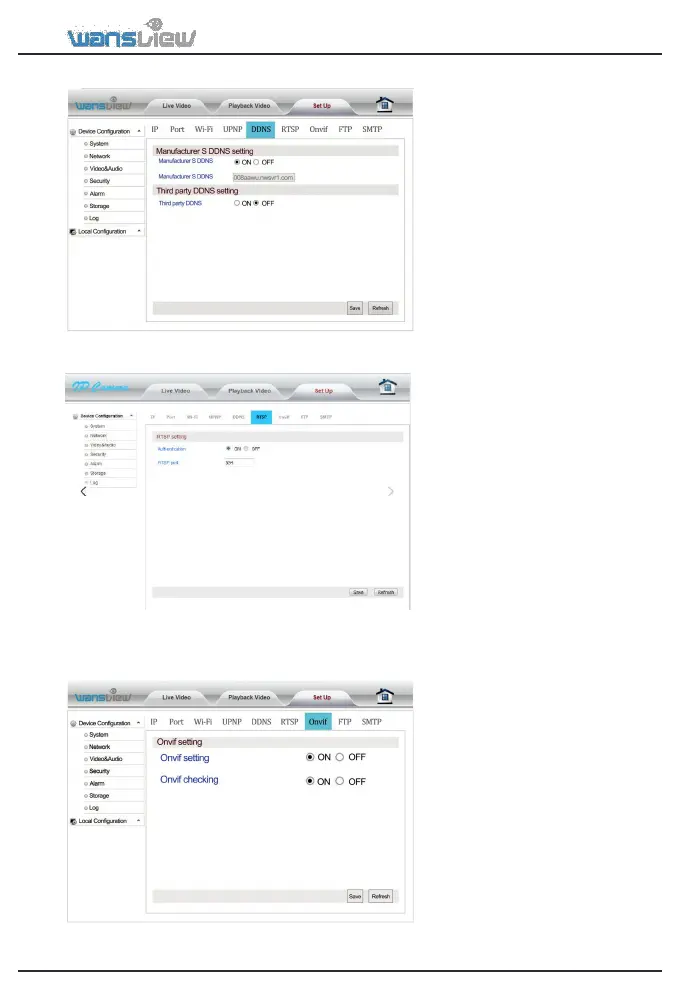
Network > DDNS setting
Network > RTSP setting
Network > Onvif setting
The user can access the camera
via DDNS domain name provided
by the manufacturer for free or a
third party domain name. Port
mapping is required while using
domain name to access. The third
party domain name supports
3322.org/dyndns.org/No-iP.com.
The user can set the RTSP port after
entering RTSP Setting bar. In
addition, the RTSP Authentication
function can be closed. Default
value of RTSP port is: 554
Selection range: 554-65535
Some general RTSP streaming
media software can be adopted to
access video on the device, such as
The first bit stream: rtsp://user:
password @IP:rtsp port /live/ch0
The second bit stream: rtsp://user:
password @IP:rtsp port /live/ ch1
The third bit stream: rtsp://user:
password @IP:rtsp port /live/ ch2
Onvif is a global standard for the
interface of IP-based security
products. The ONVIF protocol
ensures interoperability between
manufacturer, allowing you to
integrate your IP camera as a
generic ONVIF camera into existing
Enter Onvif Setting. The user can
start up and calibrate Onvif
functions. The default setting for
manufacturers do not support
calibration. Our device supports
Onvif versions 2.5 and below.



 To Next Page