9
Heating
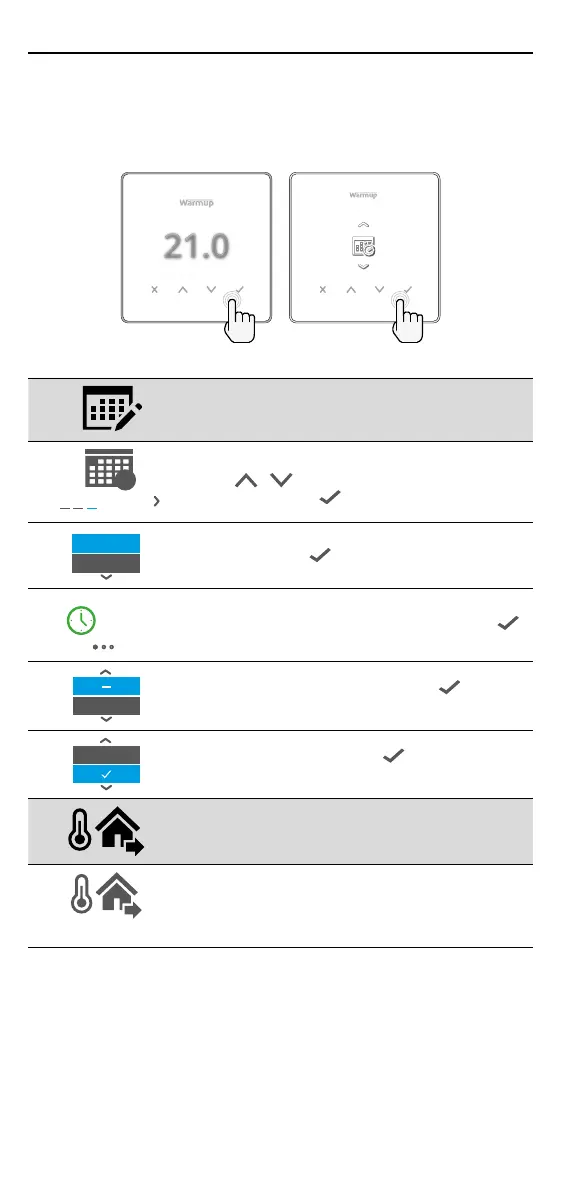
How to set a program
Setting a program allows you to set comfort temperatures at set times
throughout the day. Days can programmed individually, all days the same or
weekdays as a block and weekends as a block, the choice is yours.
21.0
Edit Program
1 2 3 4 5 6 7
7
To select the days you wish to program
press
/ . A bar will appear below the day of
the week. Press
to move to the next day.
07:00AM
09:00AM
04:30PM
09:00PM
Press to set a program.
07:00
09:00
21.0
°
Set the start time, followed by target temperature
and nally the end time for that period. Press
to accept.
+
To add/remove heating period, Press to on the
plus/minus. Up to 5 periods can be set.
+
Scroll to the tick and Press to conrm your
program.
Setback temperature
16.0°
Set setback temperature. The setback temperature
is a lower energy ecient temperature when
outside of a heating period.


 To Next Page