EasyManua.ls Logo

Warmup Luxury 2 LUXY2D44 - 4 th Event Settings

Warmup Luxury 2 LUXY2D44
20 pages
Print Icon
To Next Page IconTo Next Page
To Previous Page IconTo Previous Page
Loading...
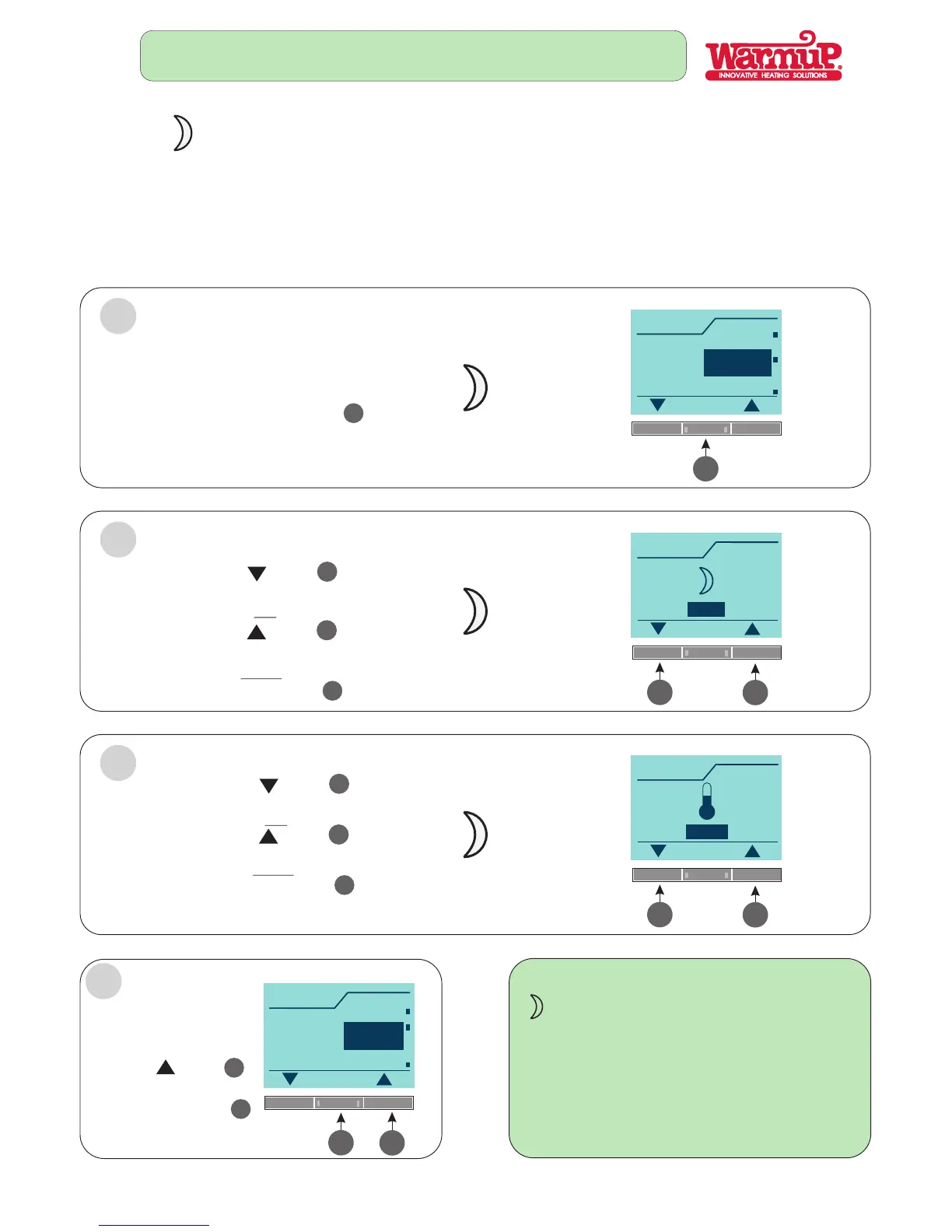
4th EVENT SETTINGS OF YOUR OWN CHOICE
THE PRESET SCHEDULE CAN BE EASILY CHANGED IN THE FOLLOWING WAY:
FOLLOW STEPS 1, 2, 3,4 :
1
CHOOSE THE DAILY EVENT
YOU WOULD LIKE TO CHANGE
(EVENING)
Press the button
4
OK
Event
OK
Night
Back
Evening
4
Time
OK
23:00
16:00
Min
06:00
Max
2
3
3
5
SELECT THE TIME YOU
WANT THE HEATING TO BE OFF
Press the button
Press the button
to adjust time EARLIER
to adjust time LATER
3
5
Press the button
4
OK
OR
THEN
Temp
OK
15.0 C
o
5.0 C
o
Min
o
40.0 C
Max
SET THE TEMPERATURE
FOR EVENING EVENT
3
5
Press the button
Press the button
to adjust tem DOWN
to adjust temp UP
3
5
Press the button
4
OK
OR
THEN
FOURTH EVENT (NIGHT)
OFF time
4
4
When you go to bed at night (floor in setback mode).
Event
OK
Back
Exit
Night
4
CHOOSE THE DAILY EVENT
YOU WANT TO CHANGE
4
5
Press the button
5
Press the button
This will return you to
the menu display screen.
4
OK
Page 10