EasyManua.ls Logo

Warmup Luxury 2 LUXY2D44 - 4-Event Schedule Options

Warmup Luxury 2 LUXY2D44
20 pages
Print Icon
To Next Page IconTo Next Page
To Previous Page IconTo Previous Page
Loading...
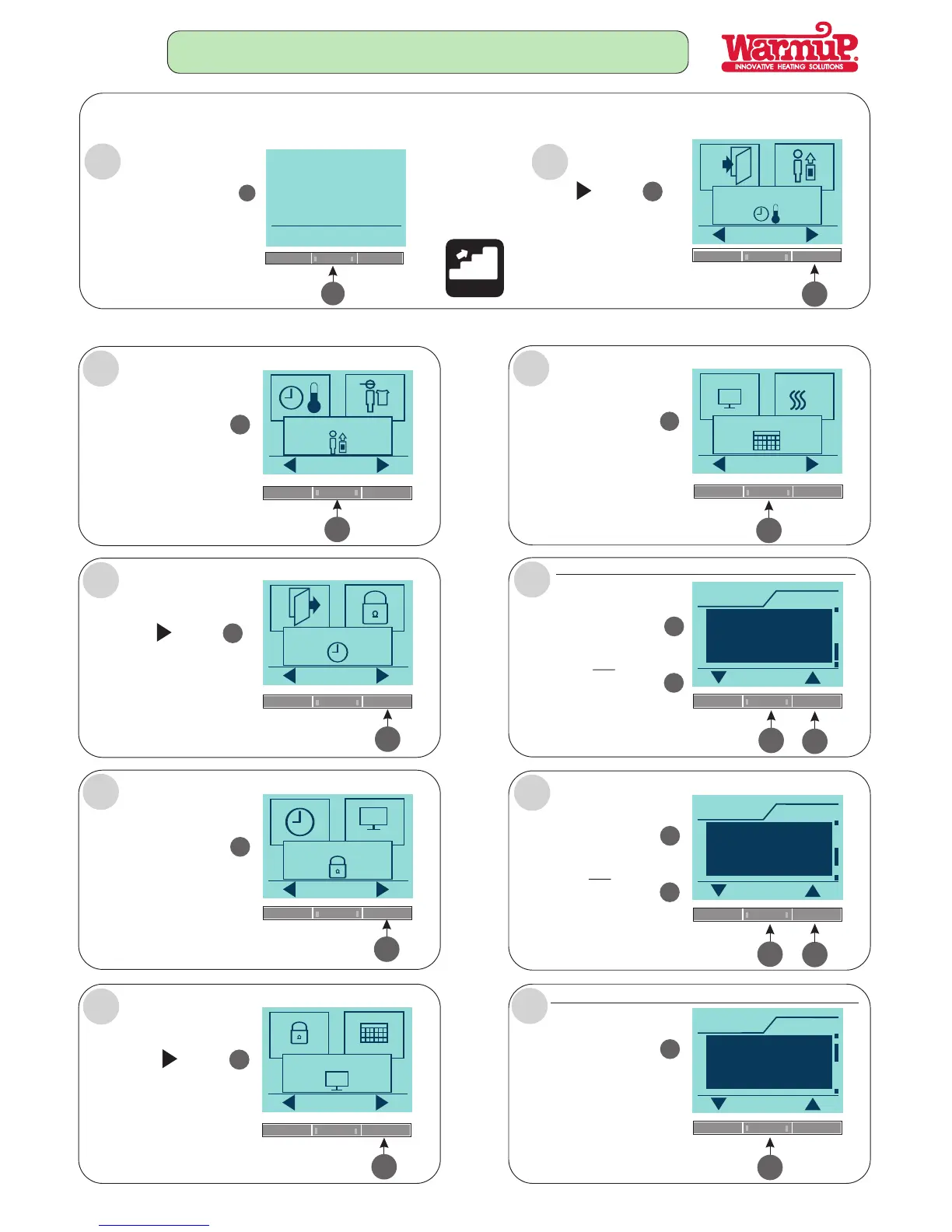
THIS FUNCTION ALLOWS YOU TO CHOOSE THE TYPE OF WEEKLY 4-EVENT SCHEDULE YOU REQUIRE.
THESE SIMPLE STEPS NEED TO BE FOLLOWED:
FOLLOW STEPS A - J:
Menu
4
Press the Menu button
4
5
OK
4-Event settings
Press the button
5
Press the button
5
User settings
OK
Press the button
4
OK
5
5
Press the button
5
A
B
C
D
E
F
OK
Time and date
OK
Child lock
5
Press the button
5
OK
OK
Display settings
Press the button
4
OK
G
4
OK
4-Event schedule
%
4
5
Press the button
to view next schedule.
5
UP
TYPICALLY USED IF ONE WORKS FROM MONDAY TO FRIDAY
Schedule
OK
5:2
Mon-Fri = 4-event
Sat-Sun = 2-event
4-EVENT SCHEDULE
H
Follow the Steps
Press the button
to accept this schedule.
4
OK
4
OR
5
Press the button
to view next schedule.
5
UP
Schedule
OK
6:1
Mon-Sat = 4-event
Sun = 2-event
I
Press the button
to accept this schedule.
4
OK
4
OR
Schedule
OK
7:0
Mon-Sun = 4-event
J
Press the button
to accept this schedule.
4
OK
4
CHOOSE INDIVIDUAL PROGRAMS FOR EACH DAY OF THE WEEK.
Page 6

Related product manuals