5
OK
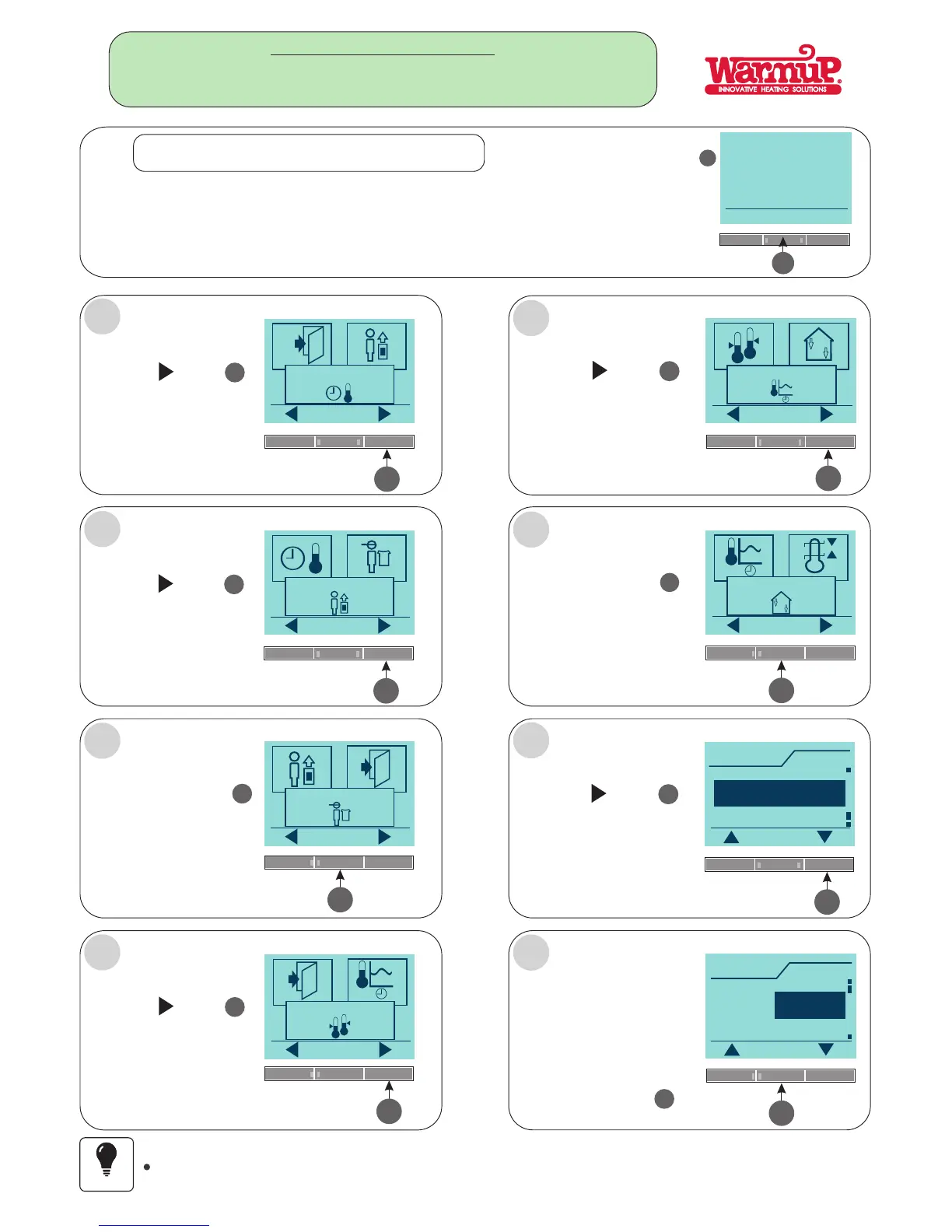
4-Event settings
Press the button
5
5
Press the button
5
User settings
OK
Press the button
4
OK
4
Engineer settings
OK
5
Press the button
5
Offset temp.
OK
5
Press the button
5
Adaptive function
OK
Press the button
4
OK
4
Application
OK
5
Press the button
5
Application
OK
Room/limit
Regulator
Room
4
Application
OK
Room
Room/limit
Floor
A
B
C
D
H
G
F
E
Page 5
APPLICATION SETTINGS.
SETTING THE THERMOSTAT TO FUNCTION USING
FLOOR OR AIR (ROOM) OR FLOOR AND AIR OR USED AS A REGULATOR.
Once a selection has been
made for ether a :
FLOOR or
ROOM or
ROOM/LIMIT (AIR & FLOOR)
REGULATORor
Press the buttonOK
4
IF the FLOOR or AIR FLOOR ( ROOM/LIMIT) selection has been made a floor sensor must be connected
Important
THESE SIMPLE STEPS NEED TO BE FOLLOWED:
FOLLOW STEPS A - H:
Press the Menu button
4
Menu
4
THE THERMOSTAT CAN REGULATE DIFFERENT OPTIONS
FLOOR - AIR (ROOM) - FLOOR AND AIR OR USED AS A REGULATOR.
FIRST TIME SETTING.



 To Next Page