EasyManua.ls Logo

Warmup Luxury 2 LUXY2D44 - Handling E2 Error Message

Warmup Luxury 2 LUXY2D44
20 pages
Print Icon
To Next Page IconTo Next Page
To Previous Page IconTo Previous Page
Loading...
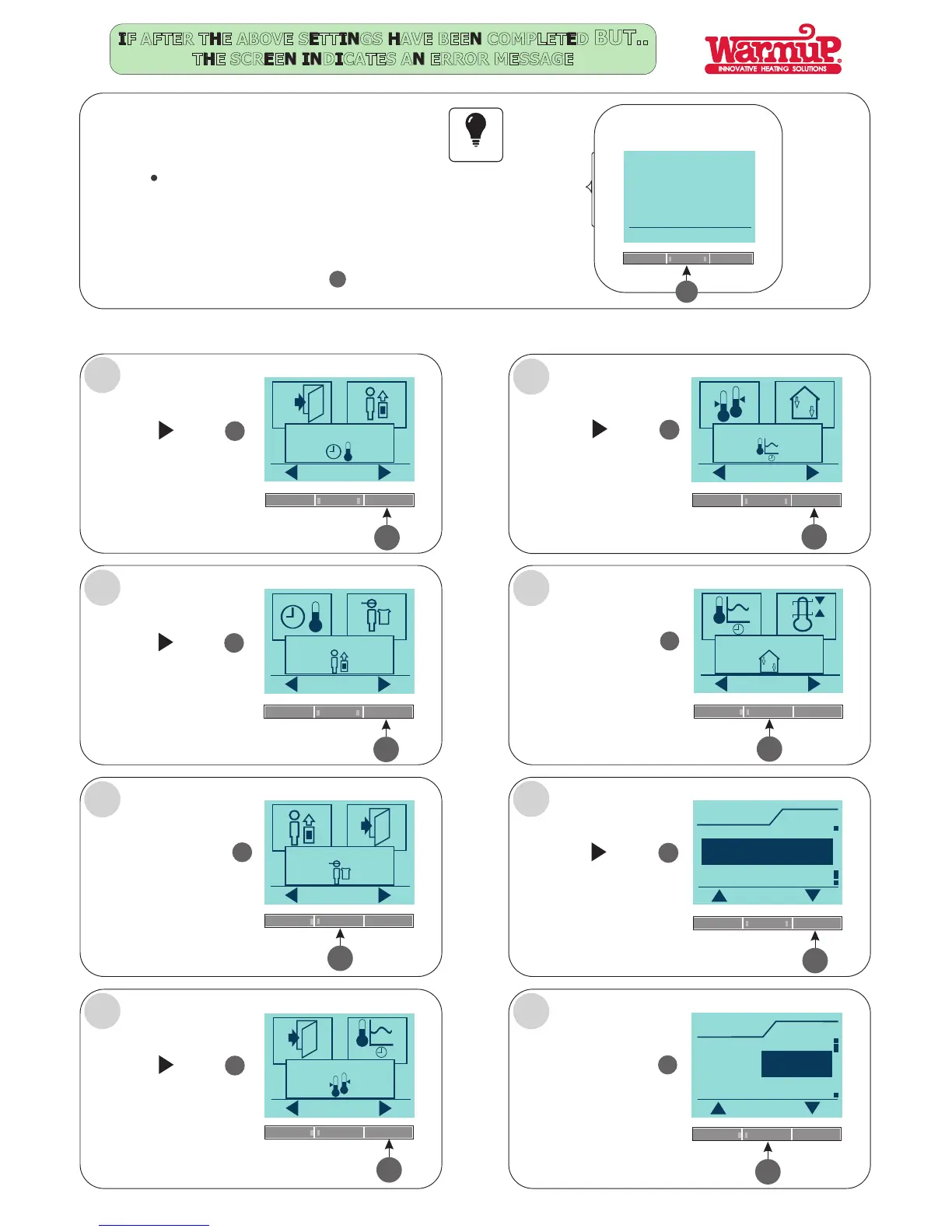
IF AFTER THE ABOVE SETTINGS HAVE BEEN COMPLETED BUT..
THE SCREEN INDICATES AN ERROR MESSAGE
IF the floor sensor has not been connected
The thermostat needs to be programmed for monitoring the
Air (Room) temperature.
E2: ERROR MESSAGE
THESE SIMPLE STEPS NEED TO BE FOLLOWED:
FOLLOW STEPS A - H:
Press the Menu button
E2:
External floor sensor
error
Menu
4
4
5
OK
4-Event settings
Press the button
5
5
Press the button
5
User settings
OK
Press the button
4
OK
4
Engineer settings
OK
5
Press the button
5
Offset temp.
OK
5
Press the button
5
Adaptive function
OK
Press the button
4
OK
4
Application
OK
5
Press the button
5
Application
OK
Room/limit
Regulator
Room
Press the button
4
OK
4
Application
OK
Room
Room/limit
Floor
A
B
C
D
H
G
F
E
Important
Page 3

Related product manuals